Who is this mouse for?

Shortcut-heavy footage reviewers

If you repeatedly pause, mark clips, switch views or change playback speed, reachable controls may matter more to you than a headline sensor figure. Logitech G and Razer both describe configurable controls on relevant models.

Long-timeline navigators

If you move through lengthy recordings, a wheel that switches between controlled steps and faster scrolling may suit different parts of the same session. Logitech G and Razer document these behaviours on specific models.

Small-desk student players

If one mouse serves study, footage review and games, consider how its cable or charging routine fits your desk alongside its weight, shape and button placement. A stated weight alone cannot establish how it will feel in your hand.

What matters when choosing?

Wired multi-button mouse

Choose it when: Most review sessions happen at one desk and you want a USB connection without charging.

Trade-off: The cable takes up desk space and is less convenient when you move between setups.

Wireless multi-button mouse

Choose it when: You move between a laptop and a fixed desk, or want a clearer cable path in a confined room.

Trade-off: You need to plan charging and check battery figures against the connection mode you intend to use.

Concern What to check Who this matters to
Review shortcuts Check which buttons your grip can reach and whether the configuration software can assign your repeated actions. If I keep pausing, marking and switching views, I want those actions within easy reach without accidental presses. Around 37% of consumers put reachable review shortcuts first.
Timeline navigation Look for documented stepped and free-spin or fast-scroll modes, then check how the wheel changes between them. Moving across a long recording calls for speed, but I still want control when making a small adjustment. For around 27% of consumers, timeline navigation is the primary concern.
Handling over long sessions Consider the stated weight alongside shape, grip and button reach; weight alone does not establish personal comfort. When the same mouse stays in use for study, review and games, I care about how it feels in my hand. Handling comes first for around 18% of consumers.
Desk and portable setup Check the connection modes, receiver connection and charging method; compare battery claims under the mode you would use. I need room to work at a small desk or take my mouse to another setup without an awkward cable arrangement. Around 18% of consumers make setup flexibility their main priority.

Mistakes to avoid

  • Choosing by button count alone

    Extra controls help with repeated actions only if you can reach and configure them. Logitech G and Razer describe software configuration for their relevant models, but a button count cannot tell you whether a layout suits your grip.

    Write down the review actions you use most often, then check whether you can assign them to buttons without changing your grip or pressing the wrong one.

  • Assuming free-spin scrolling is always preferable

    Fast scrolling and stepped scrolling serve different parts of a review session. Logitech G and Razer document models offering both kinds of behaviour.

    If you need both, check that the specific model has a configurable or dual-mode wheel and how you switch modes.

  • Comparing wireless runtimes without checking the mode

    For the Aerox 5 Wireless, SteelSeries states up to 180 hours on Bluetooth or in High Efficiency Mode, compared with 80+ hours in default 2.4 GHz mode.

    Use the figure for the connection and settings you plan to use when deciding how often you will need to charge.

  • Assuming a stated weight guarantees a good fit

    A specification cannot establish whether the shape fits your hand or whether you will press a side button unintentionally. Button placement can affect day-to-day use as much as mass.

    Check dimensions, handedness and button positions, and try a comparable shape if you can.

Gaming mouse brands to consider

Logitech G

The G502 X line is relevant if you want configurable controls and a wheel that changes between precise and rapid scrolling.

  • Logitech G specifies an 89 g build and ratcheted and hyperfast wheel modes for the G502 X Wired; it lists 13 customisable controls for the wireless G502 X LIGHTSPEED.
  • Those specifications do not establish whether either model's shape or button placement suits your hand.

Razer

The Basilisk V3 family is relevant if configurable scrolling and shortcut assignments are central to your review workflow.

  • Razer lists 10+1 programmable buttons for the Basilisk V3 and documents tactile, free-spin and automatic scrolling for the Basilisk V3 35K.
  • Software-driven functions need setting up, and the number of available controls does not establish whether you can reach them comfortably.

SteelSeries

The Aerox 5 Wireless is a route to consider if low mouse mass and cable-free use matter alongside programmable controls.

  • SteelSeries specifies a 66 g chassis and nine programmable buttons for the Aerox 5 Wireless.
  • SteelSeries' stated battery life depends on the connection or efficiency mode: up to 180 hours on Bluetooth or in High Efficiency Mode, versus 80+ hours in default 2.4 GHz mode.

Joybuy mice for footage-review setups

These wired and wireless mice offer different starting points for a student-room desk or a setup that moves with you. Check the controls and wheel behaviour of the particular model against the review actions you intend to assign.

AJAZZ AJ159 APEX gaming mouse

AJAZZ AJ159 APEX wireless mouse with charging base

Consider this for a compact setup if you want to assign repeated actions to mouse buttons; check the button layout and wheel behaviour against your review workflow.

  • The named variant lists a 56 g weight, 2.4G wireless and wired connection modes, and a magnetic charging base.
  • Its title identifies PC/Mac use. Confirm the connection modes and configuration support you need for your computer.
Joybuy

White Rapoo VT7 MAX gaming mouse

Rapoo VT7 MAX wireless mouse, white

This is a wireless option to examine if assigning several review shortcuts matters; check that the buttons are reachable with your grip.

  • The title specifies 53 g and 10 programmable buttons with macro support.
  • Its listed battery maximum of up to 750 hours depends on updating the driver and enabling low-power mode. Check the wheel behaviour separately if you need both precise and rapid scrolling.
Joybuy

AJAZZ AJ200 AI MC gaming mouse with charging dock

AJAZZ AJ200 AI MC mouse with charging dock

Consider its connection options if you move between a student-room desk and another computer setup; confirm that its assignable controls meet your review needs.

  • The named variant lists Bluetooth, 2.4G and USB-C connection modes.
  • Check the weight for this variant before making a handling comparison, as the listed figures conflict. Check the button count and wheel modes before relying on it for shortcut-heavy review.
Joybuy

Razer Cobra Wired Gaming Mouse, Minecraft Edition

Razer Cobra Wired Mouse, Minecraft Edition

This wired model is worth considering for a fixed desk if you do not want to manage charging; check whether its button positions work for your review shortcuts.

  • The named variant is a wired gaming mouse.
  • Check its weight and wheel modes before making either a handling or timeline-navigation comparison.
Joybuy
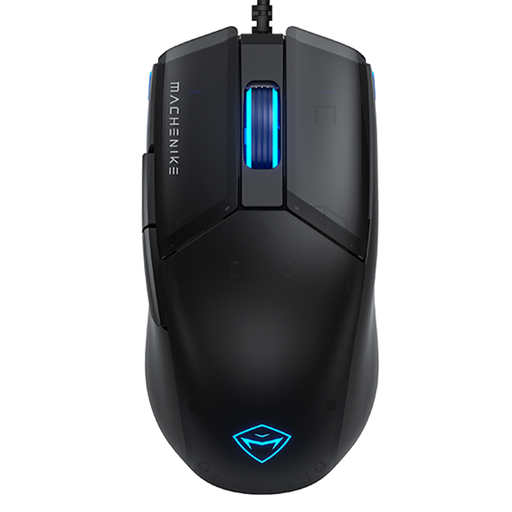
Black Machenike M7 Pro wired mouse

Machenike M7 Pro wired mouse, black

This is a wired option for a fixed student-room desk. If shortcut mapping or long-timeline scrolling will decide your purchase, check its controls and wheel behaviour first.

  • The named variant is the black, wired M7 Pro.
  • Confirm button layout, configuration support and weight against your intended use.
Joybuy

Common questions

Do I need a very high DPI setting to review tournament footage?

A headline DPI figure should not decide a footage-review mouse on its own. Choose a sensitivity you can use consistently, then assess whether the button layout and wheel let you carry out your repeated actions comfortably.

What should I look for in a scroll wheel?

Look for stepped control and a faster scrolling option if your workflow needs both small adjustments and movement through long recordings. Logitech G documents ratcheted and hyperfast modes on the G502 X Wired; Razer documents tactile, free-spin and Smart-Reel modes on the Basilisk V3 35K. Check how your playback software responds to wheel input.

How should I read a wireless mouse's battery claim?

Match the quoted runtime to the mode you intend to use. SteelSeries states up to 180 hours for the Aerox 5 Wireless on Bluetooth or in High Efficiency Mode, but 80+ hours in default 2.4 GHz mode; settings can also affect power use.

What should I check before ordering?

Check the seller's return process and warranty information, the accessories included with the particular mouse, and whether its configuration software works with your computer. Keep the seller's voluntary policies distinct from any rights that apply to faulty or misdescribed goods.

What should I do with an old gaming mouse in the UK?

Use an appropriate electrical-waste collection or retailer take-back route rather than putting it in general rubbish. GOV.UK explains that UK waste electrical and electronic equipment rules support recovery, reuse and recycling; this is an end-of-life consideration, not a restriction on using a mouse in a student room.