What matters when choosing
Wireless multi-control mouse
Choose it when: You want several accessible commands without learning a dense thumb grid.
Trade-off: Cable-free use brings charging or battery management.
Side-grid mouse
Choose it when: You use many repeatable bindings and want a dedicated thumb-button layout.
Trade-off: A dense grid takes practice and may be excessive for a short command list.
Wired multi-control mouse
Choose it when: You want extra controls without charging or wireless setup.
Trade-off: The cable needs a route that does not interfere with mouse movement.
For a gaming mouse used in space exploration games at a bright desk, decide which concern comes first for you, then check the details of the layout that addresses it.
| Concern | What to check | Who this matters to |
|---|
| Shortcut access |
Count the commands you would bind, then check button placement and reassignment or game-profile options. |
If map, scan and communication commands recur throughout play, I need controls I can find without searching for the right button. Around 38% of consumers put reachable shortcuts first. |
| Hand comfort |
Check handedness, grip guidance and thumb reach; a stated weight or button count cannot establish personal fit. |
During a long exploration session, I want my grip and the buttons I use to feel manageable together. Hand comfort comes first for around 31% of consumers. |
| Connection |
For wireless use, check modes, charging and the conditions attached to battery claims; for wired use, plan cable routing. |
I want to move the mouse without a cable crossing my desk, while accepting that it will need charging. Around 23% of consumers make cable-free use their primary concern. |
| Desk appearance |
Check the lighting options if you want them, without treating RGB as a tracking or gameplay-visibility feature. |
My desk is bright, and I care how the mouse lighting looks alongside the rest of the setup. Appearance is the main concern for around 8% of consumers. |
Joybuy gaming mice for space exploration
These mice offer different numbers of controls and wired or wireless desk setups. Choose by the commands you intend to bind, then check grip fit and connection requirements; they are not all side-grid mice.
 No image available
Rapoo VT7 MAX Wireless Gaming Mouse, White
Consider this wireless model if you want several recurring game commands on the mouse rather than a dense side grid. Its title lists 10 programmable buttons and a 53 g weight. Check the shape and button reach against your hand before choosing it.
View on Joybuy
 No image available
AJAZZ AJ200 AI MC Wireless Gaming Mouse with Charging Dock
Consider its stated medium-to-large-hand, palm- or claw-grip design if that matches how you hold a mouse. The title specifies Bluetooth, 2.4G and USB-C connection options, while the product description describes button remapping and macros. Check the programmable-button layout before relying on it for a long command list.
View on Joybuy
 No image available
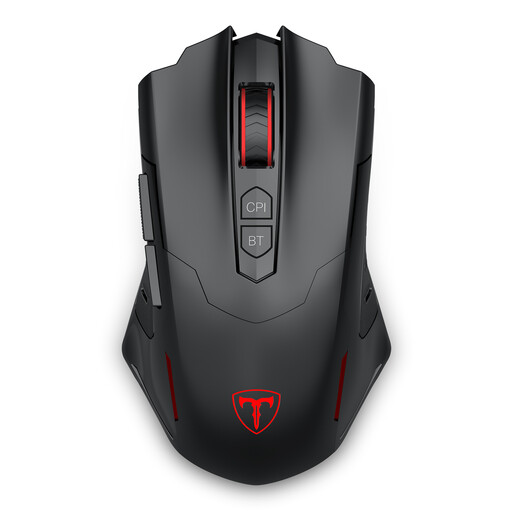
ET PC400 Wireless Gaming Mouse
This model suits a shorter list of recurring shortcuts and a cable-free desk setup. The listing specifies seven programmable buttons, 2.4G and Bluetooth connections, and an 8000 DPI rating. Check hand fit and the lighting options if either matters to your choice.
View on Joybuy
 No image available
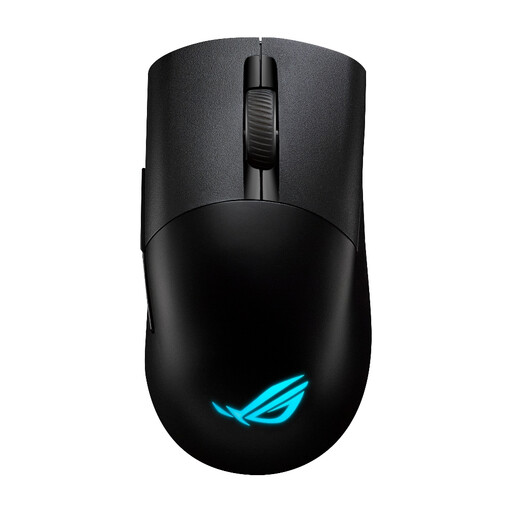
ASUS ROG Keris Wireless AimPoint Gaming Mouse, Black
Consider this right-handed model if you use claw or fingertip grip and need only a small set of mouse shortcuts. The description lists five programmable buttons, onboard memory, and 2.4GHz, Bluetooth and USB connection options. Check that five buttons cover your intended commands, and confirm the weight if it affects your decision.
View on Joybuy
 No image available
ONIKUMA CW905 Wired Gaming Mouse
This wired option is for players who want several assignable controls without charging a mouse. Its title and description state seven programmable buttons. Check how assignments are configured for your game, and allow space to route the cable.
View on Joybuy
Common questions
Do I need RGB because I play in a bright room?
No: RGB is a lighting preference, not an established way to improve tracking, command access or in-game visibility in a bright room. Choose your control layout, grip and connection method first.
Which actions should I put on extra mouse buttons?
Start with a few commands you use repeatedly, such as map, scan or push-to-talk, and assign more only if you can reach the buttons reliably. Logitech G says G HUB supports button assignments and automatic game profiles; check the equivalent setup options for the exact mouse you choose.
What should I check before using a wireless mouse for the first time?
Follow the manual for your exact model’s charging and connection steps. Corsair, for example, instructs Scimitar Elite Wireless SE owners to charge it fully before first use and provides separate USB-receiver instructions for its 2.4 GHz mode.
How should I dispose of a wireless gaming mouse in the UK?
Use an appropriate electrical-waste or battery-recycling route rather than putting a battery-powered mouse in household rubbish. GOV.UK warns that some lithium-ion batteries can catch fire when discarded in rubbish, particularly if wet or damaged; follow your local authority’s disposal instructions.


