What matters when choosing?
For virtual-spacecraft design at a home-office desk, start with the need that would decide your mouse choice when several needs overlap. Then check whether the controls, connection and shape suit your own setup.
| Concern | What to check | Who this matters to |
|---|
| Accessible shortcuts |
Count the commands you would actually map, then check button reach and configuration-software support for your computer. |
I use the same design commands repeatedly and want controls I can distinguish without looking down; roughly 33% of consumers put accessible shortcuts first. |
| Long-session comfort |
Check grip and thumb reach, and assess the mouse as part of the whole workstation. |
When a design session lasts for hours, I need a shape and desk setup I can use comfortably; around 27% of consumers make sustained comfort their primary concern. |
| Scroll control |
Decide whether deliberate scroll steps, faster traversal or sideways scrolling would help with your panels and timelines. |
Moving through long scene lists takes much of my time, so I care about controlling the scroll wheel; about 20% of consumers prioritise navigation. |
| Desk connection |
Check available ports and cable space; for wireless use, consider connection modes and charging. |
I want the mouse connection to fit the way my home-office desk is arranged; approximately 20% of consumers place connection and cable management first. |
Joybuy product choices
These mice offer wired or wireless ways to put shortcuts at your home-office desk. Choose by the number of commands you need, then check fit, software support and scrolling for your design workflow.
 No image available
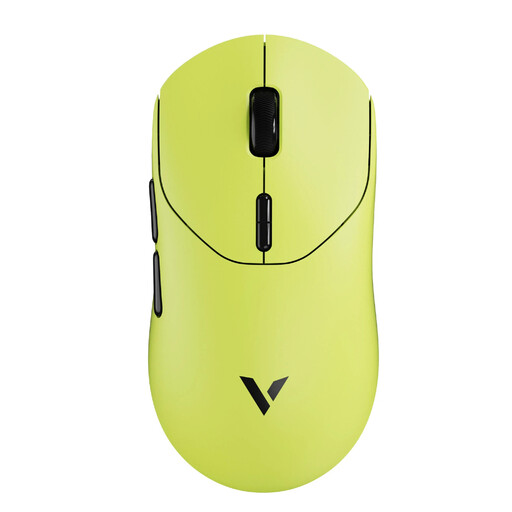
Rapoo VT2 wireless gaming mouse, yellow
Consider this model if you want several recurring commands within reach without a desk cable.
- The product name specifies 10 programmable buttons and a 53 g weight.
- Check thumb reach, configuration-software compatibility and scroll behaviour for your design tasks.
Joybuy
 No image available
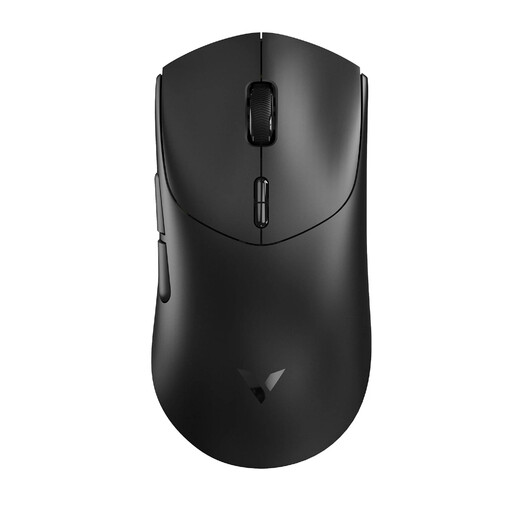
Rapoo VT7 wireless gaming mouse, black
This wireless option suits a desk where you want to map several frequent actions and avoid cable movement.
- The product name specifies 10 programmable buttons and a 53 g weight.
- Check hand fit, software compatibility and the wheel behaviour you need for navigation.
Joybuy
 No image available
Razer Cobra wired gaming mouse, Minecraft Edition
Consider this wired model if you prefer not to manage charging and want to set up mouse shortcuts.
- Confirm that its programmable controls cover your recurring commands and that configuration works with your design application.
- Check the stated weight if it affects your choice, as the available figures conflict.
Joybuy
 No image available
AJAZZ AJ200 AI MC gaming mouse with charging dock
This model is worth considering if connection choice matters alongside a modest set of mapped commands.
- The product name lists Bluetooth, 2.4 GHz wireless and USB-C connection modes.
- Check whether its controls are sufficient for your commands and whether its shape suits your hand. Confirm the weight if that affects your decision, as the stated figures conflict.
Joybuy
 No image available
ONIKUMA CW905 wired gaming mouse
Consider it if a wired connection and a smaller set of programmable commands meet your desk-work needs.
- Check how its buttons are configured and whether that setup works with your design application.
- Check grip, thumb reach and scroll behaviour before choosing it for long sessions.
Joybuy
Frequently asked questions
How many mouse buttons do I need for virtual-spacecraft design?
Choose enough reachable buttons for the actions you use repeatedly, rather than the largest count available. Logitech G lists 11 programmable buttons on the G502 HERO, Razer lists 13 controls on the Basilisk V3 35K, and Corsair lists 16 programmable buttons on the SCIMITAR ELITE WIRELESS SE; check which layout you can distinguish comfortably.
Should I use a wired or wireless mouse at my design desk?
Choose wired if you want a cable-powered connection without charging, or wireless if reducing cable movement or using Bluetooth matters more. Corsair lists 2.4 GHz wireless, Bluetooth and USB charging/data connections for the SCIMITAR ELITE WIRELESS SE; consider charging alongside your desk layout.
Will I need software to configure shortcuts and scrolling?
The advanced settings described for the cited models use their brands’ configuration software: Logitech G HUB, Razer Synapse 4 and Corsair iCUE. Check operating-system support and whether your intended shortcuts work in your design application before depending on them.
Can a gaming mouse alone make long home-office sessions comfortable?
No mouse shape establishes that the whole workstation will suit you. The Health and Safety Executive advises assessing display-screen work in the context of the equipment, furniture, working conditions and individual needs; where an employer’s home-working assessment process applies, use it alongside your mouse-fit checks.


