Fast-aim squad players
If quick turns and target reacquisition dominate your matches, moving mass and a shape you can control deserve attention.


For squad survival matches, choose a mouse by grip fit and the actions you need to reach: a lighter model may suit repeated fast aiming, a shaped shell may suit a palm-oriented grip, and extra buttons matter when you can use them without disturbing your aim. Ordinary bright-room lighting alone does not establish a need for a particular sensor; consider RGB lighting as an appearance choice and check surface claims for the exact model.
If quick turns and target reacquisition dominate your matches, moving mass and a shape you can control deserve attention.
If you repeatedly use inventory, utility or communication actions, consider whether reachable side buttons would suit your grip.
If hand support is your priority, compare shapes for your hand and grip rather than choosing by headline DPI or RGB lighting alone.
Start with the shape you can control comfortably, then decide how much you value low moving mass or reachable commands. For a bright room, assess lighting as an appearance preference and check any surface-compatibility claim against the exact mouse.
| Concern | What to check | Who this matters to |
|---|---|---|
| Aiming and response | Compare the exact model’s stated weight, connection and polling-rate support; check that its shape suits your grip. | When I make frequent quick turns, I want a mouse I can move and control reliably. Around 38% of consumers put aiming and response first. |
| Grip and comfort | Compare shell shape and dimensions with your hand, grip and preferred button reach. | For longer matches, I care most about how the shell supports my hand, whether I prefer a palm grip or a more neutral shape. Roughly 31% of consumers prioritise grip fit and comfort. |
| Command access | Check the placement of buttons you would actually map and whether the required assignments are available. | If I use inventory, utility or communication commands repeatedly, I want to reach them without shifting my grip. Around 23% of consumers make command access their primary concern. |
| Appearance and surface | Judge RGB by the look you want; if you use an unusual surface, check that model’s stated surface capability. | In a bright room, I may care more about how lighting looks or whether the mouse suits my desk surface than about extra controls. About 8% of consumers put appearance or surface use first. |
Lighting and sensor features answer different questions. Razer describes them separately for the Basilisk V3 35K; its lighting is not evidence that the mouse tracks better in a bright room.
Choose lighting for appearance, and assess tracking claims against the exact model and surface you intend to use.
Extra commands help only if you can distinguish and press the buttons without disrupting your grip. SteelSeries specifies a five-button side panel for the Aerox 5 Wireless, making its layout worth examining as well as its total button count.
Identify the actions you would map, then check whether your thumb can reach the relevant controls comfortably.
In the UK, Citizens Advice distinguishes rights concerning faulty or misdescribed goods from a return when nothing is wrong with the product. A seller’s voluntary return terms are a separate consideration.
Check the seller’s change-of-mind terms before extensive use, and keep your purchase record if you need to raise a fault.
The PRO X Superlight 2 illustrates a lightweight competitive wireless option.
The DeathAdder V3 Pro and Basilisk V3 35K illustrate different approaches to shape and controls.
The Aerox 5 Wireless combines a stated low weight with a multi-button layout.
The M75 WIRELESS is a reference point for players considering an ambidextrous shell.
These wired and wireless mice offer different combinations of grip shape, connection and controls for squad play. Compare the exact variant against your priority rather than assuming room brightness determines the sensor you need.
 No image available
Consider this wireless model if you want to compare a neutral-feeling grip with your preferred command layout. Check the included battery configuration and in-use weight before choosing it primarily for low moving mass.
 No image available
The stated 56 g weight makes this a model to examine if low moving mass is your priority. Its title lists 8 kHz polling support, but connection-mode descriptions conflict; confirm the modes for this exact variant and check whether its controls suit your grip.
 No image available
Consider its shaped grip if you favour palm or claw control. The title specifies a PAW3311 sensor and Bluetooth, 2.4 GHz and USB-C modes; check the actual mouse weight before relying on it for a low-mass setup, as the listed weight statements conflict.
 No image available
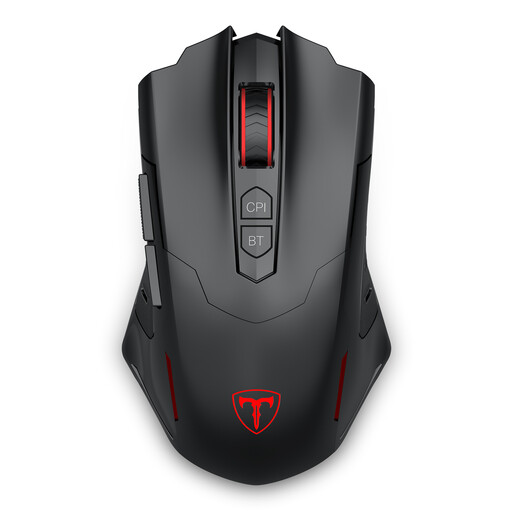
Its seven programmable buttons may interest players mapping frequent squad commands, provided the layout fits their grip. The title lists 2.4 GHz and Bluetooth connections and up to 8000 DPI; check button reach and the performance specifications important to you.
 No image available
This wired option is worth considering if a cable suits your setup and you want adjustable sensitivity and programmable controls. Check its button positions for the commands you use; its RGB modes are an appearance feature, not evidence of bright-room tracking performance.
Ordinary bright indoor lighting alone is not a reason to choose a particular sensor. Treat RGB as an appearance feature, and check the exact model’s surface-use guidance if you play on an unusual desk surface.
They can be useful if you have recurring commands you can reach without disturbing your aim. SteelSeries specifies a five-button side panel for the Aerox 5 Wireless, while Razer lists 13 assignable controls for the Basilisk V3 35K; compare the layout, not just the count.
Contact the seller and keep your purchase record. Citizens Advice says consumers can have legal rights when goods are broken, damaged, unusable or do not match their description; a seller’s change-of-mind policy is separate from those fault remedies.
Check the retailer’s electrical-equipment take-back arrangements when buying a replacement in the UK. GOV.UK sets out same-type waste electrical and electronic equipment take-back responsibilities for retailers, subject to the circumstances and exemptions in its guidance.