For long ranked strategy sessions, choose a mouse shape that suits your grip before deciding how many commands you want under your thumb. Extra controls are useful when you have bindings planned, while a lighter layout makes more sense if most commands stay on your keyboard. For wireless play, check the battery claim for the connection mode you intend to use; mouse specifications alone cannot settle questions of posture and long-session comfort.
Who this choice affects
Long-session players focused on fit
If you play for extended periods, check how a mouse shape supports your usual palm, claw or fingertip grip before comparing headline specifications. UK retailer SCAN UK identifies comfort as a particularly important and difficult part of choosing a gaming mouse.
Players with frequent strategy commands
If you repeatedly use control groups, abilities or camera actions, extra controls may give those planned bindings a place on the mouse. Logitech G lists 13 customisable controls for the G502 X LIGHTSPEED; Razer lists 21 programmable controls, including a 12-button thumb grid, for the Naga V2 HyperSpeed. Whether either layout is reachable for you still matters.
Players planning long wireless sessions
If you want a dedicated gaming wireless connection, compare battery claims in the mode you will actually use. Razer quotes separate maximum runtimes for HyperSpeed Wireless and Bluetooth on the Naga V2 HyperSpeed, while SteelSeries lists both 2.4 GHz and Bluetooth connectivity for the Aerox 5 Wireless.
What to prioritise
Start with grip and shape, then decide which repeated commands belong on the mouse; compare wireless modes and weight against that setup rather than treating any single specification as the answer.
| Concern |
What to check |
Who this matters to |
| Hand fit and posture |
Compare the shape and dimensions with your usual grip and current mouse. Check that you can keep the mouse within easy reach without bending your wrist. |
If I play for hours, I need a shape I can grip without stretching my hand, as well as a workable desk position. Around 36% of consumers put fit and posture first. |
| Command access |
List the actions you would bind before choosing a button layout; check whether your thumb can reach the controls you intend to use. |
When repeated strategy commands are taking my attention back to the keyboard, I want reachable mouse controls for the actions I have planned. Around 29% of consumers prioritise command access. |
| Wireless uptime |
Check for a dedicated 2.4 GHz receiver and compare the stated runtime for your intended connection mode and settings. |
If a long match could outlast my charging routine, I need to know which wireless mode the battery claim describes. Wireless uptime comes first for around 21% of consumers. |
| Low-mass handling |
Compare stated weights only after checking shape and deciding how many physical controls you need. |
If I frequently reposition the mouse but keep most commands on my keyboard, I may favour a lighter layout over a dense thumb grid. Around 14% of consumers put low-mass handling first. |
Buying pitfalls
-
Choosing by maximum DPI alone
A maximum DPI figure does not tell you whether a mouse fits your hand or feels controllable at your preferred sensitivity. Joybuy’s gaming mouse buying guide puts more emphasis on reliable sensing across a practical adjustable range than on the headline number.
Choose a sensitivity you can use comfortably, then assess shape, connection mode and the controls you will actually bind.
-
Buying more buttons without a binding plan
A dense thumb grid is a distinct physical layout, not an automatic improvement for every strategy player. Razer lists 21 programmable controls on the Naga V2 HyperSpeed, while the Logitech G502 X LIGHTSPEED and SteelSeries Aerox 5 Wireless offer different control layouts.
Write down your recurring commands and check thumb reach before committing to a dense layout.
-
Treating low weight as a substitute for fit
Logitech G lists the PRO X SUPERLIGHT 2 at 60 g and SteelSeries lists the Aerox 5 Wireless at 66 g, but weight alone cannot establish that either shape suits your grip. SCAN UK identifies finding a comfortable shape as a central buying challenge.
Compare weight among shapes that appear suitable, and check the seller’s return terms if you cannot try the mouse first.
-
Comparing battery figures across different modes
Razer quotes up to 250 hours for the Naga V2 HyperSpeed on HyperSpeed Wireless and up to 400 hours on Bluetooth. Those maximums describe different connection modes, so the larger figure need not reflect how you plan to play.
Check the stated runtime for your intended receiver mode, settings and charging or battery arrangement.
Relevant brands to consider
Logitech G
Its cited models illustrate two different priorities: Logitech G lists the PRO X SUPERLIGHT 2 at 60 g, while the G502 X LIGHTSPEED offers 13 customisable controls.
- The G502 X LIGHTSPEED supports configurable controls for macros, DPI settings and game-specific profiles, according to Logitech G.
- Neither control count nor low mass establishes that a particular shape fits your hand or that your bindings will be easier to use.
Razer
The Naga V2 HyperSpeed is relevant if you have a substantial set of commands to assign to its 12-button thumb grid and 21 programmable controls.
- Razer quotes up to 250 hours on HyperSpeed Wireless and up to 400 hours on Bluetooth for this model.
- Check thumb reach and grip fit before choosing the dense layout. Razer describes the Naga line as suited to medium-to-large hands and palm or claw grips.
SteelSeries
The Aerox 5 Wireless combines a stated 66 g mass with nine programmable buttons and 2.4 GHz and Bluetooth connectivity, according to SteelSeries.
- Its stated layout includes a five-button side panel with a flick switch; SteelSeries quotes up to 180 hours of battery life.
- Check whether the side controls, honeycomb shell and shape suit your grip and cleaning preferences rather than deciding by weight alone.
Joybuy product choices
These gaming mice offer different ways to approach long strategy sessions, from wireless models with stated programmable controls to a wired option for players who prefer not to manage a wireless battery. Check each model’s fit and the features needed for your own bindings.
 No image available
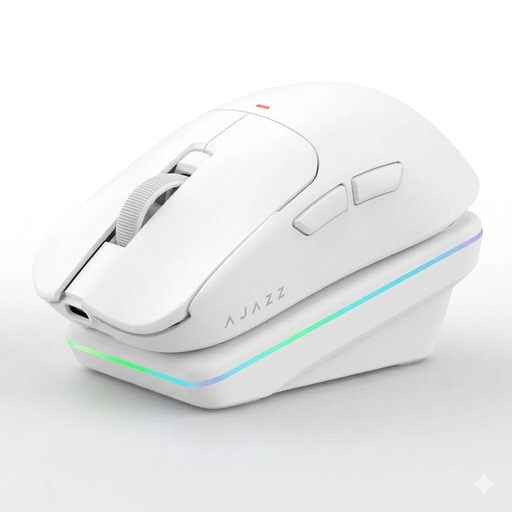
AJAZZ AJ200 AI MC Wireless Gaming Mouse with Charging Dock
Consider this model if you want to plan mouse-side commands alongside 2.4G wireless play; check the button layout and macro setup against your intended bindings.
The listed configuration includes a charging dock, a PAW3311 sensor and BT, 2.4G and USB-C connection options. Check the exact weight and expected battery runtime if either is decisive for a long session.
View on Joybuy
 No image available
Rapoo VT7 MAX Wireless Gaming Mouse, White
This is an option if you want several planned mouse-side commands in a lightweight wireless setup, provided its shape suits your grip.
The listing names 10 programmable buttons, a 53 g weight and up to 750 hours of battery life. That runtime claim applies at 1000Hz and requires the latest driver to unlock low-power mode; check what to expect at your intended settings.
View on Joybuy
 No image available
AJAZZ AJ159 APEX Wireless Gaming Mouse with Magnetic Charging Base
Consider this model if a light mouse with 2.4G connectivity appeals to you; check how many commands its button layout can accommodate.
The listed configuration states 56 g, a PAW3950 sensor and an 8KHz polling-rate claim. Confirm the connection modes, DPI specification and battery runtime before relying on them for your setup.
View on Joybuy
 No image available
Razer Cobra Wired Gaming Mouse – Minecraft Edition
Choose a wired setup if you would rather avoid managing a wireless battery during play and can accommodate a cable at your desk.
This is the Minecraft Edition of the wired Razer Cobra. Check its button layout against your bindings and confirm the weight if low mass is a deciding factor.
View on Joybuy
 No image available
MACHENIKE L9 X1 8K-Blue 3395 Wireless Mouse
This model is worth considering if you want a wireless mouse for long sessions but plan to check its button layout before moving strategy commands onto it.
Check how the shape fits your grip and which settings apply to the stated runtime before choosing it for repeated long matches.
View on Joybuy
Common questions
Should I use Bluetooth or the USB receiver for ranked strategy matches?
Use a dedicated 2.4 GHz receiver when the mouse provides one and its maker identifies that mode for low-latency play. Razer distinguishes the HyperSpeed Wireless mode from the longer-runtime Bluetooth mode on the Naga V2 HyperSpeed; check the connection and battery claim for the mode you intend to use.
How many programmable buttons do I need for a strategy game?
Choose enough reachable buttons for the commands you can name and expect to use repeatedly. A few shortcuts do not necessarily call for a thumb grid; Razer’s Naga V2 HyperSpeed offers a 12-button grid for a more extensive binding plan, while Logitech G and SteelSeries list different multi-control layouts on the G502 X LIGHTSPEED and Aerox 5 Wireless.
Can an ergonomic mouse alone prevent discomfort during a long session?
No mouse shape alone can address every aspect of prolonged computer use. Health and Safety Executive guidance on display-screen work links overuse or improper use with fatigue and upper-limb problems and advises short, frequent breaks; check your desk position, keep the mouse within easy reach and change activity regularly.
What should I do with an old gaming mouse in the UK?
Check your local authority’s instructions for disposing of electrical equipment rather than putting the mouse in general waste. GOV.UK identifies the UK Waste Electrical and Electronic Equipment framework, while Oxfordshire County Council’s household guidance gives a local example of how electrical items are handled; collection arrangements should be checked where you live.


