For historical strategy games, choose a mouse whose programmable buttons are easy to reach and whose shape suits your grip. A wired, button-rich model can suit frequent command mapping; a lighter wireless model can suit a cable-free desk, provided its controls and charging arrangements meet your needs. Check the exact layout and software compatibility before buying.
Who needs which features?
Hotkey-heavy commanders
If you want recurring commands close to your thumb, look for buttons you can reach without changing grip. Logitech G, Razer and SteelSeries describe programmable controls on the specific models discussed below; the layout matters as much as the count.
Long-campaign comfort seekers
If you spend extended sessions moving around maps and menus, compare mouse shapes against your usual grip. SCAN UK advises treating comfort as a central part of choosing a gaming mouse.
Cable-free desk users
If you prefer wireless use, balance the mouse’s controls and weight against its connection and charging arrangements. SteelSeries’ Aerox 5 Wireless is one example with programmable buttons and a stated weight of 66 g.
What should you check?
Start with the commands you would assign and the grip you normally use. Then decide whether a cable or battery management better suits your desk.
| Concern |
What to check |
Who this matters to |
| Reachable controls |
Check side-button positions and whether your computer supports the model’s remapping software. |
If I assign recurring game commands to my mouse, I need to reach them without shifting my grip or pressing the wrong button. Around 40% of consumers put accessible command mapping first. |
| Long-session fit |
Compare the shell’s shape and dimensions with your current mouse and usual palm, claw or fingertip grip. |
During a long campaign, I want a shape I can control comfortably rather than choosing by sensor figures alone. For around 40% of consumers, grip fit is the primary concern. |
| Wireless use and weight |
Confirm the connection options and charging arrangement, then compare the stated weight and button layout. |
I would rather keep a cable off my desk, but I still need enough controls for the commands I use. Cable-free use and weight come first for around 20% of consumers. |
Buying pitfalls
-
Choosing by button count alone
Nine or 11 programmable controls can both be useful, but a button that is awkward to reach may be less helpful than one you can press reliably.
List the commands you intend to map, then inspect the side-button and scroll-wheel positions on the exact model.
-
Making maximum DPI the deciding factor
Adjustable pointer sensitivity does not tell you whether the mouse shape fits your grip or its controls suit your shortcuts.
Check fit, accessible buttons and remapping support before comparing DPI settings.
-
Overlooking wireless upkeep
A wireless mouse still needs a suitable connection and a way to recharge or replace its battery. Manufacturer battery figures depend on their stated use conditions.
Check the connection mode, charging arrangement and conditions attached to any battery-life claim.
Relevant brands
Logitech G
The G502 HERO is relevant if you want to assign several recurring commands to a wired mouse.
- Logitech G specifies 11 programmable buttons, adjustable weights and onboard profiles for the G502 HERO.
- Check whether its shape and individual button positions work with your grip; those features do not describe every Logitech G mouse.
Razer
The Basilisk V3 is a right-handed option to consider if you want configurable inputs and scroll-wheel functions.
- Razer specifies 10+1 programmable buttons and a HyperScroll Tilt Wheel for the Basilisk V3.
- Its button count and scroll functions do not establish whether the shell will suit your hand size or grip.
SteelSeries
The Aerox 5 Wireless is relevant if you want wireless use while retaining several assignable controls.
- SteelSeries specifies a 66 g weight and nine programmable buttons for the Aerox 5 Wireless.
- Check whether nine controls cover your commands and whether its shape and battery arrangements suit your use.
Gaming mice on Joybuy
These choices include wired mice for players comfortable with a cable and wireless mice for cable-free setups. Compare the controls and fit of each model rather than assuming they share the same button layout.
 No image available
Rapoo VT7 MAX Wireless Gaming Mouse, White
For wireless play with several recurring commands assigned to the mouse.
The title specifies 10 programmable buttons and a weight of 53 g. Check whether the button positions suit your grip. Its advertised battery duration applies under particular driver and low-power settings, so compare those conditions with how you plan to use it.
View on Joybuy
 No image available
ONIKUMA CW905 Wired Gaming Mouse
For a wired setup where you want to assign frequently used commands to mouse controls.
Check the exact button positions and whether its remapping software supports your operating system before choosing it.
View on Joybuy
 No image available
AJAZZ AJ200 AI MC Wireless Gaming Mouse with Charging Dock
For consumers who want wireless connection options alongside configurable controls.
The title lists Bluetooth, 2.4G and USB-C modes. Check which buttons can be remapped, whether the driver supports your operating system and the mouse’s weight before deciding.
View on Joybuy
 No image available
HyperX Pulsefire Fuse Wireless Gaming Mouse
For a cable-free setup where assigning commands to mouse buttons is part of the plan.
Check the button count and positions, software compatibility and battery arrangements against your intended setup.
View on Joybuy
 No image available
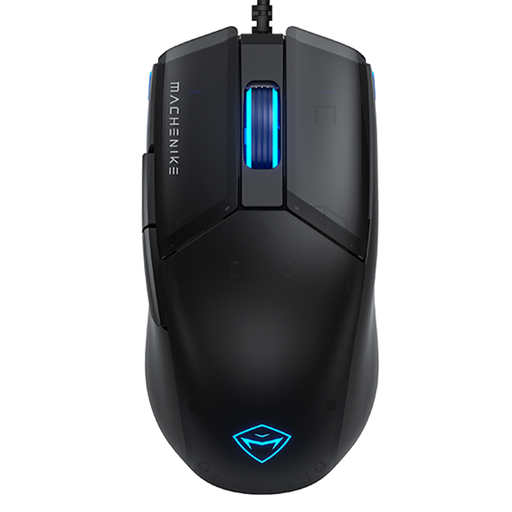
Machenike M7 Pro Wired Mouse, Black
For consumers who prefer a wired mouse and want to assign commands to its controls.
Check the available button positions, mapping support and shape against your grip before buying.
View on Joybuy
Frequently asked questions
How many mouse buttons do historical strategy games need?
Choose enough reachable buttons for the commands you actually plan to assign, rather than aiming for the highest count. SteelSeries specifies nine programmable buttons for the Aerox 5 Wireless, while Logitech G specifies 11 for the G502 HERO; their layouts may suit different grips.
Do I need software to set up mouse shortcuts?
You will generally need the exact mouse model’s configuration software to assign its programmable controls. Logitech G describes G HUB programming for the G502 HERO; check operating-system support and your game’s rules for the assignments you intend to make.
Does a resistance rating apply to other gaming mice from the same brand?
No. SteelSeries describes IP54-rated AquaBarrier protection for the Aerox 5 Wireless specifically; check another model’s own documentation rather than assuming it has the same rating.
What should I do if a gaming mouse bought in the UK is faulty?
Contact the seller and keep your order details so you can explain the fault. GOV.UK states that consumer law protects purchases of goods made remotely or in person; a retailer’s change-of-mind policy is separate from an issue with faulty goods.


