Start with a mouse shape that fits your hand and natural grip, then choose controls you can reach without shifting that grip. A thumb-button grid may suit frequent tactical commands; fewer controls can be easier to manage, while wired and wireless models bring different cable and battery considerations. Manufacturer specifications can narrow the choice, but they cannot establish how a shell will feel in your hand.
Who needs which features?
Comfort-first tactical players
If your hand or forearm feels tired during long turns, establish your grip and hand fit before comparing sensor figures or button counts. Glorious Gaming's grip guidance treats shape and hand size as part of mouse selection; fit still needs an individual check.
Shortcut-heavy commanders
If you repeatedly open maps, move the camera or select abilities, reachable programmable controls may reduce trips to the keyboard. The useful number depends on which commands you actually assign and whether your thumb can distinguish the buttons.
Desk-flexible wireless players
If you want a cable-free desk or a choice between Bluetooth and 2.4 GHz connections, check how the mouse is powered and whether its connection options suit your devices before relying on it for a long session.
What should you check first?
For long turn-based tactics sessions, settle hand fit before deciding how many commands to move onto the mouse. Then choose between cable-free movement and a wired setup you can leave connected.
| Concern |
Buying check |
Who it matters to |
| Hand fit and grip |
Compare shell dimensions with your hand and usual palm, claw or fingertip grip. Check whether side controls remain reachable without changing position. |
When a session runs long, I want a shape I can hold naturally rather than one chosen for its sensor figures. Around 36% of consumers put hand fit and long-session comfort first. |
| Shortcut access |
List your repeat commands, then compare button placement and available remapping or profiles. Check game rules before planning to use macros. |
I regularly call up maps, camera controls or abilities and want to find each assigned button without looking. Shortcut reach is the primary concern for roughly 29% of consumers. |
| Wireless continuity |
Check whether you need Bluetooth, 2.4 GHz or both, and read battery claims alongside their connection and lighting conditions. |
A cable-free or shared desk matters to me, provided I can manage power throughout my normal play sessions. Around 21% of consumers make wireless continuity their main priority. |
| Wired simplicity |
Check cable routing and whether the available controls cover the actions you intend to assign. |
I would rather leave the mouse connected than manage charging or learn a dense thumb grid. For approximately 14% of consumers, straightforward wired use comes first. |
Buying pitfalls
-
Choosing by headline DPI instead of fit
A high sensor figure says little about whether the shell suits your grip or lets you reach controls comfortably throughout a session.
Notice how you hold your current mouse, compare shapes and dimensions, and check the seller's return terms if you cannot try a new shape before buying.
-
Buying a thumb-button grid without a shortcut plan
A dense panel takes practice to distinguish by touch and can lead to unintended presses if its buttons sit awkwardly under your thumb.
Write down the commands you use repeatedly. If the list is short, compare moderately equipped mice as well as grid-based designs.
-
Treating wireless battery claims as unconditional
Quoted runtimes depend on the mode and settings used. A maximum figure need not describe your preferred connection or lighting setup.
Check the stated runtime conditions, how the mouse charges or takes replacement batteries, and whether it can be used while charging.
-
Expecting a mouse change to fix the whole desk setup
The Health and Safety Executive identifies workstation design and display-screen-equipment use as factors in pain and fatigue at work. A different mouse does not address every aspect of desk position or prolonged use.
Consider where your chair, desk and mouse place your arm, and change position or take short breaks during extended screen use. Seek appropriate professional advice if symptoms persist or worsen.
Relevant brands to consider
Logitech G
The wired G502 X illustrates a right-handed, contoured approach with several configurable controls.
- Logitech G lists an 89 g weight, an adjustable DPI-shift button and programmable tilt-wheel controls for the G502 X.
- Its right-handed shape and control positions still need to suit your hand; the feature list does not establish individual comfort.
Razer
The Basilisk V3 X HyperSpeed illustrates a right-handed wireless shape with a moderate number of controls rather than a full thumb grid.
- Razer lists nine customisable controls, 2.4 GHz wireless and Bluetooth for this model.
- Razer's quoted battery life of up to 285 hours is a manufacturer figure; check its operating conditions against your intended setup.
CORSAIR
The SCIMITAR ELITE WIRELESS SE illustrates a shortcut-dense option for players who want many tactical commands near the thumb.
- CORSAIR lists 16 programmable buttons and a repositionable 12-button Key Slider side panel.
- Those controls are useful only if you can reach and distinguish them comfortably; check the panel against your grip and shortcut plan.
SteelSeries
The wired Rival 5 illustrates a multi-button option for players who want shortcuts without a 12-button thumb grid.
- SteelSeries lists nine programmable buttons, a five-button side panel and an 85 g weight for the Rival 5.
- Its cable needs a clear route across the desk, and the side-button layout still needs to fit your thumb reach.
Gaming mice on Joybuy
These wired and wireless gaming mice offer different starting points for grip, shortcut and connection choices during long turn-based tactics sessions. Check the exact variant's fit and controls against how you play.
 No image available
AJAZZ AJ200 AI MC Wireless Gaming Mouse with Charging Dock
Consider this model if you want a wireless mouse and a charging dock at your desk.
The title lists Bluetooth, 2.4G and USB-C connection options, plus a PAW3311 sensor. Check shell dimensions and button reach for your grip, and confirm the exact weight and expected battery runtime before comparing long-session use.
View on Joybuy
 No image available
RAPOO VT2 MAX Wireless Gaming Mouse, White
Consider this model if you want wireless use and a stated set of programmable controls for repeated commands.
Its title lists 53 g and 10 programmable buttons. The advertised battery life is up to 750 hours under specified low-power settings, including a driver update and 1000 Hz operation; check runtime for the settings you intend to use. Confirm shell fit and button reach before relying on those controls.
View on Joybuy
 No image available
ONIKUMA CW905 Wired Gaming Mouse
Consider this model if you prefer a wired setup and want to assess whether its programmable controls cover a small set of repeat actions.
The title also lists adjustable levels and RGB lighting modes. Check the button layout, remapping arrangements, shell dimensions and weight if those will affect your sessions.
View on Joybuy
 No image available
Razer Cobra Wired Gaming Mouse, Minecraft Edition
Consider this edition if you want a wired mouse and its particular design appeals to you.
Check its shape and the number and placement of programmable controls against your grip and planned shortcuts. Confirm the exact variant's weight before using it to compare models.
View on Joybuy
 No image available
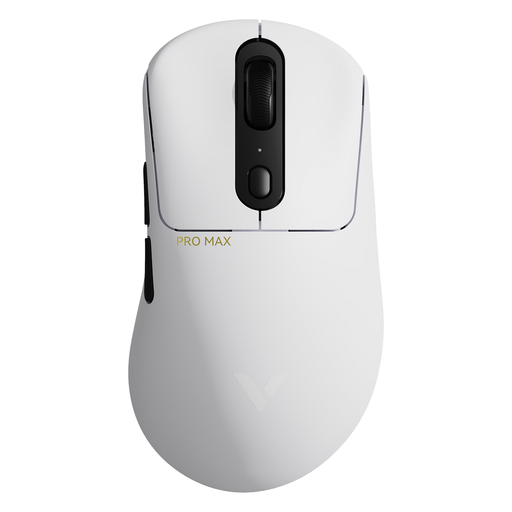
RAPOO Mice-VT3PRO MAX, White
Consider this model if you are comparing connection options and customisable controls, subject to checking the exact variant's layout.
Confirm the button count and positions before planning your bindings, and compare the shell dimensions with your hand. Check which connection mode provides any polling-rate setting you intend to use.
View on Joybuy
Common questions
Will an ergonomic gaming mouse prevent discomfort during long sessions?
No mouse shape can guarantee comfort or prevent discomfort. Check how the shell fits your grip and where your arm rests; the Health and Safety Executive also identifies workstation design and display-screen-equipment use as relevant to pain and fatigue at work.
How many shortcuts should I put on the mouse?
Start with a few repeat actions you can identify by touch, such as opening a map or selecting a frequently used ability. Test whether each binding changes your grip or leads to unintended presses before adding more; Logitech G documents button remapping and game profiles in G HUB.
Should I take breaks even in a turn-based game?
Taking short, regular breaks or changing activity is a practical way to interrupt a long period at the screen. The Health and Safety Executive recommends short, frequent breaks for display-screen work; its workplace guidance should not be read as a gaming-specific legal schedule.
What should I do with an old gaming mouse?
Check your local electrical-waste collection or retailer take-back options rather than putting it in general rubbish. GOV.UK describes the UK's waste electrical and electronic equipment framework as aiming to reduce electrical waste sent to landfill or incineration through recovery, reuse and recycling.


