Choose a mouse with more reachable controls if you regularly assign tower defence commands to buttons; choose a lighter, simpler layout if you mainly point, click and drag. In a bright room, treat RGB as an appearance preference rather than a requirement for tracking or control. Check the shape, access to DPI or profile settings, software compatibility and wireless power arrangements for the particular mouse.
Who each layout suits
Shortcut-heavy tower defence players
If you repeatedly change speed, select units or use other game-supported commands, reachable mouse buttons may save trips to the keyboard. The layout matters as much as the total button count: you need to recognise and press each assigned control reliably.
Click-and-drag focused players
If play centres on selecting, placing, scrolling and moving the pointer, a dense thumb grid may offer little practical value. A simpler layout leaves shape and movement feel as the more useful things to assess.
Bright-room setup users
If you change sensitivity or profiles while playing in strong ambient light, consider how you will identify the active setting. Physical controls and configuration options serve a different purpose from decorative RGB lighting.
What matters when choosing
Start with the commands you actually use, then assess hand fit and how you will manage settings. Room brightness alone is not a reason to choose the mouse with the most RGB lighting.
| Concern |
What to check |
Who this matters to |
| Reachable shortcut controls |
List your recurring commands, then assess button reach and remapping support. Check the game’s rules before using macros. |
If I often change game speed or select units, I want those commands within comfortable reach without accidental presses. Around 44% of consumers would put shortcut access first. |
| Shape and movement |
Check handedness, grip fit and stated mass; do not choose by weight alone. |
For long stretches of pointing, placing and dragging, I would rather have a shape I can control than extra buttons I rarely use. Comfort and movement come first for around 33% of consumers. |
| Settings in a bright room |
Check how you change and identify DPI or profiles, and whether the configuration software works with your computer. |
If I switch sensitivity during play, I need a practical way to recognise the setting without relying on decorative lighting. Around 23% of consumers would prioritise settings access. |
Buying pitfalls
-
Choosing RGB because the room is bright
RGB can change a mouse’s appearance, but it is not established as an improvement to tracking or tower defence control in bright ambient light. Logitech G describes lighting personalisation separately from DPI and button configuration.
Decide whether you like the lighting, then assess shape, reachable controls and settings access on their own merits.
-
Counting buttons without checking thumb reach
A dense layout provides places for assignments only if you can distinguish and press the buttons consistently. A 12-button thumb grid may take more learning than a smaller side-button arrangement.
Write down the commands you intend to map and assess whether the layout lets you reach them comfortably.
-
Reading a battery maximum as everyday runtime
Quoted wireless battery life depends on the stated operating conditions. Razer gives different maximums for Bluetooth and HyperSpeed Wireless on the Naga V2 HyperSpeed.
Compare figures for the connection mode you plan to use, and check whether the exact mouse uses charging or replaceable batteries.
Charging or changing batteries can interrupt use, depending on the model and how it is connected.
-
Assuming every game permits the same macros
Mouse software may offer command assignments and multi-action macros, but a game’s rules can differ by title or mode.
Use permitted remaps for the functions you need, and check the game’s current rules before relying on automated actions.
Relevant brands for reference
Logitech G
Its cited models span shortcut-rich and simpler, lower-mass layouts.
- Logitech G specifies 13 customisable controls for the G502 X LIGHTSPEED and five programmable buttons for the 60 g PRO X SUPERLIGHT 2 DEX.
- The PRO X SUPERLIGHT 2 DEX has an asymmetrical right-hand design. Neither its shape nor a higher control count suits every player.
Razer
The Naga range is relevant if you want many commands within thumb reach.
- Razer specifies 21 programmable controls, including a 12-button thumb grid, for the Naga V2 HyperSpeed.
- That grid calls for deliberate setup and a check of your thumb reach; its quoted battery maximum also depends on connection mode.
SteelSeries
The Aerox 5 Wireless represents a layout between a five-button mouse and a full thumb grid.
- SteelSeries specifies nine programmable buttons, a five-button side-panel arrangement and a 66 g stated weight for this model.
- Assess whether its particular side-button arrangement fits the commands you use; these model details do not describe every SteelSeries mouse.
Joybuy product choices
These mice cover different ways to approach tower defence play, from assigning recurring commands to keeping sensitivity controls accessible or choosing a lighter design. Compare each model’s stated features with the controls you use and check its fit and setup before choosing.
 No image available
Rapoo VT7 MAX wireless gaming mouse, white
Consider this model if you want mouse buttons for recurring tower defence commands: its title specifies 10 programmable buttons and a stated mass of 53 g.
Check whether its button placement fits your hand and whether your intended macros are permitted by the game. Its stated battery-life maximum depends on the specified operating setup and a driver update for low-power mode.
View on Joybuy
 No image available
AJAZZ AJ159 APEX wireless gaming mouse with charging dock
This 56 g model is worth considering if you want a lighter mouse and a charging dock with a colour screen.
If shortcut assignments or a particular wireless mode matter to you, confirm the button layout, supported connections and configuration software for this variant. Check the exact DPI range rather than relying on a single figure.
View on Joybuy
 No image available
AJAZZ AJ200 AI MC wireless gaming mouse with charging dock
Consider this model if you want remappable controls and a choice of Bluetooth, 2.4 GHz or USB-C connection, as stated in its title.
Check the shape against your hand, particularly if you prefer a smaller mouse. Confirm the weight and what is supplied for charging before relying on those details.
View on Joybuy
 No image available
ONIKUMA CW905 wired gaming mouse
This wired mouse may suit you if access to adjustable sensitivity matters more than wireless use. Its product information describes DPI controls and colour-coded preset levels.
If you need custom shortcuts, confirm which buttons can be reassigned and whether the required software works with your computer. The product guidance advises using a mouse pad rather than a reflective or glass surface.
View on Joybuy
 No image available
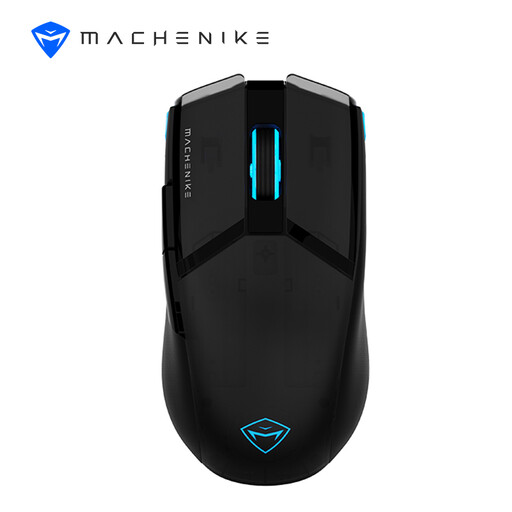
MACHENIKE M7 Pro dual-mode gaming mouse
Consider this PAW3395 model if you want the wireless and wired use described in its title.
Before choosing it for shortcut-heavy play or low-mass movement, confirm the button count, exact weight, hand fit and how button and DPI settings are configured.
View on Joybuy
Frequently asked questions
Do I need RGB lighting for tower defence in a bright room?
No: RGB is an appearance choice, not an established way to improve mouse tracking or tower defence control in a bright room. Prioritise buttons you can reach and a practical way to change or identify your DPI and profile settings.
How many mouse buttons are useful for tower defence?
Choose enough reachable buttons for the commands you actually use, rather than choosing by the largest advertised count. A simpler layout can suit mostly clicking and dragging; several recurring shortcuts may justify more controls, while a dense thumb grid is useful only if you can learn and press it accurately.
What should I check before choosing a wireless mouse?
Check its connection modes, power arrangement and the conditions attached to any quoted battery-life figure. If it uses a receiver, consider where you will connect it; if you plan to switch wireless modes, compare the manufacturer’s figures for the mode you will use.
What should I do with an old gaming mouse?
Check which electrical recycling or collection service is available through your local council, a retailer or another suitable provider. GOV.UK describes the UK’s waste electrical and electronic equipment framework as intended to reduce electrical waste sent to incineration or landfill; collection arrangements should be checked locally.


