
24/7 Customer Support

Free returns

Same-day & Next-day Delivery

Quality Guaranteed

Unlock Your Welcome Offers: FREE Delivery | Up to 80% OFF | Free 30-day JoyPlus trial
Download the APP
In the world of PC gaming, your mouse is more than just a pointer; it's your primary connection to the digital battlefield. A standard office mouse can hold you back with input lag, imprecise tracking and a lack of customisation. For serious gamers, a dedicated gaming mouse is an essential piece of kit that can significantly influence performance, whether you're lining up a critical headshot or executing a complex macro sequence.
This guide, brought to you by the Joybuy Product Recommendation Officer, is designed to cut through the marketing clutter. We'll break down the key features to look for and present some of our top recommendations for 2026, helping you find a device that matches your grip, genre and gaming ambitions.
Navigating the technical specifications of a modern PC gaming mouse can be daunting. Here are a few practical points to consider before making your choice.
The physical design of a mouse is critical for both comfort and performance. A lightweight gaming mouse, often weighing under 80 grams, is favoured by competitive FPS players for its ability to facilitate rapid, sweeping movements with minimal wrist fatigue. In contrast, players of MMOs or strategy games might prefer a heavier, more substantial ergonomic mouse that provides stability and a comfortable grip for marathon sessions. Consider your primary games and how you hold the mouse (palm, claw or fingertip grip) when evaluating its shape and weight.
Dots Per Inch (DPI) measures how sensitive your mouse is to physical movement. While a high DPI mouse offers faster cursor speed, many professional players use lower DPI settings (400-1600) for more controlled, precise aiming. The key is having a wide, adjustable range.
Polling Rate, measured in Hertz (Hz), is how often the mouse reports its position to the computer. A standard mouse has a 125Hz polling rate, while gaming models start at 1000Hz (1ms response time). For competitive play, a higher polling rate means smoother, more responsive tracking with less perceptible input lag.
A programmable mouse is a powerful tool, especially for MMO and MOBA players. Extra buttons, typically positioned for thumb access, can be mapped to in-game abilities, items or complex macros, freeing up your keyboard hand. For those who value aesthetics, an RGB gaming mouse allows you to synchronise lighting effects with the rest of your setup for a fully personalised gaming environment.
Based on their features, specifications and suitability for different gaming styles, here are a few standout models to consider.
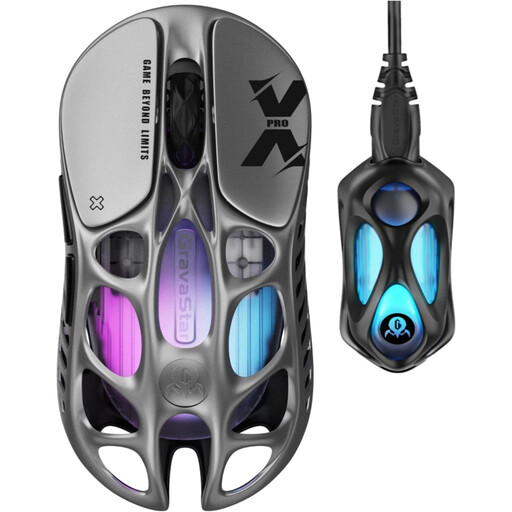
Why It Stands Out The GravaStar Mercury X Pro is engineered for one thing: pure speed. Its most striking feature is the incredibly low weight of just 49 grams, achieved through a hollow-skeleton magnesium alloy frame. This, combined with a top-tier PAW 3950 sensor capable of 32,000 DPI and a blistering 8,000Hz polling rate via its 8K dongle, places it in the top echelon of performance-focused mice.
Pros
Who is it for? This wireless gaming mouse is built for the competitive FPS player who demands the fastest response times and the lightest possible peripheral to gain an edge in fast-paced shooters like Valorant or Apex Legends.
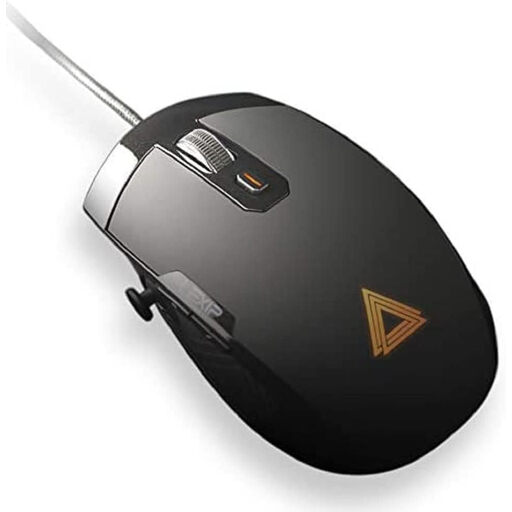
Why It Stands Out The Lexip Pu94 is not a conventional gaming mouse. Its innovation lies in a unique dual-joystick system: an internal 360° pivot joystick within the mouse body and a separate thumb joystick on the side. This design opens up new dimensions of control, allowing you to pan cameras, navigate 3D space or control vehicles without ever taking your hand off the mouse.
Pros
Who is it for? This mouse is a specialist tool. It's an excellent choice for players of flight simulators, space sims and complex MMOs. It also offers unique advantages for productivity in 3D modelling and creative software where simultaneous multi-axis control is beneficial.
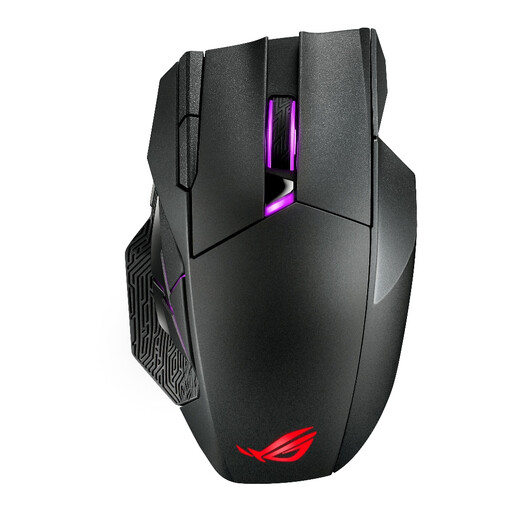
Why It Stands Out The ASUS ROG SPATHA X is a feature-packed command centre designed for MMO and MOBA enthusiasts. With 12 programmable buttons, including a six-button thumb grid, it provides extensive customisation for complex skill rotations. A standout feature is its hot-swappable micro switches, allowing users to change the click feel and extend the mouse's lifespan without any soldering.
Pros
Who is it for? This is the quintessential MMO mouse. It is aimed squarely at serious players of games like World of Warcraft or Final Fantasy XIV who need a large number of accessible buttons and a comfortable, ergonomic shape for long gaming sessions.
The models above are primarily designed for right-handed users. If you're looking for a mouse that accommodates a left-handed or ambidextrous grip, we have a dedicated selection. Explore our range of ambidextrous gaming mouse options to find the perfect fit for your setup.
Yes. In 2026, modern 2.4GHz wireless technology offers polling rates and latency that are virtually indistinguishable from their wired counterparts for gaming. A high-quality wireless gaming mouse provides the freedom of a cable-free setup without compromising on competitive performance.
There is no single "correct" DPI. Many competitive FPS players use lower DPI settings (between 400 and 1600) combined with large mouse movements for precise aiming. Others prefer higher DPI for faster cursor travel with less physical effort. A good gaming mouse offers a wide, adjustable DPI range, allowing you to experiment and find the sensitivity that best suits your playstyle.
This depends entirely on the games you play. For most FPS titles, two to four side buttons are sufficient for actions like melee or changing weapons. For MMOs or MOBAs, an MMO mouse with a grid of 6 to 12 side buttons can be a significant advantage, allowing you to map dozens of skills and macros directly to your thumb.