Start with a mouse shape that suits your hand and grip for repeated selecting, dragging and placing. Extra buttons or wheel modes are worth considering if your game accepts the commands you want to assign; wireless is a choice about desk space and power management. Treat RGB as an appearance preference, not a promise that the lighting will stand out in a bright room.
Who should consider these features?
Long-session virtual decorators
If you spend extended sessions selecting and placing furnishings, start with shell shape and grip fit rather than a headline sensor number. SCAN UK's gaming-mouse buying guide puts comfort at the centre of that choice.
Shortcut-heavy builders
If you repeatedly open catalogues, adjust the camera or switch tools, reachable controls may be useful when your game accepts the relevant button mappings. Razer lists 13 controls and configurable wheel modes for the Basilisk V3 35K; check whether that layout suits the commands you actually use.
Tidy-desk wireless users
If you prefer to move without a mouse cable, decide whether replacing batteries or recharging fits your routine. Logitech G specifies one-AA operation for the G305, while Corsair describes the M75 Wireless as rechargeable.
What matters when choosing?
For virtual-house decorating in a bright room, check hand fit first, then whether your game can use mouse shortcuts, and finally how you want to manage the desk and mouse power.
| Concern |
What to check |
Who this matters to |
| Hand fit and steady placement |
Compare the shell dimensions and shape with your palm, claw or fingertip grip; treat weight as a separate feel preference. |
Repeated dragging and fine placement make me want a shape I can hold comfortably throughout a session. Around 33% of consumers put hand fit first. |
| Shortcuts and navigation |
Check the game's button-binding options, then look at reachable controls and the exact model's wheel modes. |
I often switch tools or browse a long catalogue and want useful commands within reach. Shortcut and navigation controls come first for around 42% of consumers. |
| Desk setup and appearance |
For wireless mice, check the power system and battery-claim conditions; assess RGB visibility in your own lighting. |
I want room to move the mouse without a cable, or I care how it looks on my bright-room desk. Around 25% of consumers prioritise this setup need. |
Buying mistakes to avoid
-
Choosing the highest DPI instead of a suitable shape
A sensor figure cannot tell you whether the shell fits your grip during repeated decorating actions.
Compare shape and dimensions with the way you hold a mouse, then choose sensitivity settings you can adjust comfortably.
-
Assuming every extra button becomes a useful shortcut
Configurable controls help only if the game accepts the mappings you need and the buttons are easy for you to reach.
Check the game's binding menu before choosing a multi-button mouse, and identify the commands you would assign.
-
Comparing wireless battery figures without their conditions
Power systems and stated usage conditions differ. Logitech G rates the AA-powered G305 for up to 250 hours; Corsair rates the rechargeable M75 Wireless for up to 105 hours with RGB off. Those figures are not a like-for-like performance test.
Choose between battery replacement and recharging, then read the conditions attached to the exact model's claim.
An AA-powered model also means keeping replacement batteries available.
-
Putting an old mouse in ordinary recycling
A mouse is an electrical item, and a removable battery needs its own recycling route.
Recycle Your Electricals advises using electrical recycling or reuse routes and recycling removable batteries separately. Check local collection or retailer take-back arrangements.
Relevant brands for reference
Logitech G
The G305 is a reference point if you prefer a wireless mouse powered by a replaceable AA battery.
- Logitech G specifies LIGHTSPEED wireless, a HERO sensor and 200–12,000 DPI for the G305.
- Its stated battery life of up to 250 hours applies to the G305, not the whole Logitech G range; an AA battery will eventually need replacing.
Razer
The wired Cobra and Basilisk V3 35K illustrate different priorities: a compact mouse with lighting, or a layout with more controls and wheel options.
- Razer specifies a 58 g weight and RGB lighting for the Cobra, and 13 controls with configurable wheel modes for the Basilisk V3 35K.
- Neither the Cobra's compact shape nor the Basilisk V3 35K's extra controls establish a fit for every hand or game workflow.
Corsair
The M75 Wireless is relevant if you want a wireless mouse with side-button arrangements for right- or left-handed use.
- Corsair specifies swappable magnetic side buttons and an 89 g weight for the M75 Wireless.
- Corsair's rating of up to 105 hours per charge is stated with RGB off; check the current listing and power conditions before choosing this exact model.
Wireless mice to consider on Joybuy
These wireless models suit a cable-free desk while offering different control layouts. Compare their shapes and power arrangements with your own decorating routine; the game must accept any button mappings you plan to use.
 No image available
AJAZZ AJ200 AI MC wireless gaming mouse with charging dock
Consider this model if a charging dock and a choice of connection methods suit your desk. Its title specifies BT, 2.4G and USB-C modes, a PAW3311 sensor and up to 24000 DPI. Check the exact item's weight and wheel behaviour before buying, and confirm that your game accepts the button mappings you want.
View on Joybuy
 No image available
Rapoo VT7 MAX wireless gaming mouse, white
Consider this model if you want buttons for frequently used commands without a mouse cable. The title lists a 53 g weight and 10 programmable buttons. Button setup depends on software and game support; check the wheel behaviour and the conditions of the stated battery life for your use.
View on Joybuy
 No image available
Rapoo VT2 wireless gaming mouse, purple
Consider the VT2 if its wireless setup and programmable controls match the shortcuts your game accepts. Its title specifies 53 g, 10 programmable buttons and mechanical switches. Check the wheel behaviour separately; the stated battery-life figure depends on 1000 Hz use and a driver update that enables low-power mode.
View on Joybuy
 No image available
RAPOO VT2 MAX wireless gaming mouse, white
Consider the VT2 MAX if you want wireless movement and buttons for game-supported shortcuts. Its title specifies 53 g, 10 programmable buttons and optical switches, distinguishing it from the VT2 listed above. Check wheel behaviour and charging arrangements; the stated battery-life figure depends on 1000 Hz use and a driver update that enables low-power mode.
View on Joybuy
 No image available
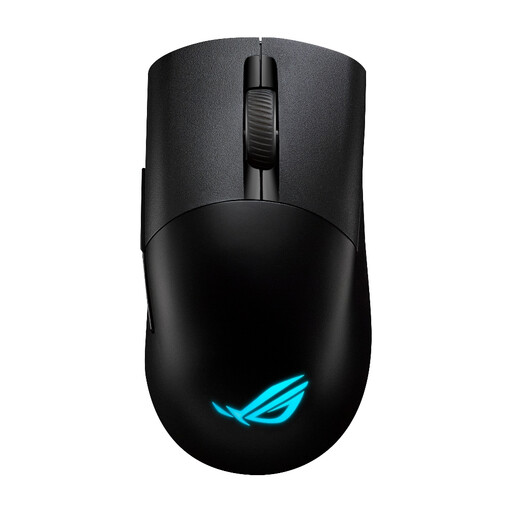
ASUS ROG Keris Wireless AimPoint gaming mouse, black
Consider this wireless model if a right-handed shape for a claw or fingertip grip sounds suitable for the way you hold a mouse. Check its fit in your hand and whether its controls work with your game. Confirm the exact item's weight, sensor and polling specifications, as well as its wheel behaviour, before choosing it on those grounds.
View on Joybuy
Frequently asked questions
Do I need very high DPI to decorate a virtual house?
No particular high DPI figure is necessary for every decorating game. Start with a shape that fits your grip and sensitivity you can adjust for comfortable object placement; a sensor's maximum DPI does not establish the right setting for your game or display.
Should I choose wired or wireless for decorating?
Choose wired if you prefer not to manage mouse batteries or charging; choose wireless if freedom from a cable matters more to your desk setup. Check the exact model's connection and power arrangements rather than assuming every mouse in either category feels or performs alike.
Will RGB lighting stand out in a bright room?
It might suit your desk's appearance, but do not assume it will look prominent in your particular lighting. Razer specifies configurable RGB for models including the Cobra and Basilisk V3 35K; assess the effect in conditions like your own room before making lighting a deciding factor.
How should I dispose of an old gaming mouse in the UK?
Use an electrical recycling or reuse route rather than ordinary recycling. Recycle Your Electricals advises separating removable batteries for battery recycling; check local collection and retailer take-back options for the mouse itself.


