For virtual-zoo building, choose a mouse that fits your hand and gives you enough accessible controls for the actions you actually repeat. A dense side-button layout is worth considering if you will set up and remember many shortcuts; otherwise, fewer controls may be simpler to use. Wireless can remove a mouse cable from a desk shared with headphones, but adds a charging or battery routine.
Who is this for?
Shortcut-heavy zoo builders
If you repeatedly switch building tools, move the camera and open management panels, accessible remaps may reduce how often you reach for the keyboard. Check that your game allows the assignments you want before choosing a layout around them.
Long-session planners
If you spend extended sessions arranging habitats and managing menus, hand size, grip and mouse weight deserve attention alongside button count. Logitech’s gaming-mouse guide identifies hand fit and grip style as comfort considerations.
Cable-conscious headphone users
If a headphone cable already crosses your desk, a wireless mouse can remove another cable from that space. Decide whether that convenience is worth keeping track of charging or batteries.
What matters when choosing?
Start with the commands you want under your hand, then check fit and connection type. Extra controls are useful only if their placement works for you and your game permits the intended bindings.
| Concern |
What to check |
Who this matters to |
| Shortcut layout |
Count the actions you would remap, then check button placement and your game’s binding options. |
When I switch building tools and menus frequently, I want repeated commands within easy reach rather than a keypad I will not learn. Around 40% of consumers put shortcut access first. |
| Hand fit |
Compare shape, grip guidance and stated weight with how you hold a mouse. |
During long planning sessions, an awkward shape would matter to me more than an extra button. Hand fit is the main concern for around 30% of consumers. |
| Desk connection |
Choose between a mouse cable and the exact wireless model’s charging or battery routine. |
With headphones already connected at my desk, I would rather manage mouse power than have another cable in the way. Keeping the connection convenient comes first for around 30% of consumers. |
Buying pitfalls
-
Buying more buttons than you will map
A dense side layout takes practice, while unused buttons add little to everyday building and management tasks.
Write down the camera, tool and interface actions you use repeatedly. Choose a side-keypad layout only if you intend to assign and learn enough commands to use it.
-
Choosing by DPI alone
Logitech describes DPI as a cursor-sensitivity setting; a high figure does not establish whether a mouse shape or control layout suits a long planning session.
Check adjustable sensitivity, hand fit, grip guidance and weight instead of choosing solely by the largest DPI number.
-
Overlooking wireless upkeep
Removing the mouse cable still leaves a charging or battery task. Power arrangements vary between models.
Check the exact model’s power source, charging method and the conditions attached to any stated battery-life figure.
A charging accessory or replacement battery may be needed, depending on the model and what is supplied.
-
Discarding purchase records
Razer requires valid proof of purchase for its limited-warranty claims. Separately, Citizens Advice explains that faulty goods may qualify for a refund, repair or replacement, depending on the circumstances.
Keep the dated receipt or order confirmation, seller details and model identifier so you can raise a fault with the retailer or make an applicable warranty claim.
Brands to consider
These examples illustrate different control layouts within particular product lines, not a judgement about every mouse from each brand.
Logitech G
The G502 X LIGHTSPEED and PRO X SUPERLIGHT 2 DEX illustrate different approaches to buttons and weight.
- Logitech G specifies 13 fully customisable controls on the G502 X LIGHTSPEED, making it relevant if you want several remaps without an MMO side keypad.
- The five-button, 60 g PRO X SUPERLIGHT 2 DEX leaves fewer on-mouse positions for zoo-management shortcuts; check whether its right-handed shape fits your grip.
Razer
The Basilisk and Naga lines offer different ways to arrange additional controls.
- Razer specifies 10+1 programmable buttons on the Basilisk V3 and three swappable side plates on the Naga V3 Pro.
- Changing side layouts is unlikely to help if you only want a few stable remaps; choose a layout you can use consistently.
Corsair
The SCIMITAR ELITE WIRELESS SE is an MMO-style option for people planning a substantial shortcut map.
- Corsair specifies 16 customisable buttons and an adjustable Key Slider side-button system on this model.
- A dense layout can take time to learn and may be unnecessary if you mainly remap a few camera or menu actions.
Joybuy product choices
These mice cover wired controls, wireless desk setups and layouts aimed at different amounts of remapping. Match each one to your preferred hand fit and confirm that your virtual-zoo game accepts the buttons or other controls you intend to assign.
 Image unavailable
Lexip Gaming Pu94 Wired Mouse
Consider this wired model if avoiding a mouse-charging routine matters more to you than removing a desk cable. If its joystick controls interest you, check whether your particular game accepts the intended inputs and bindings.
View on Joybuy
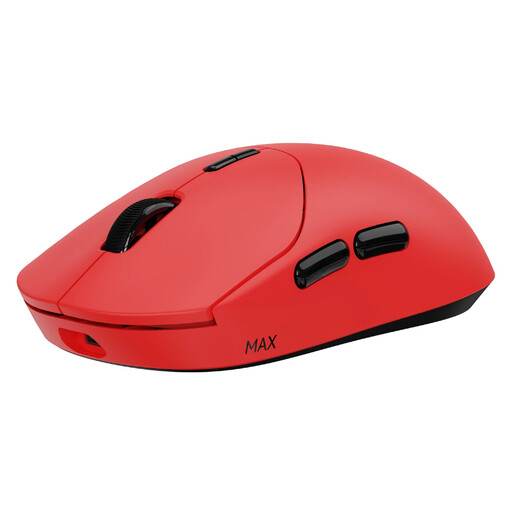 Image unavailable
RAPOO VT2 MAX Wireless Gaming Mouse, Red
Its stated 10 programmable buttons may suit several repeated commands without choosing a full side keypad. The product name specifies a 53 g weight. Treat the stated battery-life figure as conditional on 1000 Hz operation and a driver update for low-power mode, and check hand fit before buying.
View on Joybuy
 Image unavailable
ONIKUMA CW905 Wired Gaming Mouse
This wired mouse is a choice to investigate if you want programmable controls without wireless upkeep. Check how its buttons are configured and whether your game permits the assignments you have in mind.
View on Joybuy
 Image unavailable
ASUS ROG SPATHA X Wireless Gaming Mouse
Consider its MMO-style layout if you plan to put several frequently used commands on the mouse. Check the game’s side-button bindings and the mouse’s fit; confirm compatibility with your computer if you use a Mac.
View on Joybuy
 Image unavailable
AJAZZ AJ200 AI MC Wireless Gaming Mouse with Charging Dock
Its stated Bluetooth, 2.4G and USB-C modes give you connection options for a headphone-equipped desk. Check the charging arrangement, your game’s button bindings and the mouse’s weight before relying on it for long sessions.
View on Joybuy
Common questions
Do I need very high DPI or polling rate to build a virtual zoo?
Prioritise adjustable sensitivity, hand fit and controls you will use. Logitech describes DPI as cursor sensitivity and polling rate as how often the mouse reports its position; neither figure on its own tells you whether a mouse suits your grip or your game’s controls.
Is an MMO mouse useful for zoo-building shortcuts?
It can be useful if you will assign and remember enough frequent actions to justify the side buttons. Corsair specifies 16 customisable buttons on the SCIMITAR ELITE WIRELESS SE, but check your game’s binding options and whether you can reach the layout comfortably.
Is wireless better when I also use headphones?
Wireless is a desk-setup choice, not an automatic upgrade. It removes the mouse cable near your headphones but adds charging or battery upkeep; a wired mouse avoids that power routine.
What should I keep in case my mouse develops a fault?
Keep your dated proof of purchase, seller details and model identifier. Razer requires valid proof of purchase for its limited-warranty claims; separately, Citizens Advice explains that faulty goods may qualify for a refund, repair or replacement, depending on the circumstances.


