Players who want to avoid charging
If another charging routine would complicate your desk setup, start with a wired mouse. Check the computer connection and whether you can route the cable without it catching during play.


Choose a wired programmable mouse if your priority is avoiding another charging routine; check that you have a suitable computer connection and room to route its cable. A wireless mouse remains an option when cable-free movement matters more, but its charging and connection arrangements need checking. For either type, choose controls you can reach and configure for the commands you actually use.
If another charging routine would complicate your desk setup, start with a wired mouse. Check the computer connection and whether you can route the cable without it catching during play.
If you regularly use the same commands or modifiers, look at which mouse controls can be assigned and where they sit. A higher control count helps only when you can reach and configure the buttons you intend to use.
For extended campaigns, consider hand fit, thumb-button reach and scrolling behaviour alongside advertised weight. None of those figures alone can tell you how a mouse will feel in your hand.
Choose it when: avoiding mouse charging matters more than removing the cable from your desk.
Allow for: a suitable computer connection and a cable route that works with your playing space.
Choose it when: cable-free movement matters more to you than maintaining a charging routine.
Allow for: the exact model’s charging method and receiver or other connection requirements.
| Concern | What to check | Who this matters to |
|---|---|---|
| Charging and connections | Check the mouse’s connection type and your available computer ports; for wireless models, check charging and receiver requirements. | If I want fewer charging tasks at a desk with limited plug sockets, I need to know how the mouse connects before choosing it. Around 42% of consumers would put charging and setup simplicity first. |
| Command access | Check assignable controls and their placement, then confirm that your game accepts the bindings you intend to use. | During a command-heavy campaign, I want recurring actions within comfortable reach rather than choosing a button count for its own sake. For around 33% of consumers, direct access to commands would be the primary need. |
| Long-session handling | Consider shape, thumb reach and scroll behaviour; use advertised weight as a comparison point, not proof of comfort. | When I play for a long stretch, I need a shape and control layout that suit my grip. Comfortable handling would come first for around 25% of consumers. |
A wired mouse avoids mouse charging, but it still needs a suitable computer connection and space for its cable. Wireless removes that tether without removing the need to consider charging or connection arrangements.
Identify whether wall sockets, computer ports or cable space are the real constraint. Check the exact model’s connection and included accessories against your setup.
Extra controls are useful only if you can reach them comfortably and assign them to actions you use. A crowded layout may make some buttons awkward or easy to press accidentally.
List your frequent commands, then compare button placement and configuration options with that list. Check that your game accepts the intended assignments.
SteelSeries lists the Rival 5 at 85 g, while Logitech G describes the wired G502 X as weighing down to 89 g. Those figures do not establish how either shape, scroll wheel or set of side buttons will fit your hand.
Use weight to narrow your choices, then assess shape and button reach. Check the seller’s return terms if you may need to try the mouse at home.
These product lines provide useful points of comparison for wired controls, wireless setup and handling; the brand name alone does not settle which mouse suits your desk or grip.
The wired Basilisk V3 35K is relevant if you want several assignable controls and a configurable scroll wheel.
The wired Rival 5 is a reference point for players considering a smaller set of direct bindings.
The G502 X models offer points of comparison on both sides of the wired-versus-wireless decision.
These choices include wired mice for avoiding a mouse-charging routine and wireless or multi-mode mice for players who prefer cable-free use. Compare each one with your available computer connections, planned game bindings and preferred grip.
 No image available
Consider this wired model if avoiding mouse charging is your main setup priority. If you plan to move game actions onto the mouse, check which controls your historical war game can accept and whether their positions suit your grip.
 No image available
This wired mouse is worth checking if you want programmable controls without a mouse-charging routine. Confirm which buttons can be assigned, what configuration software you need and whether the layout fits your hand.
 No image available
Consider this model if cable-free movement and a larger set of assignable controls matter more than avoiding charging. Its title specifies 10 programmable buttons and 53 g; check button reach, receiver needs and charging instructions for your setup.
 No image available
This wired edition may suit a setup where avoiding mouse charging comes first. If you need specific command bindings, check its programmable-button count and placement rather than assuming they match another Razer model.
 No image available
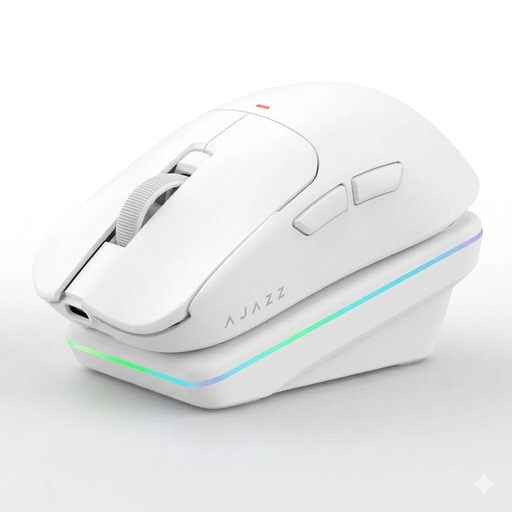
Consider this multi-mode model if you want wireless use and are willing to manage charging. The title lists Bluetooth, 2.4G and USB-C modes; check how each mode connects, what power the charging dock needs and which buttons your game can use. Confirm the exact variant’s weight if that figure affects your choice.
No. A wired gaming mouse avoids a mouse-charging routine, while a wireless one removes the cable from the playing area. Decide whether charging or cable routing is the bigger inconvenience, then check your computer’s free connections and the exact mouse’s requirements.
Choose enough reachable controls for the commands you actually want on the mouse. SteelSeries lists nine programmable buttons on the Rival 5; Razer describes secondary-function assignment across 13 controls on the Basilisk V3 35K. Check the layout and whether your game accepts your planned bindings before choosing by count.
For most UK online purchases, GOV.UK says customers can cancel up to 14 days after delivery without giving a reason. Check the seller’s instructions and any applicable exceptions for a change-of-mind return. A mouse that is faulty or misdescribed raises a separate issue from whether its shape suits your hand.
Use an appropriate electronics-recycling route when replacing an old mouse. UK guidance from the Office for Product Safety and Standards and the Department for Environment, Food & Rural Affairs describes waste electrical and electronic equipment rules aimed at recovery, reuse and recycling.