A dense thumb-button grid makes sense if you want many tower defence commands on the mouse and can reach them comfortably; a smaller set of programmable controls leaves more commands on the keyboard but may be simpler to learn. For a mouse you also use at work, check its fit and your desk position before choosing by button count, then weigh a cable-free desk against charging or battery management.
Who these mice suit
Players who use lots of shortcuts
If you repeatedly use build, upgrade, camera or utility commands, extra mouse controls may put selected actions under your thumb. A dense layout is useful only if you can reach and distinguish its buttons in your normal grip.
People using one desk for work and gaming
When the same mouse serves both tasks, assess reach, wrist position and forearm support alongside its gaming controls. The Health and Safety Executive advises keeping the mouse within easy reach and using it with a straight wrist.
People who prefer a clear desk
Wireless connectivity can remove a mouse cable from the work surface, provided you are willing to manage charging or batteries. A wired option may suit you better if the cable can be routed comfortably and you prefer not to manage power.
What matters when choosing
Start with the commands you would actually move from the keyboard to the mouse. Then check whether the button layout and desk setup remain comfortable for everyday work.
| Concern |
What to check |
Who this matters to |
| Shortcut capacity |
Count controls you can reach in your usual grip, and check remapping support for your computer. |
If I want build and upgrade commands under my thumb, I need enough buttons that I can tell apart without changing grip. Around 29% of consumers put shortcut capacity first. |
| Workstation comfort |
Check mouse reach, grip and forearm support; the Health and Safety Executive advises using a straight wrist. |
Using one mouse through work and gaming makes an awkward reach hard to ignore. For around 36% of consumers, comfortable workstation use is the primary concern. |
| Cable-free desk |
Check connection modes and how charging or battery replacement will fit your routine. |
I want room to move the mouse without a cable crossing my desk, and I am prepared to manage its power. Desk freedom comes first for around 21% of consumers. |
| Straightforward controls |
Choose a layout for the few commands you expect to remap, rather than button count alone. |
If most commands will stay on my keyboard, I would rather learn a smaller mouse-button set. Around 14% of consumers prioritise simpler controls. |
Buying pitfalls
-
Choosing the highest button count without checking thumb reach
A dense side grid helps only when you can identify and press its buttons without repeatedly shifting your grip or bending your wrist.
Compare the layout with your usual grip and check the retailer’s return terms before deciding whether to learn a 12-button grid.
-
Expecting the mouse shape to fix an awkward workstation
A different mouse cannot, by itself, bring an out-of-reach mouse position closer. The Health and Safety Executive advises keeping the mouse within easy reach, supporting the forearm and avoiding an overly tight grip.
Check the position of your mouse, keyboard and chair as well as the mouse shape.
-
Choosing wireless solely to remove the cable
A wireless mouse can clear the desk, but it also needs charging or batteries. Scan UK’s buying guide says high-end wireless gaming mice can be competitive with wired models; that does not establish the performance of every wireless mouse.
Check the model’s connection modes, stated battery conditions and charging method. Consider wired if your cable route works well and avoiding power management matters more.
Wireless use may also mean setting aside charging time or keeping batteries available, depending on the model.
-
Using maximum DPI as the main deciding factor
A maximum sensitivity figure does not tell you whether the buttons suit your tower defence commands or whether the shape fits your hand.
Decide which controls you will map and assess the grip first; then adjust cursor sensitivity to suit your screen, mousepad and preference.
Brands to consider
Razer
Its Naga and Basilisk models illustrate a choice between a dense command layout and a less crowded button arrangement.
- Razer lists 21 programmable controls for the Naga V2 HyperSpeed and 11 programmable buttons for the Basilisk V3.
- Those counts do not establish which layout your thumb can reach comfortably; check the shape and button placement.
Logitech G
The G502 X LIGHTSPEED is a reference point for buyers wanting multiple controls without a 12-button thumb grid.
- Logitech G lists 13 customisable controls and supports button assignments through G HUB.
- Control count alone does not establish whether their placement suits your hand.
Corsair
The Scimitar Elite Wireless SE is relevant if you want an MMO-style thumb panel whose position can be adjusted.
- Corsair lists 16 programmable buttons, including a repositionable 12-button side panel, with iCUE support for remapping.
- Try the panel position against your own thumb reach rather than assuming that adjustment guarantees comfort.
SteelSeries
The Aerox 5 Wireless offers a smaller programmable-control set than the dense-grid models discussed here.
- SteelSeries lists the Aerox 5 Wireless at 66 g with nine programmable buttons.
- Nine buttons leave less room for direct shortcuts if you intend to move many commands from the keyboard.
Gaming mice for work and play
These Joybuy mice cover wired and wireless desk setups, from a few remappable commands to layouts intended for more game actions. Compare the controls you would use with the grip and cable or charging arrangements that suit your workspace.
 No image available
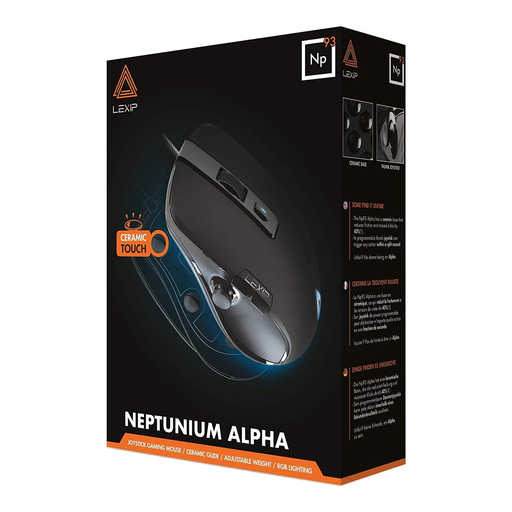
Lexip NP93 Alpha Gaming Mouse
Consider this wired model if you want several commands on the mouse without managing charging. Joybuy describes up to 12 programmable buttons; check whether its controls suit your grip and whether the cable route works at your desk.
View on Joybuy
 No image available
ASUS ROG SPATHA X Wireless Gaming Mouse
This wireless model is worth considering if you want mouse-accessible game commands at a cable-free desk. Check thumb reach before relying on its side controls, and confirm how you would charge it during regular work use.
View on Joybuy
 No image available
AJAZZ AJ200 AI MC Wireless Gaming Mouse with Charging Dock
Consider it if you want connection choices for a shared work-and-gaming desk rather than a dense thumb grid. Its title lists Bluetooth, 2.4G and USB-C modes; check the shape and controls for your grip. Confirm the exact weight if that affects your choice.
View on Joybuy
 No image available
Rapoo VT7 MAX Wireless Gaming Mouse, White
Consider this model if you want a wireless mouse with controls for a moderate set of game commands. Its title specifies 10 programmable buttons and 53 g. The stated battery duration depends on a driver update to unlock low-power mode at 1000 Hz; check charging arrangements and button reach too.
View on Joybuy
 No image available
Logitech G102 USB Gaming Mouse, Blue
This wired USB option suits a desk where you plan to keep most tower defence commands on the keyboard and use only a few mouse shortcuts. Check the cable route and grip fit for your work setup.
View on Joybuy
Questions about choosing
Do I need a 12-button mouse for tower defence?
No; choose a dense thumb grid if you will regularly map enough commands to use it and can reach its buttons comfortably. If you need only a few shortcuts, a smaller control set can leave the remaining actions on the keyboard.
Is wireless necessarily worse than wired for gaming?
No. Scan UK says high-end wireless gaming mice can be competitive with wired models, but that does not settle the choice for every device. Check the model’s connection options, your desk layout and how you would manage charging or batteries.
How should I position a mouse at a home-office desk?
Keep it within easy reach so you can use it with a straight wrist. The Health and Safety Executive also advises supporting your forearm and avoiding an overly tight grip; adjust the desk setup if the mouse position makes you reach.
Do extra mouse buttons need software?
Check the software requirements for the commands you want to assign. Logitech G says G HUB supports button assignments, while Corsair says iCUE supports remapping and macros; confirm compatibility with your computer and intended mouse before relying on those features.


