Choose a gaming PC around your arena games, intended resolution and refresh-rate target, rather than the highest hardware tier by default. In a bright room, assess the monitor separately: its typical brightness, screen coating and connection-specific refresh rate affect the setup in ways a more powerful tower cannot resolve. Check the selected PC configuration and any game-specific latency feature before paying for capabilities you may not use.
Who this setup suits
Competitive 1080p arena players
If you mainly play competitive titles on a Full HD display, start with your games and chosen settings. A more demanding display target calls for a fresh check of the complete PC configuration, not just its graphics-card name.
Bright-room setup buyers
If daylight or room lighting makes the screen difficult to see, plan the display alongside the computer. Compare stated typical brightness and screen coating, then check the refresh rate available through the connection you intend to use.
Players who also stream or upgrade
If you expect to run recording or streaming software alongside matches, or add memory or storage later, check the selected tower’s installed parts and expansion options. Lenovo describes such options for its Legion Tower 5i Gen 10 family, but configurations vary.
What to check before buying
Set your game and display target first, then compare the complete PC-and-monitor setup. For a bright room, tower specifications alone cannot establish whether the screen will be easy to see.
| Concern |
Buying checks |
Who this matters to |
| Bright-room visibility |
Compare the monitor’s typical brightness and coating; consider reflections at the intended desk position. |
When daylight makes a screen difficult to see, I need to assess the display as well as the PC. Around 36% of consumers put bright-room visibility first. |
| Competitive responsiveness |
Match the exact GPU and CPU configuration to your games, settings and refresh-rate target; confirm game support for any advertised latency feature. |
For competitive matches, I want the system and display chosen around the responsiveness I’m aiming for. Consumers who put that need first account for around 36%. |
| Game-fit configuration |
Compare the selected processor, GPU, memory and storage with your games’ requirements and intended resolution. |
If my games and monitor will not use a higher-spec configuration, I would rather choose parts that fit my plans. Around 21% of consumers prioritise that match. |
| Expansion and support |
Check available memory and storage upgrades, the selected cooling system and the warranty for that configuration. |
When I expect to add components or rely on support later, upgrade access and cover matter to me from the outset. That is the primary need for around 7% of consumers. |
Buying pitfalls
-
Choosing the tower without assessing the monitor
A faster PC will not address reflections or establish whether an existing screen is suitable for the room.
Compare a candidate monitor’s stated typical brightness and coating, and consider where direct light falls on the screen.
-
Assuming the headline refresh rate works through every port
Dell lists its AW2525HM monitor at 320Hz through DisplayPort but 255Hz through HDMI. The connection therefore matters when planning a high-refresh setup.
Check the selected PC’s graphics output, the monitor input and the refresh rate supported through that connection.
-
Buying by desktop family name alone
The GPU, memory, storage, cooling and warranty can differ between configurations in one range. Lenovo’s stated cooling options for the Legion Tower 5i Gen 10, for example, are not a specification for every unit.
Compare the complete selected configuration and its warranty before ordering, including the operating system and any peripherals you need.
-
Applying Great Britain guidance to Northern Ireland without checking
GOV.UK’s electrical-equipment guidance is expressly framed for equipment supplied in or into Great Britain and notes that some provisions apply differently in Northern Ireland.
For delivery to Northern Ireland, check the applicable official guidance or ask the seller about the product supplied to your destination.
Brands to consider
3XS Systems
Scan’s custom and prebuilt gaming-PC range includes configurations aimed at esports and 1080p gaming.
- Scan describes entry configurations with RTX 5050 or RTX 5060 graphics for casual esports titles.
- Check the parts in the selected 3XS build against your games and monitor; a range-level description does not establish performance for every configuration.
Lenovo Legion
Lenovo’s Legion desktop range is relevant if you want a prebuilt tower and are considering later memory or storage changes.
- Lenovo states that the Legion Tower 5i Gen 10 offers upgradeable memory, expandable storage and configuration-dependent cooling options.
- Confirm the installed GPU, cooling, upgrade access and warranty on the exact configuration; family-level maximums are not included in every tower.
Alienware
Dell’s Aurora range offers configured gaming desktops for buyers considering substantial hardware capacity.
- One Dell-listed Aurora configuration has a Core Ultra 9 285K, RTX 5080 16GB, 64GB DDR5 memory and 2TB NVMe storage.
- Those parts describe that displayed configuration, not every Aurora; match the selected hardware to your games and display target.
Joybuy products for this setup
These choices include laptops with built-in displays and desktop options for arena gaming. For each one, check your games and intended settings; where the monitor is separate or part of a bundle, assess its bright-room characteristics and connection options before deciding on the complete setup.
 Image unavailable
Lenovo LOQ Essential 15ARP11, Ryzen 7 170, RTX 5050, 15.6-inch FHD 144Hz
Consider this laptop if you want to play on a built-in Full HD display rather than select a separate monitor. Its title specifies 16GB RAM and a 1TB SSD; check whether the screen suits your room lighting and whether your games meet your performance target at the chosen settings.
View on Joybuy
 Image unavailable
CyberPowerPC JOYB1004 bundle, Ryzen 5 7500F, RTX 5060 8GB
This desktop bundle is an option if you are assembling a setup that includes a monitor, keyboard, mouse, headset and mousepad. The named configuration has 16GB DDR5 and a 1TB NVMe SSD. Confirm the included monitor’s model, brightness, coating and refresh rate before relying on it for bright-room matches.
View on Joybuy
 Image unavailable
THUNDEROBOT Radiant S16, Ryzen 7 7745HX, RTX 5060, 16-inch QHD+ 240Hz
Consider its built-in QHD+ display if that resolution and refresh-rate target match your plans. The configuration also lists 16GB DDR5 and a 1TB SSD. Check the screen’s brightness and coating for your room, and assess achievable performance in your particular games and settings.
View on Joybuy
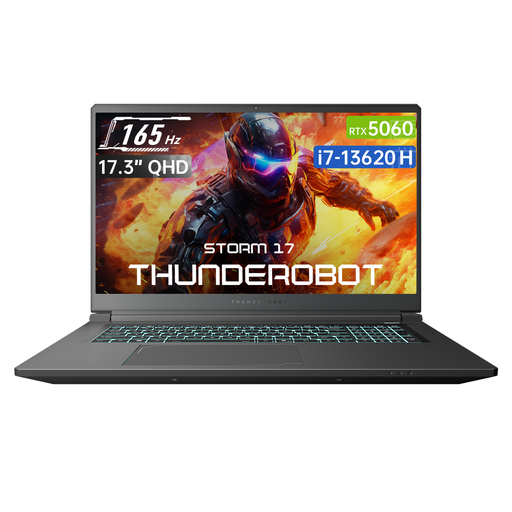 Image unavailable
THUNDEROBOT Storm 17 5060, Core i7-13620H, 17.3-inch QHD 165Hz
This laptop is worth comparing if you want a 17.3-inch built-in QHD display for matches. Its title names GeForce RTX 5060 graphics, 16GB DDR5 and a 1TB SSD. Check screen brightness and coating for the intended desk position, and match game performance to the QHD settings you plan to use.
View on Joybuy
 Image unavailable
CyberPowerPC JOYB1013, Ryzen 7 9800X3D, RTX 5080 16GB, white
Consider this tower if your games, display target or other workloads call for the listed configuration, rather than assuming higher-tier parts are necessary for arena play. It has 32GB DDR5 and a 2TB NVMe SSD. A monitor is not included, so choose one with suitable bright-room specifications and confirm the intended connection and game settings.
View on Joybuy
Common questions
Is a gaming PC alone enough for matches in a bright room?
No: the monitor and its position also affect whether you can see the game clearly. Compare typical brightness and screen coating, and consider reflections at your desk; a tower specification cannot answer those display questions.
Will a 320Hz monitor run at 320Hz with any new gaming PC?
Not necessarily. Dell specifies 320Hz through DisplayPort but 255Hz through HDMI for its AW2525HM, so check the monitor input, the selected PC’s graphics output and the supported mode before choosing a connection.
Does an NVIDIA graphics card mean Reflex works in every arena game?
No. NVIDIA describes Reflex as a technology implemented by game developers, so check support in the specific game as well as the selected system rather than relying on the graphics-card brand alone.
Can I use Great Britain electrical-equipment guidance for delivery to Northern Ireland?
Do not assume it applies unchanged. GOV.UK frames its Electrical Equipment (Safety) Regulations 2016 guidance around supply in or into Great Britain and notes differences for some provisions in Northern Ireland; check the applicable guidance for your delivery destination.


