
24/7 Customer Support

Free returns

Same-day & Next-day Delivery

Quality Guaranteed

Unlock Your Welcome Offers: FREE Delivery | Up to 80% OFF | Free 30-day JoyPlus trial
Download the APP
Stepping into the world of PC gaming is an exciting prospect, but the journey to find the right hardware can be filled with confusing jargon and tempting offers that don't always deliver. A gaming PC bundle seems like the perfect solution—a single box that gets you up and running. However, not all packages are created equal. Many are designed with hidden compromises that can lead to buyer's remorse.
As a Joybuy Product Recommendation Officer, my role is to help you see past the marketing jargon. Before you commit, let's look at the common pitfalls that UK buyers encounter and how to sidestep them to find a system that truly meets your needs.
To avoid these traps, focus on a few key parameters that determine the real-world performance and longevity of your setup.
The heart of any gaming PC is the relationship between the Central Processing Unit (CPU) and the Graphics Processing Unit (GPU). For a smooth experience in modern games, these two components must be well-balanced.
For example, a modern RTX 5060 gaming PC is a capable choice for playing games at 1080p and 1440p resolutions. To get the most out of it, it should be paired with a competent processor, such as an AMD Ryzen 5 7000-series chip or a recent Intel Core i5. This ensures the CPU can feed the graphics card with data efficiently, preventing stuttering and allowing the GPU to work to its full potential.
The type of storage in a PC dramatically affects how responsive it feels. A NVMe SSD (Non-Volatile Memory Express Solid-State Drive) is the current standard for a reason. It offers significantly faster boot times and game-loading speeds compared to older SATA SSDs and traditional hard disk drives (HDDs). Given that many new games require over 100GB of space, a 1TB NVMe SSD should be considered the practical minimum for any starter gaming PC.
A good gaming computer package should serve you well today and offer flexibility for tomorrow. Check for a solid selection of modern ports, including USB 3.2 for fast data transfer and DisplayPort outputs for high-refresh-rate monitors. Furthermore, the PC case and motherboard should provide accessible slots for adding more RAM or storage in the future, ensuring your investment can grow with your needs.
Instead of a one-size-fits-all approach, we've matched a few options to different user needs. This helps ensure you're getting a system that aligns with your specific goals and budget.

Why This Fits Their Persona: This is the ideal plug-and-play solution for anyone new to PC gaming. It removes the complexity of choosing components by providing a tower, monitor, keyboard, mouse and headset in one package. It's a complete, ready-to-go full gaming setup UK residents can have running in minutes.
It directly counters the "peripheral afterthought" by including a full set of accessories. It also avoids the bottleneck trap with a well-matched AMD Ryzen 5 7500F CPU and NVIDIA GeForce RTX 5060 GPU.
All-in-one convenience with a single point of purchase and warranty. The core specification is strong enough for modern 1080p/1440p gaming and productivity.

Why This Fits Their Persona: This user prioritises high frame rates and graphical fidelity. They likely already own a high-refresh-rate monitor and premium peripherals. This PC provides a powerful core system built for demanding 1440p and entry 4K gaming without the hassle of building it themselves.
It avoids the "future-proof" myth by delivering excellent current-generation performance at a reasonable price point. The Intel Core Ultra 7 265KF and RTX 5070 are a potent and balanced combination, ensuring no performance is left on the table.
High-end performance from its CPU/GPU pairing, 32GB of fast DDR5 memory for heavy multitasking and a 1TB NVMe SSD for quick loading.
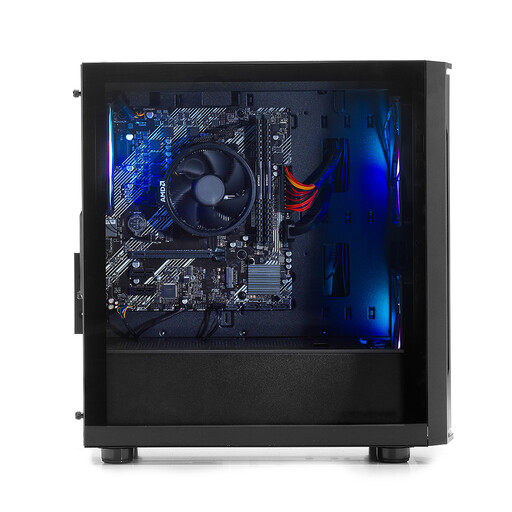
Why This Fits Their Persona: This is a great entry point for students or casual players who need a PC for both productivity and light gaming. The integrated Radeon graphics are capable of running popular esports titles like Valorant or League of Legends smoothly at 1080p, while the Ryzen 5 CPU handles schoolwork with ease.
This system is transparent about its capabilities. It doesn't over-promise and delivers solid performance for its intended use case. It's a balanced system that uses a capable APU (a CPU with integrated graphics) to provide value.
An accessible price point and a clear upgrade path. You can easily add a dedicated graphics card later to transform it into a more powerful gaming machine. The NVMe SSD ensures it remains fast and responsive for daily tasks.
We have compiled a complete, real-time list of products that fully satisfy these strict selection criteria and UK safety regulations.
For many people, especially beginners, a prebuilt gaming PC with monitor offers excellent value. You get the convenience of a single purchase, one warranty for the entire system and the confidence that the components are compatible. While building a PC yourself allows for complete customisation, it requires technical knowledge, time and managing multiple warranties. A well-chosen bundle from a reputable builder like CyberPowerPC provides a great balance of performance and convenience.
A well-balanced mid-range gaming PC should provide a good experience in new games for around 3 to 5 years, though you may need to lower graphical settings over time. The graphics card is usually the first component gamers look to upgrade to boost performance in the latest titles. The CPU, RAM and storage often have a longer useful lifespan.
The electricity consumption of a gaming PC depends on its components. A high-performance system with an RTX 5070 will draw more power under load than an entry-level PC with integrated graphics. However, modern components are also designed with efficiency in mind and use very little power when idle or performing light tasks like web browsing. It's a factor to consider, but for most users, the cost is manageable and a small part of the overall hobby.