Choose a Windows desktop by comparing its complete CPU, memory, graphics and storage configuration with the requirements of the orbital simulator you intend to use. Kerbal Space Program offers a published starting point for that game, but its requirements cannot establish how another simulator, a large craft or a modded installation will run. For headphones, choose a connection explicitly compatible with the PC, then consider fit, microphone needs and whether you want to manage charging.
Who this setup suits
Getting started with orbital simulation
If you are learning manoeuvres and building your first missions, start with the published requirements for the exact game you choose. Kerbal Space Program, described by Steam as a spacecraft game based on orbital physics, is one relevant example—not a specification for every simulator.
Planning more complex missions
If you expect larger craft, mods or other demanding games alongside orbital practice, compare complete desktop configurations rather than relying on the gaming-PC label. The appropriate headroom still depends on the software and settings you plan to use.
Practising at a desk with headphones
If headphones will be part of longer sessions, check their PC connection, fit and microphone arrangement. SteelSeries’ Arctis Nova range illustrates why the exact model matters: connection options across the family include wired and wireless routes, not one shared setup.
What to check before buying
Identify the simulator and intended display settings before comparing PCs; then check the headphone connection against the chosen desktop’s ports.
| Concern |
Buying checks |
Who this matters to |
| Simulation headroom |
Compare the exact CPU, installed memory and graphics card with your simulator’s requirements; account for your intended resolution and mods. |
If I plan more complex missions or a demanding simulator, I want to assess the whole PC rather than trust its gaming label. Around 42% of consumers put simulation headroom first. |
| Balanced desktop configuration |
Check CPU, memory, graphics and SSD storage together against the game you have chosen; do not transfer performance claims from unrelated games. |
When I am starting with a specific simulator, I want a clearly described desktop without choosing extra capacity solely on assumption. For around 33% of consumers, that balanced fit comes first. |
| Headphone usability |
Match the headset connector or wireless dongle to the PC; consider fit, microphone needs and charging. |
For long desk sessions, I need headphones I can connect and wear comfortably without disrupting practice. Headphone usability is the primary concern for around 25% of consumers. |
Buying pitfalls
-
Treating the gaming-PC label as a simulator performance test
Kerbal Space Program’s published requirements apply to that game; performance figures for unrelated games use different workloads and settings. Neither establishes how an unnamed orbital simulator will run.
Choose the simulator and version, intended resolution and likely mod use, then compare its requirements with the desktop’s exact configuration.
-
Reading a product-family maximum as the specification of one PC
HP OMEN and Acer Predator Orion families contain different configurations. A component shown as an option or family maximum need not be fitted to the model you select.
Check the selected PC’s CPU, graphics card, installed memory, storage, ports, cooling details and included accessories on its own listing.
-
Assuming every wireless headset connects the same way
Wired, USB, Bluetooth and 2.4 GHz headsets have different connection requirements. Bluetooth availability alone does not establish which PC gaming features a particular headset supports.
Check the exact model’s PC compatibility, supplied cable or dongle, required ports and charging method.
An adapter may be needed if the supplied connector does not match the ports you intend to use.
Brands to consider for this setup
HP OMEN
HP’s OMEN desktop range is relevant when comparing differently sized prebuilt towers, including the 16L, 35L and 45L lines.
- HP lists a range of component options across these models.
- Listed maximum and optional components must be checked against the configuration of the PC you would actually buy.
Acer Predator
Acer’s Predator Orion family offers a compact Orion 3000 line alongside larger Orion models.
- Acer describes different tower sizes and component options within the family.
- Acer’s cooling and modularity descriptions do not establish the installed hardware or upgrade access of every configuration.
MSI
The MAG Infinite S3 is a prebuilt desktop line to compare by exact configuration rather than by family name.
- One MAG Infinite S3 configuration is listed with an Intel Core i5-14400, 16 GB DDR5, a 1 TB SSD and an RTX 5060 8 GB.
- That listing does not describe the components or cooling of every MAG Infinite S3 configuration.
SteelSeries
The Arctis Nova headset family is relevant when comparing wired and wireless connections for a PC desk setup.
- SteelSeries describes both wired and wireless connection options across the family.
- Confirm the chosen headset’s PC connection and supplied accessories; a feature listed for one model need not apply to another.
Gaming PCs and headsets on Joybuy
These choices cover wired headsets, a desktop bundle with peripherals and standalone gaming desktops. Compare any PC with your simulator’s requirements, and check the connection and fit of the headphones you intend to use.
 Image unavailable
LOGITECH ASTRO A10 Gen 2 Wired Headset, White
A wired option for a desk setup where avoiding headset charging matters. Check that its connection suits your PC’s audio ports and assess the fit for longer sessions.
View on Joybuy
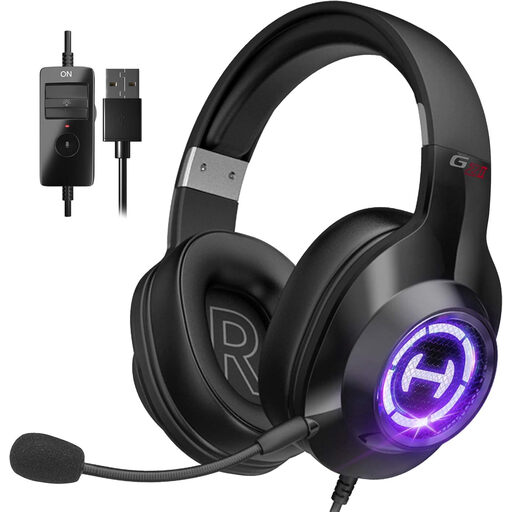 Image unavailable
Edifier G2II USB Wired Headset, Black
Consider this wired headset if you have an available USB port and want a headset with a microphone. Its title lists 50 mm drivers and a 7.1 surround-sound feature; check the connection and fit rather than assuming either feature determines comfort or sound quality.
View on Joybuy
 Image unavailable
CyberPowerPC JOYB1004 Gaming PC Bundle
This bundle is worth checking if you want a desktop and peripherals together. Its named configuration is an AMD Ryzen 5 7500F, NVIDIA GeForce RTX 5060 8GB, 16GB DDR5, 1TB NVMe SSD and Windows 11 Home; the title also lists a monitor, keyboard, mouse, headset and mousepad. Confirm the exact monitor and headset specifications before deciding whether the bundle meets your display and headphone needs.
View on Joybuy
 Image unavailable
CyberPowerPC JOYB1013 Gaming Desktop, White
Compare this desktop’s listed capacity with a specified simulator or other demanding uses; the component names alone do not establish game performance. Its configuration is an AMD Ryzen 7 9800X3D, NVIDIA GeForce RTX 5080 16GB, 32GB DDR5, 2TB NVMe SSD and Windows 11 Home. Check the peripherals you need separately, along with the installed cooling configuration if that affects your choice.
View on Joybuy
 Image unavailable
CyberPowerPC JOYB1010 Gaming Desktop, Black
This is another disclosed desktop configuration to compare with the requirements of your chosen simulator, not a prediction of how it will run. It lists an Intel Core Ultra 7 265KF, NVIDIA GeForce RTX 5070 12GB, 32GB DDR5, 1TB NVMe SSD and Windows 11 Home. Check which display and headphone connections you need and what peripherals come with the selected configuration.
View on Joybuy
Frequently asked questions
Can I choose a PC using Kerbal Space Program’s requirements?
Use them as a starting point only if Kerbal Space Program is the game you intend to play and the published requirements apply to your version. The Kerbal Space Program Wiki lists Windows 10 64-bit, a Core i5, 8 GB RAM, DX10 graphics with 1 GB VRAM and 4 GB storage in its Windows recommendations; another simulator, mods or different display settings call for their own checks.
Should I choose wired or wireless headphones for practice?
Choose wired headphones if you prefer not to manage charging and can match the connector to your PC. A 2.4 GHz wireless headset may suit you if its exact model explicitly supports PC use through the supplied dongle and you have an available port; Bluetooth support alone does not establish support for every PC gaming feature.
Can I cancel an online PC or headset order if I change my mind?
For applicable UK distance sales, GOV.UK says consumers generally have 14 days after receiving an item to tell the seller they want to cancel, followed by another 14 days to return it. Exceptions and rules about handling can affect a change-of-mind return, so check the applicable terms before extensive use; this is distinct from remedies for faulty or misdescribed goods.
What should I do if the PC arrives faulty or differs from its listing?
Contact the seller about a remedy and keep the listing, order confirmation and details of the configuration received. GOV.UK distinguishes faulty or misdescribed goods from a change-of-mind return; the appropriate remedy depends on the circumstances, rather than on the retailer’s voluntary return policy alone.


