Who is this for?

Procedure-focused space-simulator players

If you want to operate spacecraft systems and work through lunar-flight procedures on a monitor, the game itself sets the starting point for your PC choice. Steam describes Reentry as a space-flight simulator covering Apollo-era moon-landing missions.

VR moon-experience buyers

If the landing is meant to be experienced through a headset, check the game’s VR platform and headset requirements alongside the PC. Steam lists SteamVR or Oculus PC support for Apollo 11 VR HD: First Steps.

One-PC mixed-use gamers

If the same computer will also handle other games or creative work, compare its graphics card, memory, storage and connections against those uses too. A simulator’s minimum requirement alone does not settle the choice for everything else you plan to run.

What matters when choosing?

Monitor-based simulation

Choose this when: Your selected game is played on a conventional display; Steam describes Spaceflight Simulator in terms of building rockets, planning flights and attempting landings.

Trade-off: You do not need to plan a headset setup for this route, but the suitable PC specification still depends on the particular game and display you choose.

VR lunar experience

Choose this when: Your intended title supports or requires VR and you can pair the PC with a compatible headset and controllers.

Trade-off: Headset compatibility adds another check. Steam lists SteamVR or Oculus PC support and a GTX 1070 recommended graphics requirement for Apollo 11 VR HD: First Steps; that recommendation is specific to this title.

Concern What to check Who this matters to
Game and platform fit Identify the exact game and edition; check its current system requirements, operating system and VR or headset support. I need to know that the PC and my chosen version of the game will work together before comparing graphics options. Around 40% of consumers would put that game-and-platform match first.
Graphics and display Compare the exact GPU with the game’s requirements and your intended monitor resolution or VR setup. If I have a particular display and visual setting in mind, I want to assess the graphics card against that target. Roughly 30% of consumers would make graphics and display fit their primary concern.
Complete-system setup Check installed memory, SSD capacity, operating system, connections and the seller’s support terms for the exact configuration. I want a computer that fits my peripherals and is straightforward to set up and maintain, not just an appealing GPU name. About 30% of consumers would put the complete-system setup first.

Buying pitfalls

  • Assuming every moon-landing game needs the same PC

    Steam’s descriptions cover different experiences, from rocket building in Spaceflight Simulator to a VR-supported Apollo experience. One title’s graphics recommendation cannot be applied to every lunar game.

    Find the exact game and edition, then compare its published requirements with the proposed PC and your monitor or headset.

  • Choosing by the graphics-card name alone

    The GPU matters, but memory, storage, operating system and connections also affect whether the complete computer fits your setup. A GPU family name does not identify every component in a desktop.

    Read the full configuration, including the exact GPU, RAM, SSD, display connections and power supply details, before making a decision.

  • Treating a seller’s warranty as your only protection

    Warranty and support terms vary by seller and model. In the UK, statutory protections for faulty or misdescribed goods are separate from a seller’s voluntary warranty, as explained by GOV.UK.

    Keep the listing and order confirmation, check the warranty terms for the PC you order, and inspect the delivered specification against the listing.

Brands to consider

3XS Systems / SCAN

A PC-builder and retailer route for buyers comparing configured desktops and component choices.

  • SCAN provides gaming-PC component guidance and describes warranty and support offers for its 3XS systems.
  • Check the exact configuration and current warranty terms for the particular PC; a range-wide description does not establish its fit for your simulator.

PCSpecialist

A configurable-desktop route when you want to select components around a known game and peripheral setup.

  • PCSpecialist says buyers can configure the processor, graphics card, memory and storage of its gaming PCs.
  • Compare the finished configuration, rather than the range name, with your game’s requirements before ordering.

CyberPowerPC

A ready-configured desktop option for buyers who prefer to assess a listed set of components.

  • A listed CyberPowerPC configuration identifies its processor, graphics card, memory, storage and operating system, giving buyers specific components to compare.
  • Those details belong to that listed configuration, not every CyberPowerPC desktop; check the model you intend to buy.

Joybuy product choices

These choices suit a starting search for monitor-based PC gaming: three desktop configurations and a laptop with its own display. Compare each one with your exact simulator and display target; if you plan to use VR, check headset compatibility separately.

CyberPowerPC JOYB1004 gaming PC bundle

CyberPowerPC JOYB1004 gaming PC bundle with monitor and peripherals

Consider this bundle if you want a desktop and display setup together; confirm that the supplied monitor suits the game and settings you intend to use.

The named configuration has an AMD Ryzen 5 7500F, NVIDIA GeForce RTX 5060 8GB, 16GB DDR5, a 1TB NVMe SSD and Windows 11 Home. The bundle names a monitor, keyboard, mouse, headset and mousepad; check the monitor model and refresh rate for the bundle you order.

Joybuy

Stormforce Cyclone gaming desktop

Stormforce Cyclone Core i7 desktop with RTX 5080, 32GB RAM and 2TB SSD

Consider this tower if you want the stated graphics card, memory and storage for gaming beyond a single simulator; those components alone do not establish performance in your chosen game.

The product name specifies an Intel Core i7, 32GB RAM, a 2TB SSD, RTX 5080 and Windows 11. Check the power-supply configuration and the tower’s dimensions against your setup before ordering.

Joybuy

Stormforce Defiance gaming desktop

Stormforce Defiance Ryzen 7 5700X desktop with RTX 5070, 32GB RAM and 2TB SSD

This is another tower configuration to compare with a monitor-based simulator’s requirements, particularly if stated memory and storage capacity matter to your wider PC use.

The product name specifies an AMD Ryzen 7 5700X, 32GB RAM, a 2TB SSD, RTX 5070 and Windows 11. The tower is listed at 24kg, so plan a stable, ventilated place for it.

Joybuy
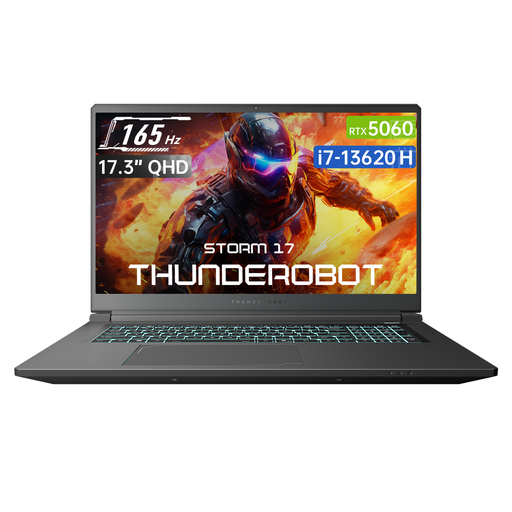
THUNDEROBOT Storm 17 5060 gaming laptop

THUNDEROBOT Storm 17 5060 laptop with 17.3-inch QHD 165Hz display

Consider the laptop if you want a gaming computer with its own screen rather than a separate desktop monitor; check the exact game against the laptop GPU and your intended settings.

The named configuration has an Intel Core i7-13620H, GeForce RTX 5060, 16GB DDR5 RAM, a 1TB SSD and a 17.3-inch QHD 165Hz display. For extended use, keep its vents clear on a hard, flat surface.

Joybuy

Frequently asked questions

Do I need a VR-ready PC for a simulated moon landing?

Only if the particular experience you choose supports or requires VR. Steam lists SteamVR or Oculus PC support for Apollo 11 VR HD: First Steps, while its description of Spaceflight Simulator focuses on rocket building, flights and landings; check your chosen title’s current requirements before selecting a PC or headset.

What should I check when a gaming PC arrives?

Check the delivered model and components against the listing and order confirmation, including the CPU, exact GPU, memory, storage, operating system, ports and any bundled accessories. Keep those records and contact the seller if the PC is damaged or differs from what was described.

Does a seller’s warranty replace my UK rights if the PC is faulty?

No. A seller’s warranty is separate from statutory protections for faulty or misdescribed goods; GOV.UK explains that sellers must provide remedies when goods are faulty, not as described or do not do what they are supposed to do. The appropriate remedy and timing depend on the circumstances, so retain the listing, order confirmation and correspondence with the seller.

How should I get rid of an old gaming PC?

Use an appropriate electrical-equipment recycling or collection route rather than putting an old PC in general waste. Check local-authority or retailer collection options and remove your personal data from its storage before handing it over.