What should you check before buying?
Start with your most demanding intended game and the screen mode you want to use; then check whether the PC can connect and fit where you plan to put it.
| Concern |
What to check |
Who this matters to |
| Graphics at your screen resolution |
Check the exact graphics-card model and memory against your intended games, rather than treating a minimum requirement as a 4K recommendation. |
If I want to explore a modern 3D world on my 4K screen, graphics headroom matters more to me than case lighting. Around 42% of consumers put that visual need first. |
| Current-game compatibility |
Compare the processor, graphics card, RAM, operating system and free storage with the most demanding game you plan to install. |
I want a straightforward PC that meets my games’ requirements without paying for features I will not use; roughly 33% of consumers prioritise that baseline. |
| TV-side connection and fit |
Identify the graphics-card output, your screen’s supported input mode and the cable needed; check chassis dimensions and support terms. |
When the PC has to sit beside my TV, I need it to connect and fit before extra performance matters. About 25% of consumers make that setup their primary concern. |
Joybuy products for different setups
These options include desktop towers for a fixed large-screen setup and laptops for consumers who also want a portable computer. Compare each configuration with your games and screen rather than assuming that a listed graphics card establishes performance at your chosen settings.
 No image available
CyberPowerPC JOYB1004 RTX 5060 PC and monitor bundle
Consider this desktop bundle if you need a PC and monitor together; check the included monitor’s model and connectors against the screen you intend to use.
AMD Ryzen 5 7500F, NVIDIA GeForce RTX 5060 8 GB, 16 GB DDR5 RAM, 1 TB NVMe SSD and Windows 11 Home. The bundle also names a keyboard, mouse, headset and mousepad.
Joybuy
 No image available
CyberPowerPC JOYB1013 Ryzen 7 9800X3D / RTX 5080 desktop
This tower is an option to compare if graphics capability is a priority for your large screen; check performance for your games and the output mode needed by your display.
AMD Ryzen 7 9800X3D, NVIDIA GeForce RTX 5080 16 GB, 32 GB DDR5 RAM, 2 TB NVMe SSD and Windows 11 Home; white finish.
Joybuy
 No image available
Lenovo Legion Pro 5 LEG P5 R9 5060 laptop
Choose a laptop form only if you also want to move the computer away from the large screen; check its external-display connection against your TV or monitor.
The product name specifies R9, 32 GB of RAM, 2 TB of storage and 5060 graphics. It is a laptop rather than a desktop tower.
Joybuy
 No image available
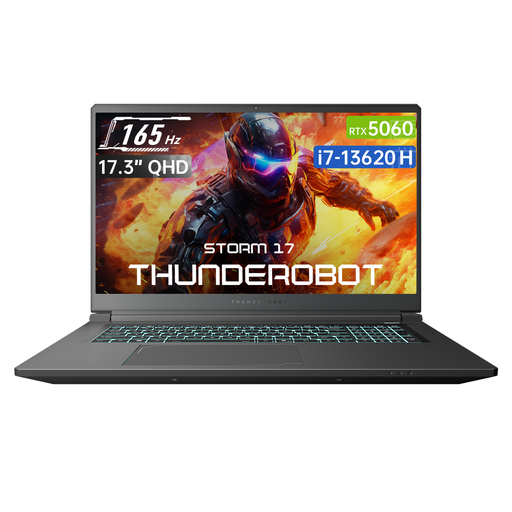
THUNDEROBOT Storm 17 5060 gaming laptop
This laptop suits a setup that also needs portability; confirm what mode its HDMI output supports before connecting a separate large screen.
17.3-inch QHD 165 Hz display, Core i7-13620H, GeForce RTX 5060, 16 GB DDR5 RAM, 1 TB SSD and HDMI.
Joybuy
 No image available
Lenovo Legion T7 34IAS10 RTX 5070 Ti tower
Consider this fixed desktop if you want to compare towers with discrete graphics; verify its display output and your intended games’ requirements before choosing it for a particular screen mode.
Intel Core Ultra 7 265K, RTX 5070 Ti, 32 GB RAM, 1 TB SSD and Windows 11 Home.
Joybuy
Common questions
Do I need HDMI 2.1 for large-screen puzzle games?
Not for every screen mode: choose the connection for the resolution and refresh rate you intend to use. NVIDIA states that HDMI 2.1 can carry a 4K/120 signal with compatible equipment, so check the graphics-card output, display input and cable rather than relying on a “4K” label.
Is 16 GB of RAM enough for modern puzzle adventures?
It meets the published minimum memory requirement for the current Riven remake, according to GOG.com, but it is not a guarantee for every game or setting. Check the complete requirements for the titles you intend to play, including their graphics-card requirements.
Which PC port should I use for my large screen?
For a PC with a discrete graphics card, use its display output unless the PC maker instructs otherwise. ASUS ROG lists graphics-card HDMI and DisplayPort outputs separately from a rear chassis HDMI port on G22CH configurations; identify the corresponding ports on your exact model before connecting the screen.
Can I cancel an online UK gaming-PC order if I change my mind?
For a standard UK distance sale of goods, a change-of-mind cancellation period generally ends 14 days after you or a nominated person receives the goods, subject to applicable exceptions. The Consumer Contracts Regulations and GOV.UK describe this cancellation right; check the seller’s return instructions, and keep a faulty-goods claim distinct from a change-of-mind return.
What if a new gaming PC bought from a UK trader is faulty?
Contact the seller about your rights under the Consumer Rights Act 2015 rather than relying solely on a manufacturer’s warranty. Coventry City Council Trading Standards explains that goods must be as described, fit for purpose and of satisfactory quality; record the fault and tell the seller what has happened.


