One-socket racers
If the computer and primary screen must work from one available wall socket, a gaming laptop is the starting point. Check the requirements of your games and plan separately for any powered wheel or other accessory.


If one wall socket must power both the computer and its primary display, start with a gaming laptop: its screen does not need a separate monitor plug. Choose a compact desktop or tower when you can also power a monitor and any racing accessories without exceeding the marked rating of the extension device. A smaller desktop saves desk space, but does not necessarily save sockets.
If the computer and primary screen must work from one available wall socket, a gaming laptop is the starting point. Check the requirements of your games and plan separately for any powered wheel or other accessory.
If you want an external display and a powered racing wheel near a single wall socket, plan the connected load before choosing an extension device. Electrical Safety First advises using only one extension device per socket and checking its marked rating.
If component access matters more than combining the PC and screen, consider a tower or compact desktop. Either route still needs an external display with its own power arrangement.
Choose when: The available socket must serve the computer and primary display together.
Allow for: Its charger, plus separate power arrangements for any powered wheel or external screen.
Choose when: Desk footprint matters and you can power an external monitor.
Allow for: The PC and monitor as separate powered devices; chassis size does not establish electrical load.
Choose when: Component access or a particular desktop configuration takes priority over reducing powered devices.
Allow for: A separately powered monitor and a load check covering the complete setup.
| Concern | What to check | Who this matters to |
|---|---|---|
| Fewer powered devices | Check whether the laptop screen will be your primary display and whether its supplied charger suits your setup. | If my computer and screen must share one available socket, I want to avoid powering a separate monitor. Around 40% of consumers put that need first. |
| Monitor and wheel power | Read the marked rating of the extension device and the ratings of every connected device or power supply; do not daisy-chain leads. | With a monitor and powered racing accessories at my desk, I need a way to connect them without exceeding the lead's limit. That is the primary concern for around 30% of consumers. |
| Game fit and upgrades | Compare the exact PC configuration with your games' requirements, then check the component access or upgrades you need. | I would accept a separately powered screen if the PC meets my planned games' requirements and offers the component access I want. Around 30% of consumers prioritise this. |
For a game-specific reference point, Electronic Arts recommends 16 GB RAM, RTX 2070-class graphics and 100 GB of available storage for F1 25. Check the requirements of the racing titles you intend to play rather than treating those figures as a universal specification.
Extra outlets do not increase the lead's electrical capacity. Electrical Safety First notes that some older extension leads and many cable reels are rated at 10 A or less, even though most extension leads are rated at 13 A.
Use the rating marked on your lead and the ratings of the actual PC, monitor and accessories when assessing the combined load.
Daisy-chaining can overheat the plug at the wall socket and increase fire risk, according to Electrical Safety First.
Use only one extension device per wall socket. If its reach or capacity does not meet your needs, reconsider the setup and seek a registered electrician's advice about additional sockets.
A small PC still needs its own power connection and an external display. ASUS lists an AC adapter and display outputs for its ROG NUC (2025); its compact dimensions do not account for monitor power.
Count the monitor and any powered wheel, speakers or chargers alongside the PC before choosing where to place the setup.
Requirements differ by title and by the settings you plan to use. Electronic Arts lists different minimum and recommended requirements for F1 25.
Check the official requirements for your planned games against the exact PC configuration, including graphics, memory and available storage.
The cited Zephyrus G16 and ROG NUC illustrate a laptop-with-screen route and a compact desktop route.
The cited Legion Tower 7i Gen 10 is a conventional desktop option for buyers planning a separate monitor.
The Trident line is relevant when a smaller desktop footprint is the main consideration.
The cited Aurora configuration is a prebuilt tower to consider when you can accommodate a separate display.
These choices include laptops whose built-in screens avoid a separate primary-monitor plug, followed by a tower for a setup where you can power an external display. Compare each configuration with your games and account for every powered accessory.
 No image available
Its built-in screen avoids a separately powered primary monitor. Check the supplied charger's UK plug and rating before planning a one-socket setup.
 No image available
The built-in 14-inch screen suits a setup without a separate primary monitor. Confirm the exact configuration and supplied power adapter before buying.
 No image available
The integrated display keeps the core computer-and-screen setup in one device. Its listed 16 GB RAM matches Electronic Arts' recommended memory for F1 25; check that game's other requirements against this configuration.
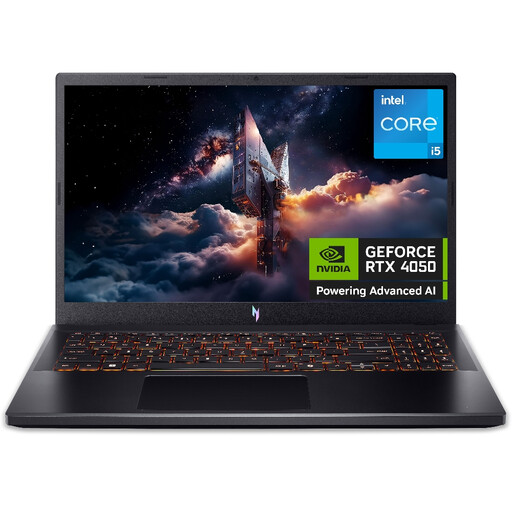 No image available
Its built-in display avoids a separate primary-monitor connection. Confirm the display refresh rate, which is stated differently across the product information, and check the supplied adapter's UK compatibility.
 No image available
Consider this tower if you can arrange power for an external monitor; the monitor is not included. Check the ratings of the PC, display and peripherals against your extension device before connecting them.
They can share one socket through a suitable single extension device if their combined load, including accessories, stays within its marked rating. Electrical Safety First says ratings vary between extension leads and warns against plugging one lead into another; check the actual equipment and lead rather than judging by the number of outlets.
Not necessarily: a compact desktop still needs power for an external monitor. For example, ASUS lists an AC adapter and external display outputs for its ROG NUC (2025), so plan power for both devices.
Start with the official requirements for the titles you intend to play, then compare the exact processor, graphics, memory and available storage. Electronic Arts recommends 16 GB RAM, RTX 2070-class graphics and 100 GB of available storage for F1 25, but other games can have different requirements.
Choose by its marked electrical rating and the combined ratings of the equipment you will connect, not outlet count alone. Electrical Safety First advises using only one extension device per wall socket; if the arrangement cannot meet your needs, ask a registered electrician about additional sockets.