Choose around the ranked game you play, your resolution and your monitor’s refresh rate, rather than the graphics card name alone. Riot Games publishes a 144+ FPS reference specification for VALORANT, but that game-specific tier cannot guarantee a particular prebuilt PC’s results. For a home office, also check memory, storage, connections and physical fit; consider more graphics headroom if you expect to play more demanding games or work at higher resolutions.
Who is this for?
Ranked players using a high-refresh display
If responsive play is your priority, match the PC to your game, settings, resolution and monitor. Riot Games’ 144+ FPS specification applies to VALORANT; a display’s refresh rate alone does not establish the frame rate a PC will deliver.
Home-office gamers who multitask
If the same PC handles work applications, browser tabs, voice chat and games, consider memory and local storage alongside graphics. Check the exact configuration you intend to buy rather than assuming every model in a product family is equipped alike.
Consumers planning around limited desk space
If placement is tight, measure the available space and check the specific PC’s dimensions, display outputs and network connections. Leave room for the ventilation arrangement required by the model you choose.
What matters when choosing?
Start with the game and display you intend to use, then decide how much storage and work capacity you need before checking connections and available space.
| Concern |
What to check |
Who this matters to |
| Game and display match |
Check your game’s requirements against the exact CPU and GPU, then confirm the intended resolution, settings and monitor connection. |
I want responsive ranked play without choosing components on an unrelated game’s advertised frame rate. Around 36% of consumers put matching performance to their game and display first. |
| Work, chat and storage |
Compare installed RAM and SSD capacity; check expansion options if you expect your applications or game library to grow. |
My work files, browser tabs and voice chat share the PC with my games, so local capacity matters day to day. Roughly 29% of consumers make multitasking and storage their primary concern. |
| Space and connections |
Measure the intended position and check the exact model’s display outputs and wired or wireless network options. |
I need the PC to fit my workspace and connect to the monitor and network I already use. Around 21% of consumers place physical fit and connectivity first. |
| Configuration fit |
Compare the complete CPU, GPU, RAM and SSD configuration against your confirmed game target, not just the product-family name. |
I would rather avoid paying for capacity I will not use, while keeping enough for my chosen game. Approximately 14% of consumers prioritise avoiding unnecessary specification. |
Mistakes to avoid
-
Taking an advertised FPS figure as a ranked-game result
The cited desktop figures concern Call of Duty: Modern Warfare 3 at 1080p. They do not establish performance or frame-time consistency in VALORANT, Counter-Strike 2 or another tactical game.
Check your game’s requirements and look for results using the game, resolution and settings you intend to play.
-
Choosing a tower before checking its space and connections
Case dimensions and ports vary by configuration, so a product-family name is not enough to establish whether a tower fits or connects to your display.
Measure its intended position, allow for ventilation and check the exact model’s monitor outputs and network connections.
-
Treating 512 GB and 1 TB storage as interchangeable
Gaming desktops are listed with both capacities. The smaller SSD leaves less local space for a combined games-and-work library.
Consider the games, applications and files you plan to keep installed, and check the model’s storage expansion options if those needs may grow.
Brands to consider
MSI
A reference point for comparing mid-range prebuilt desktops.
- The listing for the MAG Infinite S3 combines a Core i5-14400, RTX 5060 8 GB, 16 GB DDR5 and a 1 TB SSD.
- Those components describe that configuration, not every MSI desktop or its performance in your ranked game.
Acer
Relevant when comparing a smaller-SSD Nitro configuration with a higher-specification Predator desktop.
- Listed configurations span RTX 5050 graphics with a 512 GB SSD and a Predator option with Core i7 and RTX 5070 graphics.
- The cited 1080p frame-rate figures are for Call of Duty: Modern Warfare 3, not a result for your tactical game.
Lenovo Legion
Useful for assessing desktop connections and placement alongside gaming components.
- A Legion T5 configuration lists HDMI 2.1, DisplayPort, Wi-Fi 6E and 2.5 Gigabit Ethernet.
- Check the exact tower’s dimensions and ports; another Legion configuration need not have the same layout.
PCSpecialist
A configuration reference for an i5 and RTX 4060 desktop with 16 GB RAM and a 1 TB SSD.
- The Icon 242 listing states a three-year manufacturer guarantee for that model.
- Confirm the components and guarantee terms for the particular PC you intend to order.
Stormforce
A specification reference for a Ryzen 5 and RTX 5060 desktop.
- A Joybuy Recoil listing describes a Ryzen 5 5500, RTX 5060 8 GB, 16 GB DDR4 and a 1 TB NVMe SSD.
- That particular Recoil listing says the item is no longer available; use its components for comparison, not as a current purchase option.
Gaming laptops for a home-office setup
These Joybuy gaming laptops offer built-in displays for a home-office setup. Compare their stated screen resolution and refresh rate with your ranked game’s requirements, and check desk space, operating system and external-monitor connections where relevant.
 Image unavailable
Lenovo LOQ Essential 15ARP11, Ryzen 7 170, RTX 5050
Consider this if you want to play on a built-in high-refresh screen while keeping work files and games locally. The listed configuration has a 15.6-inch FHD 144 Hz display, 16 GB RAM and a 1 TB SSD.
The screen’s refresh rate does not guarantee matching frame rates in your game. Check whether its memory capacity and operating-system setup meet your plans.
Joybuy
 Image unavailable
HP OMEN 17-db1000na, Ryzen AI 7 350, RTX 5060
Consider this if a larger built-in display suits your desk and you also need space for work files and games. Its title lists a 17.3-inch Full HD screen, 16 GB RAM, a 1 TB SSD and Windows 11 Home; the supplied configuration information specifies a 144 Hz display.
Check your ranked game’s performance at the settings you intend to use rather than treating 144 Hz as an achieved frame rate.
Joybuy
 Image unavailable
THUNDEROBOT Radiant S16, Ryzen 7 7745HX, RTX 5060
Consider this if you want a 16-inch built-in screen for ranked play and a 1 TB SSD for games and other files. The listed variant has a QHD+ 240 Hz display and 16 GB DDR5 RAM.
Check game performance at QHD+ and confirm the operating system, physical dimensions and ventilation needs before choosing it.
Joybuy
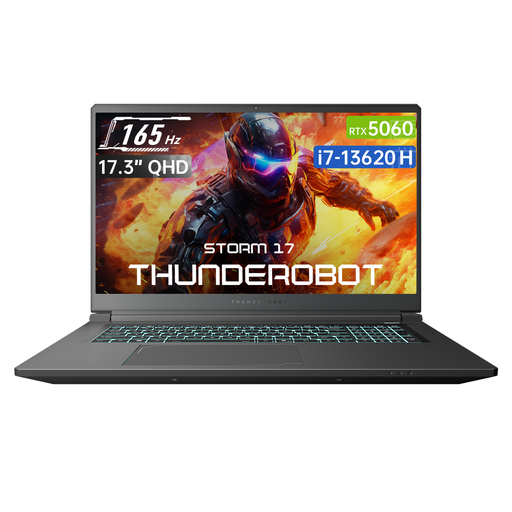 Image unavailable
THUNDEROBOT Storm 17 5060, Core i7-13620H
Consider this if you have room for a 17.3-inch built-in display and want local storage for work and games. The listed variant has a QHD 165 Hz screen, RTX 5060 graphics, 16 GB DDR5 RAM and a 1 TB SSD.
Verify performance in your chosen game at QHD, along with the operating system, dimensions and ventilation requirements.
Joybuy
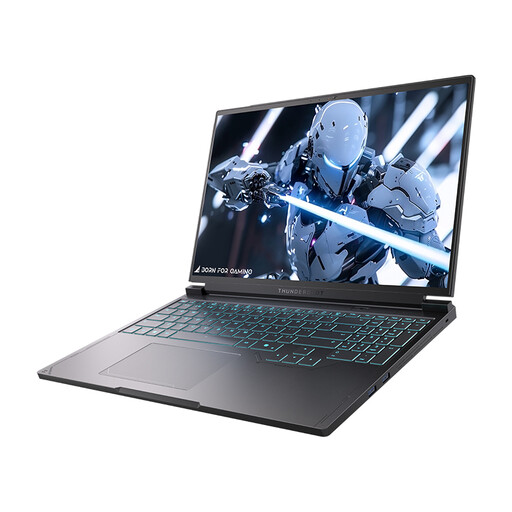 Image unavailable
THUNDEROBOT Radiant S16 5060, Core i7-13650HX
Consider this Core i7 variant if you want a 16-inch built-in screen and storage for both work and games. Its title lists a QHD+ 240 Hz display, RTX 5060 graphics, 16 GB DDR5 RAM and a 1 TB SSD.
Confirm performance in your ranked game at the intended settings, as well as the operating system, dimensions and ventilation needs.
Joybuy
Common questions
Does an RTX graphics card guarantee smooth ranked matches?
No: the result also depends on the complete PC, the game, resolution and settings. Riot Games’ published performance tiers apply specifically to VALORANT, while the cited desktop frame-rate figures are for Call of Duty: Modern Warfare 3 at 1080p. Check results for the tactical game you intend to play.
Can an old desktop go in household rubbish?
No. GOV.UK advises against putting waste electrical products in household rubbish. Check your local electrical-waste collection or recycling options when replacing a PC.


