Choose a gaming PC around the monitor and input devices you will use for reaction practice, rather than choosing the highest-tier graphics card by default. A prebuilt desktop offers a stated configuration, a configurable tower lets you tailor the setup, and a laptop supplies its own screen. Check game support for latency features, room fit, cooling and included equipment before deciding.
Who is this for?
Student focused on aim training
If responsive practice is your priority, assess the PC, game, display and input devices together. NVIDIA describes Reflex Low Latency as coordinating CPU and GPU rendering, but support depends on the game and graphics setup.
Student sharing a small room
If the PC must sit alongside study equipment, consider its footprint, ventilation space, cable access and cooling behaviour as well as its gaming specification. The final configuration matters, particularly with configurable towers.
Student using one PC for study and play
If coursework, browser tabs and voice chat run alongside games, check installed memory, storage, connections and support terms. Corsair describes 32GB of memory as offering more multitasking headroom than its suggested 16GB gaming baseline; neither figure is a requirement for every workload.
What matters when choosing?
For a student room, decide whether you want a fixed desktop configuration, a tower tailored to your space or a built-in laptop display; then check the complete training setup.
Prebuilt desktop
Consider it when: You want to compare a stated configuration without choosing every component. HP lists an OMEN 35L configuration with a Core Ultra 5 245K, 32GB RAM, 1TB SSD and RTX 5060 Ti 16GB.
Keep in mind: Check the selected model and its included peripherals; the HP example is not a minimum specification for aim training.
Configurable tower
Consider it when: You need to select components or a smaller case around your desk and other uses. PCSpecialist offers component choices and Micro-ATX options.
Keep in mind: Check the finished configuration, including its operating system, rather than assuming every option is supplied.
High-spec tower
Consider it when: Demanding games or creation work call for specifications beyond your reaction trainer. Dell lists an Alienware Aurora configuration with a Core Ultra 9 285K, RTX 5080, 64GB RAM and 2TB SSD.
Keep in mind: Those components do not replace checks on display settings, input devices or the tower's fit in the room.
| Concern |
What to check |
Who this matters to |
| Responsive practice |
Check the intended game's latency-feature support and whether the PC's outputs suit your monitor's planned resolution and refresh setting. |
I want aim practice to feel consistent, so the whole input-to-display setup matters more to me than a GPU name alone. Around 33% of consumers put responsive practice first. |
| Complete configuration |
Compare the selected CPU, graphics card, RAM, SSD, operating system and included equipment. |
I need a PC that covers both training and coursework without discovering that a necessary part of the setup is separate. Roughly 27% of consumers make configuration completeness their main concern. |
| Room fit and noise |
Measure the available space, including cable and ventilation clearance; seek model-specific noise information if disturbance matters. |
In a shared room, I need the tower to fit without obstructing ventilation, and I care how it sounds during use. Around 20% of consumers prioritise room fit and noise. |
| Study use and future changes |
Check installed memory and storage, expansion options, network connections and support terms for the selected configuration. |
My coursework and games share one machine, so I want enough capacity now and a practical way to adapt it later. About 20% of consumers put study use and future changes first. |
Mistakes to avoid
-
Choosing the tower before the display setup
A graphics card alone does not establish end-to-end responsiveness. NVIDIA describes Reflex as coordinating CPU and GPU rendering in supported setups; the monitor connection and input devices still matter.
Choose your intended monitor resolution and refresh setting, then check the selected PC's outputs and the game's feature support.
A suitable monitor, cable or input device may need to be obtained separately.
-
Assuming every configuration includes the same equipment
PCSpecialist's listed systems differ in memory, graphics and operating-system inclusion. Dell's cited Aurora configuration also offers peripheral choices rather than establishing that a mouse is supplied.
Review the final selected specification and confirm the operating system, monitor, keyboard and mouse before ordering.
-
Taking a cooling claim as proof of quiet operation
Cooling options differ by configuration: Lenovo describes both air- and liquid-cooling options for the Legion Tower 5i Gen 10. A cooling description does not establish how a particular PC will sound in your room.
Measure the intended location and look for noise information for the exact configuration if quiet operation is important.
Brands relevant to these choices
HP OMEN
A prebuilt desktop route illustrated by HP's UK OMEN 35L configurations.
- HP lists an OMEN 35L configuration with a Core Ultra 5 245K, 32GB RAM, 1TB SSD and RTX 5060 Ti 16GB, and describes tool-less upgrade access.
- Confirm dimensions, included peripherals and noise information for the selected configuration.
Lenovo Legion
A gaming-tower line with configuration-dependent cooling and expansion options.
- Lenovo describes cooling options and tool-less side-panel access for the Tower 5i Gen 10.
- Product-line expansion limits do not describe the memory, storage or cooling fitted to every Tower 5i.
Alienware
Dell's configured gaming-desktop route for workloads that call for a high-spec tower.
- Dell lists an Aurora configuration with a Core Ultra 9 285K, RTX 5080, 64GB RAM and 2TB SSD.
- That configuration is not necessary for basic aim training; check the chosen peripheral options separately.
PCSpecialist
A configurable desktop route when components or case size need tailoring.
- PCSpecialist offers component selection and lists Micro-ATX build options.
- Check the finished build carefully: listed configurations differ in memory and operating-system inclusion.
Corsair
A prebuilt gaming-PC route that includes compact CORSAIR ONE systems.
- Corsair offers assembled systems and describes 32GB RAM as providing additional multitasking headroom over its suggested 16GB gaming baseline.
- Those memory figures are Corsair's selection guidance, not universal requirements; check the dimensions and specification of the particular system.
Joybuy product choices for room-based training
These choices include desktop towers, a desktop bundle and laptops with built-in screens. Decide whether you have space for a separate display or would rather use a laptop screen, then check each configuration against your game and room.
 No image available
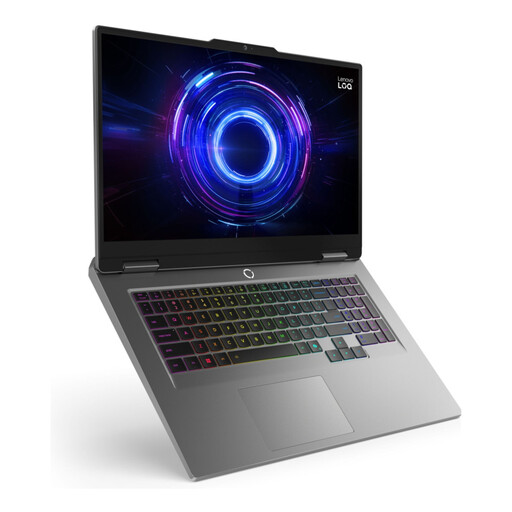
LOQ 17IRX10 i7-13650H, 24GB, 1TB, W11H
Consider this laptop if you want to practise on a built-in screen rather than place a tower and monitor in the room. Check whether its screen size and operating noise suit your space.
The product name identifies the i7-13650H configuration with 24GB memory, 1TB storage and W11H.
View on Joybuy
 No image available
CyberPowerPC JOYB1004 Ryzen 5 7500F, RTX 5060 bundle
Consider this desktop bundle if you need a supplied monitor and input devices. Confirm the monitor's exact model and refresh rate before relying on it for high-refresh practice.
Its named configuration has a Ryzen 5 7500F, RTX 5060 8GB, 16GB DDR5, 1TB NVMe SSD and Windows 11 Home. The bundle name includes a monitor, keyboard, mouse, headset and mousepad.
View on Joybuy
 No image available
THUNDEROBOT Radiant S16 Ryzen 7 7745HX, RTX 5060
The built-in high-refresh display may appeal if a separate monitor will not fit, but its panel rating does not establish the frame rate a game will achieve. Confirm the operating system before ordering.
The product name specifies a 16-inch QHD+ 240Hz display, Ryzen 7 7745HX, RTX 5060, 16GB DDR5 RAM and 1TB SSD.
View on Joybuy
 No image available
ASUS ROG Zephyrus G14 GA403WR-QS088W, German Grey
Consider the 14-inch laptop format if desk footprint matters. If you plan to practise on its screen, check its refresh rate; also confirm the keyboard layout.
The named configuration has a Ryzen AI 9 HX 370, WQXGA+ display, 32GB LPDDR5x RAM, 2TB SSD, RTX 5070 Ti and Windows 11 Home.
View on Joybuy
 No image available
CyberPowerPC JOYB1013 Ryzen 7 9800X3D, RTX 5080, White
Consider this tower if demanding games or other workloads call for its configuration; reaction training alone does not require its specification. Plan the separate display and input setup and check the tower's fit.
The named configuration has an RTX 5080 16GB, 32GB DDR5, 2TB NVMe SSD and Windows 11 Home.
View on Joybuy
Common questions
Will a faster gaming PC alone improve reaction timing?
No: the PC is only one part of the input-to-display path. NVIDIA says Reflex Low Latency coordinates CPU and GPU rendering in supported setups; check the game, monitor connection and refresh settings, and input devices rather than expecting a GPU name to determine the result.
Should I choose 16GB or 32GB RAM for study and gaming?
Choose according to the games and applications you intend to run together. Corsair describes 16GB as a common modern-gaming baseline and 32GB as offering more multitasking headroom, but that guidance does not establish a requirement for every aim trainer.
Does a gaming desktop include a keyboard and mouse?
Not necessarily; check the exact desktop or bundle configuration. Dell's cited UK Aurora configuration offers peripheral choices and shows no mouse selected, so do not assume that a tower listing supplies one.
What electrical-safety check matters when ordering a gaming PC?
For equipment placed on the market in Great Britain, the Office for Product Safety and Standards identifies the Electrical Equipment (Safety) Regulations 2016 as the applicable framework. Keep the order and product documentation and ask the seller about the selected product if you need clarification; do not treat a listing alone as proof of a particular certification. This Great Britain guidance should not be assumed to describe Northern Ireland's provisions.


