What to check before buying
Start with the training software and the display you intend to use, then choose a PC configuration and physical format that fit your desk and other tasks. A built-in laptop screen or bundled monitor still needs its own display checks.
| Concern |
What to check |
Who this matters to |
| Input-to-display responsiveness |
Check that the game or trainer runs at your intended resolution and refresh rate. Look for display input-lag measurements with the test mode stated; confirm Reflex support in the application if it influences your PC choice. |
If reaction drills are my priority, I want to know when an input appears on screen, not just how fast the PC’s parts sound on paper. Around 46% of consumers put responsiveness first. |
| Desk fit and everyday setup |
Measure the space for the PC, cables and airflow. Check the exact model’s dimensions, display connections and ports. |
When my gaming setup shares a work desk, it needs to fit without obstructing the space I use each day. Desk fit is the primary concern for around 27% of consumers. |
| Multitasking and upgrades |
Compare installed RAM and storage with your software needs. For a tower, check the exact configuration’s expansion options before planning later changes. |
If I train while working, communicating or recording, I need a configuration that accommodates those tasks and my longer-term plans. Around 27% of consumers put multitasking and upgrade headroom first. |
Joybuy products for this setup
These listings cover laptops with built-in displays and desktop configurations for a home-office training setup. Compare each screen or monitor separately for input lag; a listed refresh rate or graphics card does not establish end-to-end responsiveness.
 No image available
THUNDEROBOT Radiant S16, Ryzen 7 7745HX, RTX 5060
A laptop option if you want the training display and PC in one device. The listing specifies a 16-inch QHD+ 240 Hz screen, 16 GB DDR5 RAM and a 1 TB SSD; compare the screen’s measured input lag and available display modes before relying on it for reaction practice.
View on Joybuy
 No image available
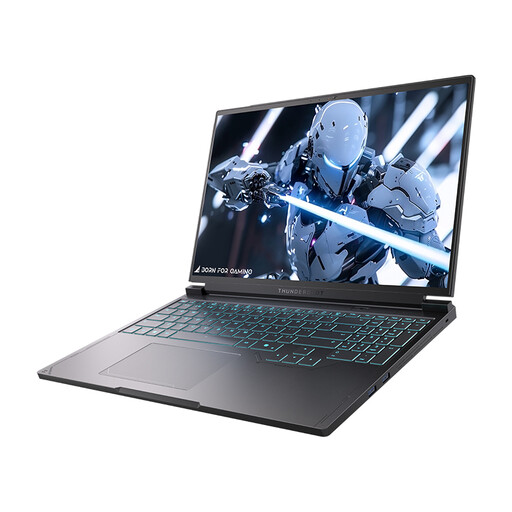
Thunderobot Radiant S16 5060, Core i7-13650HX, RTX 5060
A built-in-display option for a desk where a separate tower and monitor may be less convenient. Its listed configuration includes a 16-inch QHD+ 240 Hz screen, 16 GB DDR5 RAM and a 1 TB SSD; check measured screen input lag for the mode you will use.
View on Joybuy
 No image available
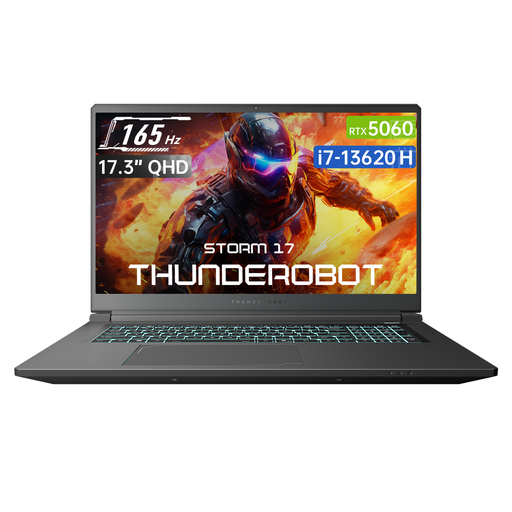
THUNDEROBOT Storm 17 5060, Core i7-13620H, RTX 5060
Consider this laptop if you want a larger built-in screen at the training desk. The listing specifies a 17.3-inch QHD 165 Hz display, 16 GB DDR5 RAM and a 1 TB SSD; check desk space and measured display input lag rather than judging responsiveness from refresh rate alone.
View on Joybuy
 No image available
CyberPowerPC JOYB1004, Ryzen 5 7500F, RTX 5060 bundle
A desktop bundle to consider if you need a monitor and peripherals with the PC. Its listing names 16 GB DDR5 RAM, a 1 TB NVMe SSD, a monitor, keyboard, mouse, headset and mousepad. Confirm the included monitor’s exact model and refresh rate, then check input-lag measurements before choosing it for reaction practice.
View on Joybuy
 No image available
CyberPowerPC JOYB1013, Ryzen 7 9800X3D, RTX 5080
A tower configuration to compare if training will share the PC with other demanding applications. The listing specifies an RTX 5080 16 GB, 32 GB DDR5 RAM and a 2 TB NVMe SSD. A monitor and peripherals are not included, so choose a compatible display and assess its refresh rate and measured input lag separately.
View on Joybuy
Frequently asked questions
Is a fast gaming PC enough for reaction-timing training?
No: the display is also part of the input-to-screen path. DisplayLag notes that a higher-refresh display can produce lower input lag when fed a supported higher refresh rate, so check the monitor, its connection and its low-processing mode alongside the PC.
Does a monitor’s advertised 1 ms response time prove low input lag?
No. DisplayLag distinguishes pixel response time from input lag; a response-time label alone cannot tell you how soon an input appears on screen. Compare input-lag measurements that state the display settings and test method.
Will NVIDIA Reflex help in every reaction-training app?
No universal benefit can be assumed. NVIDIA Developer describes Reflex as technology integrated by developers, so check support in the specific game or trainer before making it a reason to choose an RTX configuration.
How should I arrange disposal of an old gaming PC in the UK?
Check your local authority’s electrical-equipment collection options and ask the seller about any applicable take-back arrangement. The UK Waste Electrical and Electronic Equipment Regulations 2013 set out obligations relating to this equipment, but the practical collection route depends on the locality and seller.


