Choose the PC and monitor together: the desktop must suit your games, replay files and open applications, but monitor brightness, screen coating and placement are the direct considerations for viewing replays in a bright room. A configuration with 32GB RAM and a 1TB SSD is a useful starting point for an active local library; choose the graphics card against the games, resolution and refresh rate you intend to use, and consider more storage if you keep extensive recordings.
Who this setup is for
Bright-room replay reviewers
If daylight or room lighting makes tactics and player positioning difficult to inspect, treat the monitor as part of the purchase. The tower supplies the video output; screen brightness, coating and placement affect what you can see.
High-refresh competitive players
If you switch between playing and reviewing footage, choose the graphics card and monitor refresh rate together. Check whether your games and settings can make use of the display you have in mind.
Replay-library multitaskers
If you keep local captures while running a game, browser, voice chat and analysis tools, check memory and storage capacity as well as graphics specifications.
What to check before buying
Start with the viewing problem, then set a gaming performance target and decide how much local replay storage and expansion room you need.
| Concern |
What to check |
Who this matters to |
| Bright-room visibility |
Compare the monitor’s typical brightness and matte or anti-glare coating; consider where reflections fall on the screen. If HDR matters, check for a named VESA DisplayHDR tier rather than relying on an HDR label alone. |
I review positioning in daylight and need to see the screen clearly before upgrading PC performance; around 31% of consumers put bright-room visibility first. |
| Competitive play |
Check the monitor’s resolution, refresh rate and connection requirements against benchmarks for your chosen games and PC configuration. |
When I play competitively as well as review replays, I want my games to make use of a high-refresh display; roughly 31% of consumers prioritise that playing experience. |
| Replay storage and multitasking |
Check installed RAM and SSD capacity against your active file library and simultaneous applications. Confirm that your replay format and software support any video acceleration you intend to use. |
Keeping recordings locally while several tools are open makes capacity my main concern; about 23% of consumers place replay storage and multitasking first. |
| Expansion and support |
Check accessible memory and drive connections, component clearance and the selected configuration’s warranty terms before planning upgrades. |
If I expect to add storage or memory later, I need to know what this particular tower allows; around 15% of consumers make expansion and support their primary concern. |
Buying pitfalls
-
Treating screen glare as a tower-PC problem
A faster graphics card does not change the monitor’s brightness, coating or position relative to room lighting.
Assess the exact monitor alongside the desktop. Compare like-for-like brightness specifications and check its screen coating; if HDR is important, look for a named DisplayHDR certification. VESA cautions against treating ambiguous HDR labels as equivalent.
-
Choosing by desktop family name alone
Configurations within a gaming-desktop family can have different processors, graphics cards, memory and storage. HP’s OMEN 35L listings, for example, include distinct 32GB and 64GB configurations.
Use the exact product number to check the CPU, GPU, RAM, SSD, display connections, included peripherals and warranty for the configuration you are ordering.
-
Assuming a larger SSD fixes every replay issue
More capacity gives files room to stay local, but playback or transcoding also depends on the format and application. NVIDIA’s documented hardware video acceleration applies to supported codec workflows, not automatically to every game replay file.
Estimate the size of the library you want to keep, confirm your software’s format support and check whether the chosen desktop has accessible storage expansion.
Gaming desktop brands to consider
HP OMEN
HP lists OMEN 35L configurations spanning different memory, storage and graphics options, so the product number matters more than the family name alone.
- HP Store UK lists a 32GB RAM, 1TB SSD configuration with an RTX 5060 Ti 16GB, alongside other OMEN 35L configurations.
- Check the selected processor, graphics card, memory, storage and included components; specifications from one OMEN 35L do not apply to every variant.
Lenovo Legion
Lenovo’s Legion Tower 7i Gen 10 is worth examining if access for later changes is part of your desktop decision.
- Lenovo describes tool-free access on the Tower 7i Gen 10.
- A cited Lenovo UK configuration has 16GB DDR5 memory and a 1TB SSD. Confirm the memory option and upgrade conditions for the specific tower you choose.
Alienware
A specified Dell UK Alienware Aurora configuration pairs RTX 5080 graphics with 64GB DDR5 memory and 2TB NVMe storage.
- That configuration offers stated capacity to consider if you keep a sizeable local library and run several applications.
- Confirm the selected configuration’s storage arrangement, included peripherals, warranty and upgrade options rather than applying those specifications to every Aurora.
ASUS ROG
ASUS presents the ROG G700 as an upgrade-oriented tower with tool-less access and standard-sized components.
- ASUS states that G700 configurations can support up to 64GB DDR5 memory and PCIe Gen 5 storage.
- Those are product-family capabilities, not the installed specifications or guaranteed future compatibility of every selected configuration.
Joybuy product choices
These gaming PCs offer different combinations of memory, storage, graphics and form factor for playing competitively and reviewing replays. For bright-room use, assess the separate monitor—or the laptop’s built-in screen—before deciding on the complete setup.
 No image available
CyberPowerPC JOYB1013 gaming desktop, white
Consider this desktop if you want 2TB of stated local storage alongside gaming and other open applications.
AMD Ryzen 7 9800X3D, NVIDIA GeForce RTX 5080 16GB, 32GB DDR5, 2TB NVMe SSD and Windows 11 Home.
A monitor is not included. Check the screen you intend to use for brightness and glare handling, and check game and replay-software requirements separately.
View on Joybuy
 No image available
Lenovo Legion T7 34IAS10 gaming tower
Consider this tower if component access matters alongside gaming and replay-review use.
Intel Core Ultra 7 265K, NVIDIA GeForce RTX 5070 Ti, 32GB RAM, 1TB SSD and Windows 11 Home. The listed chassis has a tool-less design.
Check the monitor and its connection at your intended resolution and refresh rate. Tool-less access does not establish which future components will fit or how upgrades affect support.
View on Joybuy
 No image available
CyberPowerPC JOYB1010 gaming desktop, black
This is a 32GB RAM, 1TB SSD desktop to consider for competitive gaming with an active local replay library.
Intel Core Ultra 7 265KF, NVIDIA GeForce RTX 5070 12GB, 32GB DDR5, 1TB NVMe SSD and Windows 11 Home.
A monitor is not included. Check its brightness and coating separately, and confirm that the graphics-card connection supports your intended display mode.
View on Joybuy
 No image available
Stormforce Defiance gaming desktop, Ryzen 7 5700X
Consider this desktop if a 2TB local game or replay library is important to your setup.
AMD Ryzen 7 5700X, NVIDIA GeForce RTX 5070, 32GB RAM, 2TB SSD and Windows 11.
Confirm monitor inclusion, display connections and the screen’s bright-room characteristics for the setup you plan to use. Check performance against your own games and replay software.
View on Joybuy
 No image available
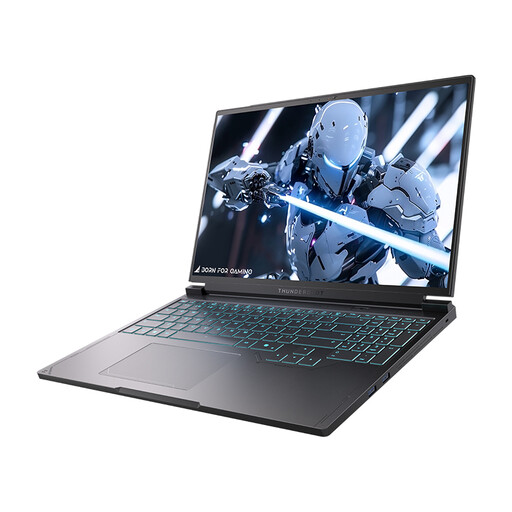
Thunderobot Radiant S16 5060 gaming laptop, black
This laptop is an alternative to a tower and separate monitor if you want a built-in high-refresh display.
16-inch QHD+ 240Hz display, Intel Core i7-13650HX, NVIDIA GeForce RTX 5060 Laptop GPU, 16GB DDR5 RAM and 1TB SSD.
Check the built-in screen’s brightness and coating for your room. Decide whether 16GB RAM meets the needs of your game, replay tools and other applications running together.
View on Joybuy
Common questions
Can a more powerful gaming PC fix a washed-out screen in a bright room?
Not by itself: PC performance does not change the monitor’s brightness, screen coating or position relative to a window. Check those display characteristics while choosing a graphics card for your games and refresh-rate target.
Should I choose 4K or high-refresh QHD for playing and reviewing replays?
Choose according to which activity matters more: high-refresh QHD is an option to assess for competitive play, while 4K calls for a separate check of game performance at that resolution. Dell UK specifies its Alienware AW2726DL monitor at 2560 × 1440 and 280Hz, but that specification does not establish the frame rate your chosen PC will produce.
Will an NVIDIA graphics card accelerate replay review?
It can accelerate supported video workflows when the file format and application use its hardware video engines. NVIDIA documents decoding support for formats including H.264, HEVC and AV1; confirm separately whether your game’s replay files and review software use a supported format.
What should I check before relying on future desktop upgrades?
Check the exact tower’s accessible slots and drive connections, power-supply capacity, component clearance and warranty terms. A tool-less panel can make access easier, but it does not establish compatibility with a particular future graphics card, drive or cooler.


