Choose a gaming PC for team practice around your games, planned resolution and whether you will share your screen, rather than by the graphics-card name alone. The listed 16 GB desktops with RTX 5060 graphics offer configurations to assess for gaming and voice chat; a Ryzen 7 and RTX 5060 Ti configuration is another option if concurrent sharing matters, but neither specification guarantees a particular game or stream result. In a bright room, assess the display separately, then check your headset, connection and voice-chat settings.
Who this setup is for
Players who share gameplay with their team
If you play while occasionally showing teammates a game window or your whole screen, assess the game and sharing workload together. Discord lets desktop users choose what to share and adjust stream quality and frame rate.
Players practising in a bright room
If daylight makes game detail difficult to see, evaluate the display as well as the computer. Monitor brightness, surface treatment and placement matter to this decision; a more powerful tower does not change the screen's coating.
Teams focused on voice coordination
If reliable conversation is your priority, check your headset or microphone and network options alongside the PC. Discord also advises checking mute settings, volume and voice-channel permissions when troubleshooting calls.
What to check before buying
Set your game and display-resolution target first. Then assess screen sharing, bright-room visibility and voice coordination as separate parts of the setup.
| Concern |
What to check |
Who this matters to |
| Gaming while sharing |
Compare the exact GPU, CPU and memory with your games' requirements and intended resolution. Check the screen-share quality and frame-rate settings you plan to use. |
If I want to play while sharing a game window, I need to judge both workloads without assuming a published game frame rate will apply to mine; around 42% of consumers put gameplay and sharing first. |
| Bright-room visibility |
Check the display's stated brightness in cd/m² and anti-glare treatment. Consider where it will sit relative to windows. |
Daylight across my screen makes game detail harder to see, so I need to assess the display rather than expect a new tower to fix reflections; roughly 33% of consumers prioritise bright-room visibility. |
| Voice coordination |
Confirm the connections and headset or microphone you need. Check input selection, mute state and voice-channel permissions before practice. |
When teammates cannot hear me, extra graphics capability will not correct the voice setup; around 25% of consumers chiefly need dependable communication and connectivity. |
Buying pitfalls
-
Expecting the tower to fix screen glare
Brightness and anti-glare treatment belong to the display. For a concrete comparison point, The MSI MAG 274QRFW monitor is listed with 400 cd/m² stated brightness and an anti-glare coating; that specification does not establish how every screen will look in your room.
Choose the monitor alongside the PC, checking its stated brightness, surface treatment, resolution, refresh rate and connections. Consider its position relative to direct light.
You may need a separate monitor or a different display position.
-
Applying a retailer's game frame rate to screen sharing
A frame-rate figure for one game and setting does not establish the result for another game running alongside a Discord share. Discord allows users to change share quality and frame rate.
Check your own game requirements, intended display resolution and sharing settings against the exact PC configuration.
-
Overlooking the microphone and voice settings
A PC specification cannot correct a muted input or missing voice-channel permission. Discord's troubleshooting guidance includes checking mute, volume and permissions.
Test the headset or microphone, selected input and output, connection and team-channel settings before relying on the setup for practice.
A suitable headset or microphone may need to be obtained separately.
-
Leaving personal data on an old PC
If the new computer replaces an old one, disposing of the old machine without clearing it can expose personal information. Oxfordshire County Council advises removing computer data before taking equipment for recycling.
Back up files you need, remove personal data securely and check your local electrical-equipment recycling arrangements.
Relevant brands and product lines
HP OMEN
The OMEN 16L is a prebuilt desktop line to consider for gaming with team voice chat.
- An OMEN 16L configuration has 16 GB DDR5 memory, a 1 TB SSD and RTX 5060 8 GB graphics.
- Check the CPU, connections and other specifications of the exact configuration you choose; a retailer's game-performance figure is not a result for every game and communication workload.
MSI MAG
The MAG line includes a desktop and a separately evaluated monitor relevant to this setup.
- A MAG Infinite S3 desktop is listed with Wi‑Fi 6E and Gigabit Ethernet, and a MAG 274QRFW monitor with 400 cd/m² stated brightness and an anti-glare coating.
- The monitor specifications apply to that display, not to every MAG screen or to the desktop itself.
PCSpecialist
The Flux 350 is a prebuilt desktop configuration to examine if gaming while sharing is a priority.
- A Flux 350 is listed with a Ryzen 7 7700, RTX 5060 Ti 8 GB, 16 GB RAM and a 1 TB SSD.
- Those components do not establish a particular game-plus-Discord result; game settings, sharing settings and the network still matter.
Gaming computers on Joybuy
These choices include two prebuilt desktops and two gaming laptops for team practice. For either format, assess the screen you will use in your room and the headset and connection you need.
 Image unavailable
CyberPowerPC JOYB1004 Ryzen 5 7500F gaming PC bundle
Consider this bundle if you want a desktop, monitor and headset together; check whether the included display suits your room and whether the headset meets your microphone needs.
Ryzen 5 7500F, GeForce RTX 5060 8 GB, 16 GB DDR5, 1 TB NVMe SSD and Windows 11 Home. The bundle also names a keyboard, mouse and mousepad.
If you plan to use a wired connection, confirm the exact PC's Ethernet options before buying.
View on Joybuy
 Image unavailable
CyberPowerPC JOYB1013 Ryzen 7 9800X3D gaming desktop
Consider this tower if its listed components fit your games and multitasking plans. Choose a monitor for the room separately, and plan for the keyboard, mouse and headset you need.
Ryzen 7 9800X3D, GeForce RTX 5080 16 GB, 32 GB DDR5, 2 TB NVMe SSD and Windows 11 Home.
Check its connection options if a wired network is important to your team setup; the component list alone does not establish a screen-sharing result.
View on Joybuy
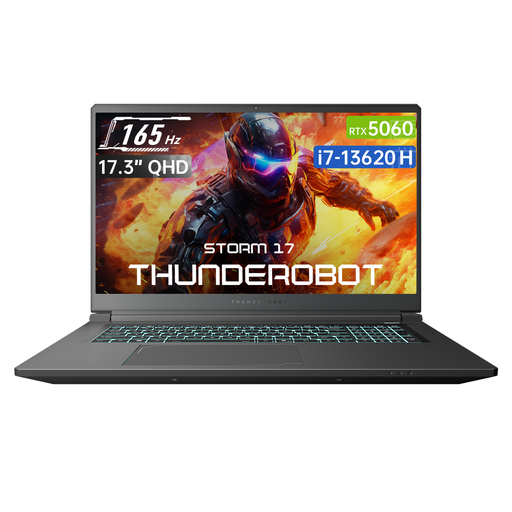 Image unavailable
THUNDEROBOT Storm 17 5060 gaming laptop
Consider a laptop if you want a built-in screen and keyboard for practice in different places. Check the screen's brightness and surface treatment before relying on it in a bright room.
17.3-inch QHD 165 Hz display, Core i7-13620H, GeForce RTX 5060, 16 GB DDR5, 1 TB SSD, HDMI and Wi‑Fi 6.
Confirm the microphone or headset you intend to use, and assess game-plus-sharing requirements for this laptop configuration rather than a desktop graphics card with a similar name.
View on Joybuy
 Image unavailable
THUNDEROBOT Radiant S16 gaming laptop
This laptop combines a built-in display with the computer used for team practice. Check how the screen handles your room lighting rather than judging it by resolution or refresh rate alone.
16-inch QHD+ 240 Hz display, Ryzen 7 7745HX, GeForce RTX 5060, 16 GB DDR5, 1 TB SSD and Wi‑Fi 6.
Choose a suitable microphone or headset separately and check the requirements of the games and sharing settings you intend to use.
View on Joybuy
Common questions
Can a gaming PC alone solve glare in a bright room?
No: the tower does not set the display's brightness or surface treatment. Compare monitors separately and consider their placement; The MSI MAG 274QRFW is listed at 400 cd/m² with an anti-glare coating, but that is a specification of one monitor, not a universal bright-room threshold.
What should I check before using Discord for team practice?
Check your selected microphone and output device, mute state, volume and voice-channel permissions. If you will share gameplay, Discord lets desktop users share an application window or their entire screen and adjust stream quality and frame rate; test those settings with your game.
Do I need a wired network port for team sessions?
A wired port is worth checking if you want the option of connecting by Ethernet, but it is not a requirement for every team session. The HP OMEN 16L and MSI MAG Infinite S3 configurations discussed here list Gigabit Ethernet alongside Wi‑Fi; call and stream reliability also depends on your local network and service.


