Choose a gaming PC for two-screen tile-set creation around the software you use and the connections your monitors need, then assess its graphics card against your games. Adobe’s recommendations for Photoshop and Substance 3D Designer differ substantially, so a 2D editing setup should not be treated as a specification for 3D material work. Before ordering, check the exact PC’s display outputs against both monitors’ inputs.
Who this setup suits
2D tile artists who also game
If you draw pixel or painted tiles while keeping references or a game-engine editor on the second screen, start with your editing software’s requirements rather than a 3D material-workstation specification. Adobe recommends at least 16 GB RAM for Photoshop; Unity recommends at least 8 GB RAM for Unity 6 and notes that larger projects need more.
3D texture and material creators
Procedural material graphs and 3D previews call for a different check. Adobe’s recommended Windows specification for Substance 3D Designer includes 32 GB RAM and 16 GB graphics memory; those figures apply to that software, not to every tile artist.
Buyers configuring a two-screen desktop
If you want one desktop for games and creative work, check its final graphics card and physical outputs alongside both monitors’ inputs. PCSpecialist and Scan 3XS offer configurable gaming systems, but component choice alone does not establish that a particular configuration will connect your two screens.
What matters when choosing
Decide whether tile creation means primarily 2D editing or 3D material work before comparing PC configurations. Whichever route applies, two usable display connections remain essential.
2D tiles and engine editing
Consider when: You make sprites, painted tiles or UI assets in an image editor and work alongside a game-engine editor.
Limit: This route does not establish suitability for procedural 3D materials or demanding game settings.
3D materials and texture graphs
Consider when: Your tile workflow includes procedural materials or 3D previews in Adobe Substance 3D Designer.
Limit: Designer’s higher recommended specification is software-specific, not a requirement for straightforward 2D tile editing.
| Concern | Buying checks | Who this matters to |
|---|
| Two-screen connections |
Compare the exact PC’s physical graphics outputs with both monitors’ inputs. Check any required cable or adaptor against the intended resolution and refresh rate. |
If I need my editor and reference or engine view visible together, I want to establish that both screens can connect as intended; roughly 29% of consumers put two-screen connectivity first. |
| 2D editing and storage |
If you use Photoshop, compare RAM with Adobe’s recommendation of at least 16 GB and check the internal SSD. Account for other applications you will keep open. |
Working between tile files and an engine makes responsive editing my priority; around 21% of consumers primarily focus on their 2D creation workflow. |
| 3D material workload |
For Adobe Substance 3D Designer on Windows, compare the CPU, RAM, graphics memory and SSD with Adobe’s recommendations, including 32 GB RAM and 16 GB graphics memory. |
Procedural materials or 3D previews are central to what I create, so a 2D editing target is not enough for my decision; roughly 29% of consumers prioritise the 3D material workload. |
| Game requirements |
Identify the games, resolution and settings you want before comparing graphics cards; assess the complete PC configuration as well. |
I also want to play particular games at my chosen settings, rather than choose graphics hardware for tile editing alone; around 21% of consumers put gaming performance first. |
Buying pitfalls
-
Choosing by the gaming label alone
A gaming specification does not establish that the PC has the memory, storage or connections your tile workflow requires. Adobe and Unity publish different requirements for the creative applications you might use.
List your image editor, engine, material tools and games, then compare the final configuration with the requirements relevant to those applications.
-
Assuming the graphics card will connect both monitors
A GPU reference specification may not describe the physical outputs fitted to the card in a particular PC.
Check the final PC’s output list against both monitor manuals and identify any cables or compatible active adaptors needed.
A different cable or adaptor may be needed to complete the planned connections.
-
Applying a 2D editing target to 3D materials
Adobe recommends 32 GB RAM and 16 GB graphics memory for Substance 3D Designer on Windows, while its Photoshop RAM recommendation is at least 16 GB. They describe different software workloads.
If Designer is part of your work, compare the PC with Designer’s current requirements rather than relying on a Photoshop-oriented target.
-
Ordering without keeping the final configuration
A configurable system’s selected components and delivery terms are the details you need to refer back to, rather than the builder’s general range description.
Keep a copy of the selected specification and review the seller’s delivery and cancellation information before ordering.
Relevant brands and platforms
PCSpecialist
PCSpecialist offers gaming PCs configurable by processor, graphics card, memory and storage.
- Component selection can help you specify RAM and storage for the software you use.
- Check the chosen PC’s actual graphics outputs and software requirements; configurability does not establish either.
Scan 3XS
Scan 3XS offers configurable gaming-system ranges.
- A configurable system lets you assess the selected components as a complete build.
- A range description does not establish the RAM, graphics memory or display connections of a particular build.
AMD Radeon
A desktop graphics platform relevant to checking graphics memory and monitor connections.
- AMD lists 16 GB GDDR6 memory, DisplayPort 2.1a and HDMI 2.1b in its Radeon RX 9060 XT 16 GB reference specification.
- Confirm the ports on the actual card or configured PC; the reference specification does not identify every board’s layout.
Adobe Substance 3D
A software reference when tile creation includes Substance 3D Designer materials or 3D previews.
- Adobe publishes a recommended Windows specification for Designer that buyers can compare with a proposed PC.
- Designer’s requirements should not be applied to simple 2D editing unless that software is part of the workflow.
Joybuy product choices
These choices include gaming desktops for a fixed workspace and laptops for a portable alternative. Match each PC to your tile-creation software, then check how it would connect to your two screens; a laptop is not a like-for-like desktop replacement.
 No image available
CyberPowerPC JOYB1013 desktop, Ryzen 7 9800X3D and RTX 5080 16 GB
Consider this Windows desktop if your tile workflow includes software with higher stated memory and graphics-memory recommendations. It has 32 GB DDR5 RAM, 16 GB graphics memory, a 2 TB NVMe SSD and Windows 11 Home. Adobe recommends 32 GB RAM and 16 GB graphics memory for Substance 3D Designer on Windows; matching those figures alone does not establish performance in your projects or games. Check the actual display outputs and both monitors’ connections; a monitor and peripherals are not included.
View on Joybuy
 No image available
CyberPowerPC JOYB1010 desktop, Core Ultra 7 265KF and RTX 5070 12 GB
Consider this desktop for 2D tile editing alongside an engine and gaming, subject to your games’ requirements. It has 32 GB DDR5 RAM, a 1 TB NVMe SSD and Windows 11 Home. Its stated 12 GB graphics memory is below Adobe’s 16 GB recommendation for Substance 3D Designer on Windows, so do not use the RAM figure alone to judge that workflow. Confirm the physical display outputs and your monitors’ inputs; a monitor and peripherals are not included.
View on Joybuy
 No image available
CyberPowerPC JOYB1004 bundle, Ryzen 5 7500F and RTX 5060 8 GB
Consider this bundle for a 2D tile-editing setup if its included monitor can form one part of your planned two-screen workspace. The PC has 16 GB DDR5 RAM, a 1 TB NVMe SSD and Windows 11 Home; the bundle also lists a monitor, keyboard, mouse, headset and mousepad. Confirm the included monitor’s model and connectors, the other screen’s inputs and the PC’s outputs. Its stated 8 GB graphics memory is below Adobe’s 16 GB recommendation for Substance 3D Designer on Windows.
View on Joybuy
 No image available
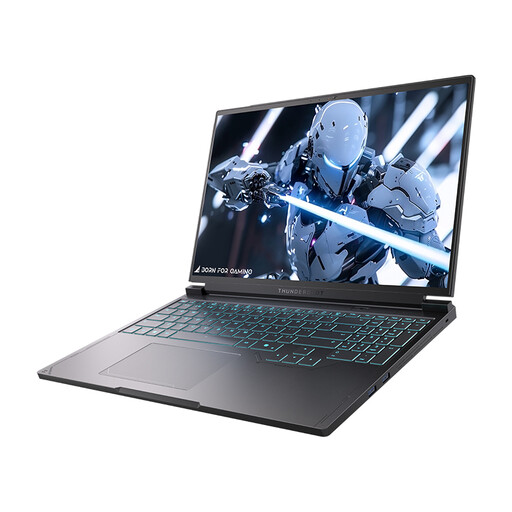
THUNDEROBOT Radiant S16 laptop, Ryzen 7 7745HX and RTX 5060
Consider this laptop instead of a desktop if moving the PC between workspaces matters to you. It has a 16-inch QHD+ 240 Hz display, 16 GB DDR5 RAM and a 1 TB SSD. If your plan involves two external monitors, confirm that both can operate at your intended resolutions and refresh rates. For Substance 3D Designer, check the laptop GPU’s graphics-memory capacity against Adobe’s 16 GB recommended figure.
View on Joybuy
 No image available
Thunderobot Radiant S16 5060 laptop, Core i7-13650HX and RTX 5060
This laptop is another portable option for 2D tile work and gaming, rather than a fixed desktop setup. It has a 16-inch QHD+ 240 Hz display, 16 GB DDR5 RAM and a 1 TB SSD. Check the connections and supported display modes for both external monitors before planning a two-screen workspace. If you use Substance 3D Designer, confirm the laptop GPU’s graphics-memory capacity against Adobe’s recommendation.
View on Joybuy
Frequently asked questions
Do I need two graphics cards for two monitors?
Not necessarily: the deciding check is whether the graphics card fitted to your PC provides two connections that work with your monitors. Compare its physical outputs with both monitors’ inputs and any cable or adaptor requirements. AMD’s Radeon RX 9060 XT 16 GB reference specification lists DisplayPort 2.1a and HDMI 2.1b, but the actual board in a PC still needs checking.
Is 16 GB RAM enough for creating tile sets?
It meets Adobe’s published Photoshop RAM recommendation, but the answer changes with your software and what you run at the same time. Unity notes that larger, more complex projects need additional RAM; Adobe recommends 32 GB RAM for Substance 3D Designer on Windows. Choose against the applications in your own workflow.
What should I check before ordering a configured gaming PC online?
Check and keep a copy of the final CPU, graphics card, RAM, storage, operating system and physical display outputs, then compare them with your software and monitors. Review the seller’s delivery and cancellation information for the particular configuration before ordering; a general product-range description is not a substitute for the selected specification.


