
24/7 Customer Support

Free returns

Same-day & Next-day Delivery

Quality Guaranteed

Unlock Your Welcome Offers: FREE Delivery | Up to 80% OFF | Free 30-day JoyPlus trial
Download the APP
Choosing gaming PCs and gaming accessories involves more than comparing graphics-card names or counting USB ports. A prebuilt gaming PC may look impressive on a product page yet lack the storage, connectivity or upgrade flexibility you need. Similarly, a racing wheel can be unsuitable for your console, while a screen protector may fit the device but interfere with touch controls.
This guide focuses on the details that affect everyday use, helping UK gamers, content creators, sim-racing fans and PlayStation Portal owners make a more informed purchase.
An RTX 5080 gaming PC and an RTX 5070 gaming PC sit in different performance tiers, but the graphics card is only one part of the system. Check the processor, memory, storage, cooling, power supply and warranty before comparing prices.
A powerful GPU paired with limited RAM can restrict multitasking, while a small SSD may require frequent game management. For streaming, editing or running several applications alongside a game, 32GB RAM is a practical specification to consider.
A “2TB” label tells you capacity, not the type of drive. A 2TB NVMe SSD generally offers faster booting and application loading than a traditional hard disk drive. However, check whether the desktop has additional M.2 or SATA expansion space if you expect your game library and media files to grow.
A gaming PC with 2TB SSD storage can be convenient for large modern games, but it is still worth checking how much space remains after Windows and recovery partitions are installed.
Before buying PC gaming peripherals, confirm the platform, connection type and supported games. A force feedback racing wheel designed for Windows may not work with a console, and console-compatible models can have separate PlayStation and Xbox versions.
For a desktop, measure the available space carefully. Large towers can weigh more than 20 kg and require clear airflow around the intake and exhaust vents. Also check whether the package includes a keyboard, mouse, monitor or Wi-Fi antenna; these are not always supplied.
Your monitor should influence your PC choice. For 1080p esports gaming, an entry-level dedicated GPU or integrated graphics may be sufficient for suitable titles. For 1440p high-refresh gaming, ray tracing or 4K output, a stronger dedicated graphics card is more appropriate.
Check the available HDMI and DisplayPort outputs, especially if you plan to use multiple monitors, an ultrawide display or a VR headset. A Windows 11 gaming PC should also have current drivers installed and enough ventilation for sustained loads.
A Ryzen gaming PC can suit buyers who value multi-core performance and an AMD upgrade route, while an Intel Core i7 gaming PC can be attractive for demanding multitasking, game streaming and content creation. Do not compare processor names alone: review the exact model, core count, memory generation and motherboard chipset.
For most current gaming and productivity setups, 16GB may be adequate, but 32GB RAM provides more headroom for browsers, Discord, recording software and creative applications.
For a force feedback racing wheel or truck simulator steering wheel, examine the clamp system, pedal layout, cable length and desk stability. Force feedback can move a lightweight table, so a secure mounting surface is important.
For a PlayStation Portal screen protector, check the fit, installation method, touch sensitivity and surface coating. Tempered glass with an anti-fingerprint treatment may reduce visible smudges, but careful dust-free installation remains essential.
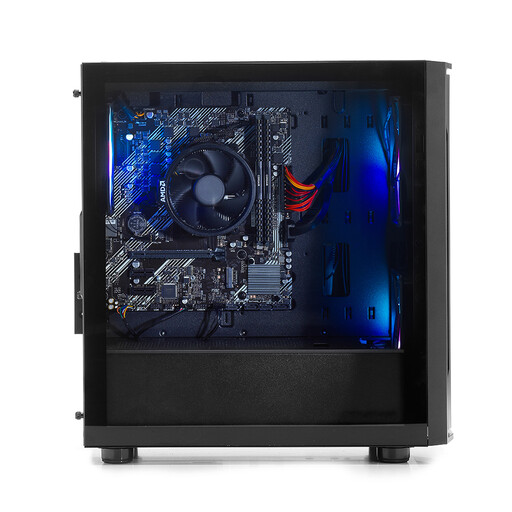
Why This Fits Their Persona: A compact starting point for UK users who want a Windows 11 desktop for everyday tasks, esports and lighter gaming without moving straight to a large, high-powered tower.
It clearly uses integrated Radeon Vega 7 graphics, 8GB DDR4 RAM and a 500GB NVMe SSD, so buyers can set realistic expectations rather than assuming flagship performance.
Six-core Ryzen 5 5500GT processor, NVMe storage, Wi-Fi and DisplayPort connectivity in a compact chassis.
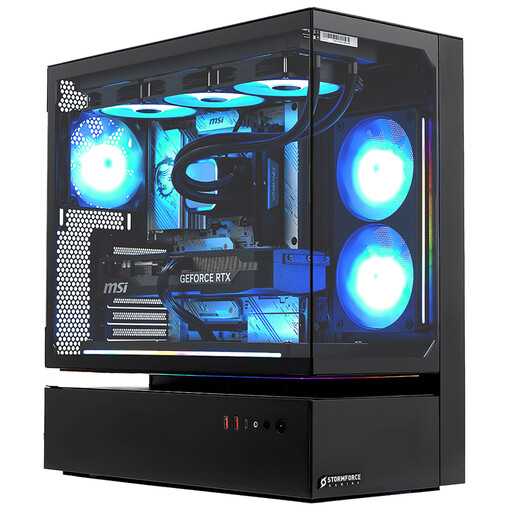
Why This Fits Their Persona: Suitable for buyers seeking a ready-to-use desktop for demanding gaming, high-refresh displays, streaming and creative workloads.
The listing specifies the Core i7-14700F, RTX 5080 16GB GDDR7, 32GB DDR4 and 2TB NVMe SSD instead of relying on a vague “gaming” label.
20-core processor, 16GB graphics memory, Wi-Fi and Bluetooth, plus a 3-year collect, repair and return parts-and-labour guarantee.
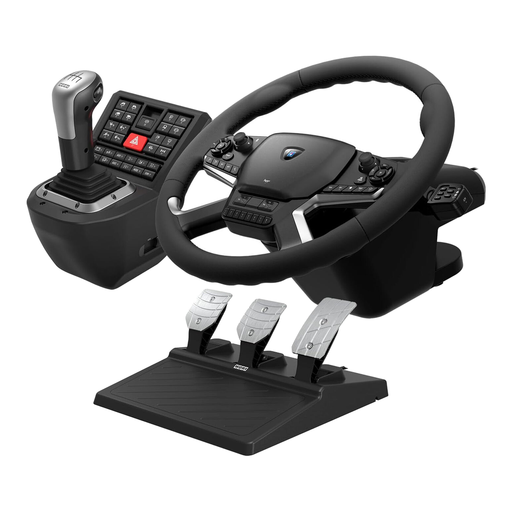
Why This Fits Their Persona: Designed for PC simulation enthusiasts who want dedicated controls for titles such as Euro Truck Simulator 2 and American Truck Simulator.
It states Windows 10 and Windows 11 compatibility, wired USB connection and the included power adapter, steering wheel, shifter and pedals.
Dual-motor force feedback, adjustable pedal unit and mounting clamps for a more dedicated simulator setup.
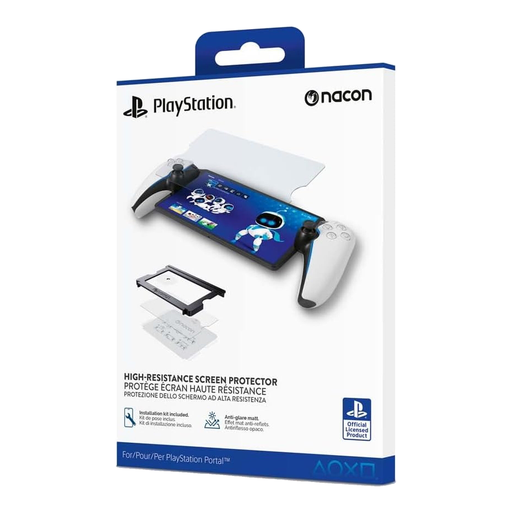
Why This Fits Their Persona: A practical add-on for PlayStation Portal owners who want to reduce everyday scratches and keep the display easier to clean.
Compatibility is specified for PlayStation Portal, with an installation kit and alignment guides supplied to help reduce positioning errors.
9H tempered glass, anti-reflective and anti-fingerprint coatings, plus a stated 2-year manufacturer’s warranty.
We have compiled a complete, real-time list of products that fully satisfy these strict selection criteria and UK safety regulations.
A prebuilt gaming PC can be suitable if the listing clearly states the processor, graphics card, RAM, storage, operating system, power supply and warranty. It also avoids the compatibility work involved in selecting individual components. Before ordering, confirm delivery details, the plug and power requirements, return terms and whether peripherals are included.
Lifespan depends on component quality, dust levels, ventilation, usage and the games you play. Keeping vents clear, updating graphics drivers and cleaning dust filters can support reliable operation. A desktop with upgradeable memory or storage may remain useful for longer, although newer games can eventually require a graphics-card upgrade.
Electricity use varies according to the graphics card, processor, game settings and time spent under load. High-performance systems generally draw more power than entry-level desktops, particularly during demanding gaming or rendering. Use Windows power settings for lighter tasks, avoid blocking ventilation and check the PC’s power rating before connecting it to a suitable UK socket or surge-protected extension.