What to check before buying
For digital card games at a socket-limited play space, decide how the complete setup will be powered before comparing PC specifications.
Gaming laptop
Choose it when: You want to play on the built-in screen or move the computer between rooms.
Trade-off: It still needs its appropriate charger for plugged-in use, and an external monitor adds another powered item.
Compact mini PC
Choose it when: Desk space is tight and you already have a display and a safe way to power the setup.
Trade-off: A small PC does not replace the display; check whether the exact unit also needs memory, storage or an operating system.
Desktop tower
Choose it when: You have room and safely planned power for a separate display, and have identified more demanding uses beyond card games.
Trade-off: The tower-and-monitor setup has more separately powered components than laptop play on a built-in screen.
| Concern |
What to check |
Who this matters to |
| Socket use and safety |
Count everything powered at once, including the PC or charger and any separate display. Check an extension lead’s marked rating and do not chain extensions, as Electrical Safety First advises. |
With few free outlets, I want to avoid adding powered equipment without creating an unsafe arrangement. Around 36% of consumers put socket use and safety first. |
| Fit for the actual games |
Check each game publisher’s current operating-system, memory, graphics and storage requirements. Blizzard Support lists 8GB RAM and 12GB available storage in Hearthstone’s Windows minimum. |
If I mainly play card games, I want a PC that meets those games’ requirements without choosing extra hardware for games I do not plan to play. This is the primary concern for around 29% of consumers. |
| Moving between rooms |
Compare the exact laptop’s screen size, weight and supplied charging arrangement with where you expect to play. |
I may play in different rooms and want to take the same screen-equipped computer with me. Around 21% of consumers prioritise that portability. |
| Other planned uses |
Identify the more demanding games or tasks first, then check their requirements and the complete monitor and power plan. |
Card games are my starting point, but I also intend to use the PC for more demanding games or other work. For around 14% of consumers, that broader use is the main consideration. |
Gaming laptops for a built-in-screen setup
These Joybuy laptop choices have built-in screens, so basic card-game play need not involve a separately powered monitor. Compare each model with your games’ requirements and check the charger and plug for your intended setup.
 No image available
Lenovo LOQ Essential 15ARP11 gaming laptop
Consider this built-in-screen laptop if you want to play without powering a separate monitor.
AMD Ryzen 7 170, 16GB RAM, 1TB SSD, GeForce RTX 5050 and a 15.6-inch 144Hz FHD display.
Check the supplied UK plug and the exact game requirements before choosing it.
Joybuy
 No image available
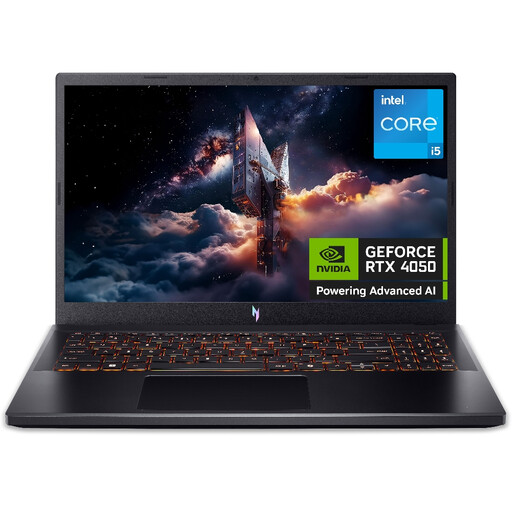
Acer Nitro V 15 ANV15-52 gaming laptop
Its built-in screen suits a card-game setup that avoids a separate powered monitor.
Intel Core i5-13420H, NVIDIA RTX 4050, 16GB RAM, 512GB SSD and a 15.6-inch Full HD display.
Confirm the display refresh rate for the exact configuration, along with the supplied UK plug and your games’ requirements.
Joybuy
 No image available
MSI Pulse 16 AI gaming laptop
This laptop offers a built-in display for play without a separate monitor at the desk.
Intel Core Ultra 7 155H, GeForce RTX 4060, 16GB DDR5 RAM, 1TB SSD and a 16-inch QHD+ 240Hz display.
Confirm the exact model configuration, supplied UK plug and requirements of the games you intend to play.
Joybuy
 No image available
ASUS ROG Zephyrus G14 GA403WR-QS088W gaming laptop
Consider its built-in 14-inch screen if you want a laptop setup without a separate powered display.
AMD Ryzen AI 9 HX 370, 32GB RAM, 2TB SSD, GeForce RTX 5070 Ti and a WQXGA+ display.
Check the supplied charger, its charging requirements and UK plug for this exact variant; specifications for other G14 models do not establish them.
Joybuy
 No image available
HP OMEN 17-db1000na gaming laptop
The built-in screen avoids a separate powered monitor, though its size is worth considering if you move between rooms.
AMD Ryzen AI 7 350, 16GB RAM, 1TB SSD, RTX 5060 and a 17.3-inch Full HD display.
Confirm the supplied adaptor and UK plug, and compare the configuration with your intended games.
Joybuy
Questions about the setup
Do card games require a high-spec gaming PC?
Not necessarily: Blizzard Support lists 8GB RAM and 12GB available storage among Hearthstone’s Windows minimum requirements. Check the current requirements of every game you intend to play, as well as any more demanding uses; Wizards of the Coast also offers MTG Arena on PC, Mac and mobile, so an existing suitable device may be worth considering.
Can I add more extension leads when sockets run out?
Do not chain extension leads to make room for the PC setup. Electrical Safety First advises using only one extension device per wall socket and warns that chaining leads can overheat the plug; check the marked rating against the combined load of everything connected.
What should I inspect on an extension lead?
Check its marked current rating, plug and cable condition before using it for the complete setup. Electrical Safety First advises keeping cable reels fully unwound when necessary and stopping use if you notice damage, scorch marks, melted plastic or overheating.
Which charger should I use with a gaming laptop?
Use the charger supplied or specified by the manufacturer for the exact laptop. Electrical Safety First advises charging on a hard, flat surface; confirm the model’s connector and power requirements rather than assuming another laptop charger will work.
What should I check on a non-UK laptop configuration?
Confirm the supplied plug and charger before buying, along with the warranty terms for that configuration. Electrical Safety First advises checking for a standard UK plug or a suitable conversion adaptor rather than relying on a travel adaptor.


