Who this guide is for

Unreal and 3D-project learners

If you expect to create substantial scenes or assets as well as play games, compare your course software with the PC’s full specification. Epic Games’ Unreal Engine 5.8 recommendations include 32 GB RAM and at least 8 GB of graphics memory; Blender Foundation publishes separate minimum and recommended requirements.

Creators moving between campus and home

If you need to continue the same projects in different places, consider a laptop’s exact configuration and carrying practicality alongside its gaming capability. Course arrangements can differ: the Bedford College Group lists several creative applications, while the University of Westminster describes access to a dedicated Games Development Project Lab.

First-time desktop setup buyers

If you are buying a computer and may also need a display and input devices, compare what is included with what you already own. Blender Foundation recommends a display resolution of at least 1920 × 1080 for optimal use and a three-button mouse.

What to prioritise when choosing

Prebuilt gaming desktop

When it fits: You work mainly at one desk and want a seller-specified complete system.

Trade-off: A monitor may be separate, and configurations and warranty terms vary by system.

Custom-built desktop

When it fits: You want to choose components and are comfortable assembling and troubleshooting them, or selecting a specialist-built configuration.

Trade-off: With a self-build, you take on compatibility checks and fault diagnosis; confirm who supports a completed specialist-built system.

Gaming laptop

When it fits: You need to take your development work between home and college.

Trade-off: Graphics specifications and upgrade options depend on the exact model, and a large screen can affect carrying practicality.

Desktop with monitor and peripherals

When it fits: You do not already have a usable screen, keyboard or mouse and want to plan the full desk setup.

Trade-off: Check the listed contents carefully; a desktop and a peripheral bundle do not necessarily include the same items.

Concern What to check when buying Who this matters to
Development software Check the course software and versions. Epic Games’ Unreal Engine 5.8 recommendations include 32 GB RAM and at least 8 GB graphics memory; compare the exact PC configuration with the software you will use. If I expect to build substantial scenes as well as play games, I want the computer to match the course tools. About 33% of consumers put development-software headroom first.
Working in more than one place Ask whether the course requires a personal computer on campus or provides suitable lab access. For a laptop, check the exact graphics configuration, installed RAM, display and service terms. If I need to continue projects between home and college, portability matters as much as the configuration. About 27% of consumers prioritise taking their work between locations.
Complete desk setup Check whether the listing includes a monitor, keyboard and mouse. Blender Foundation recommends at least 1920 × 1080 for optimal use and a three-button mouse. When I am starting without peripherals, I need to know what will be ready to use at the desk. Around 20% of consumers prioritise completing the setup.
Assembly and support Confirm who builds the computer and handles faults. Scan states that qualifying 3XS desktops have a three-year warranty, with onsite cover in year one and return-to-base cover in years two and three; terms differ for Scan Gaming PCs. If I do not want to diagnose component or assembly problems myself, support arrangements affect my choice. About 20% of consumers put assembly and fault support first.

Buying pitfalls to avoid

  • Choosing by graphics-card name alone

    A gaming graphics card does not tell you how much system memory is installed. The cited Dell Alienware Aurora ACT1250 default configuration has 16 GB RAM, while Epic Games recommends 32 GB for Unreal Engine 5.8.

    Compare the exact selected configuration with the software used on the course; do not assume another configuration shown on the same product page is included.

    A later memory upgrade may be needed if the chosen configuration and the learner’s software requirements do not match.

  • Assuming a desktop listing includes a complete workstation

    A desktop may be supplied without a monitor, keyboard or mouse, leaving you without everything needed for a desk setup.

    Check the itemised contents and compare them with the peripherals you already have. PCSpecialist identifies monitors and input devices as additional items buyers can select.

    Any missing screen or input devices need to be accounted for separately.

  • Treating a product title as proof of the exact laptop variant

    The Joybuy listing for MSI Stealth A18 AI+ A3XWHG-002UK also describes a different Stealth 18 AI Studio family and gives conflicting display details. That makes the exact model and specification important to resolve before relying on the listing.

    Compare the full model code and core specifications with MSI’s information for that specific variant before buying.

Relevant brands to consider

These examples relate to particular product lines and configurations; a brand’s inclusion is not a recommendation of every model or an indication of availability.

PCSpecialist

Configurable desktops for buyers who want component choices, either as a specialist-built system or a self-build starting point.

  • Its configurator lets buyers select components such as the processor, graphics, memory and storage.
  • The Wraith Pro I listing’s 32 GB RAM, 8 GB RTX 5060 Ti and 1 TB SSD describe that configuration, not every PCSpecialist system.

Dell Alienware

Prebuilt gaming desktops for buyers comparing a configured system from one seller.

  • The cited Aurora ACT1250 configuration lists a Core Ultra 7 265F, RTX 5060 Ti with 8 GB VRAM and a 1 TB SSD.
  • The cited default configuration has 16 GB RAM; Dell offers a 32 GB selection on that page, so check the exact option selected against course software requirements.

MSI

Gaming laptops, including the specified UK Stealth A18 AI+ variant, for buyers considering a portable development computer.

  • MSI lists the A3XWHG-002UK with a QHD+ 18-inch display, RTX 5070 Ti Laptop GPU, 32 GB RAM and a 2 TB SSD.
  • The 18-inch format may not suit every carrying need, and these specifications apply to the named variant.

Scan 3XS

Prebuilt and configurable systems for buyers comparing specialist system support.

  • Scan states that qualifying 3XS desktops have a three-year warranty, with onsite cover in year one and return-to-base cover in years two and three.
  • Check the product line: Scan advertises different terms for Scan Gaming PCs.

Joybuy products for game-design study and gaming

These options cover prebuilt desktop systems for a fixed workspace and a gaming laptop for working across locations. Check each configuration against the learner’s software and any peripherals already available.

CyberPowerPC JOYB1013 gaming desktop, Ryzen 7 9800X3D, RTX 5080, 32GB RAM, 2TB SSD

CyberPowerPC JOYB1013 Gaming Desktop, Ryzen 7 9800X3D, RTX 5080, 32GB, 2TB

For a fixed workspace, this prebuilt desktop is a route to consider for game-design software and PC gaming.

The listed configuration includes a Ryzen 7 9800X3D, RTX 5080 with 16 GB graphics memory, 32 GB DDR5 RAM, a 2 TB NVMe SSD and Windows 11 Home. Monitor, keyboard and mouse are not included.

View on Joybuy

CyberPowerPC JOYB1010 gaming desktop, Core Ultra 7 265KF, RTX 5070, 32GB RAM, 1TB SSD

CyberPowerPC JOYB1010 Gaming Desktop, Core Ultra 7 265KF, RTX 5070, 32GB, 1TB

This prebuilt desktop is suited to a fixed-desk setup; check its configuration against the learner’s course software.

The listed configuration includes a Core Ultra 7 265KF, RTX 5070 with 12 GB graphics memory, 32 GB DDR5 RAM, a 1 TB NVMe SSD and Windows 11 Home. Monitor, keyboard and mouse are not included.

View on Joybuy
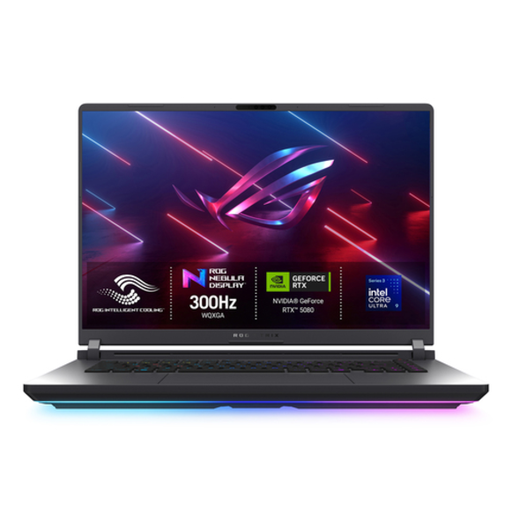
ASUS ROG Strix G16 G615LW-TS262W gaming laptop, Core Ultra 9 290HX Plus, RTX 5080, 32GB RAM

ASUS ROG Strix G16 G615LW-TS262W Gaming Laptop, Core Ultra 9 290HX Plus, RTX 5080, 32GB

The laptop format may suit a learner who needs to move development work between locations; consider carrying needs as well as the specification.

The listed configuration includes a 16-inch WQXGA 300 Hz display, 32 GB RAM and a 1 TB NVMe SSD.

View on Joybuy

Lenovo Legion T7 34IAS10 gaming tower, Core Ultra 7 265K, 32GB RAM, RTX 5070 Ti, 1TB SSD

Lenovo Legion T7 34IAS10 Gaming Tower, Core Ultra 7 265K, 32GB, RTX 5070 Ti, 1TB

This desktop tower is a fixed-workspace option to compare with the learner’s software requirements.

The listed configuration includes a Core Ultra 7 265K, 32 GB RAM, an RTX 5070 Ti, a 1 TB SSD and Windows 11 Home. Its chassis is described as tool-less for upgrades.

View on Joybuy

Stormforce Cyclone gaming desktop, Intel Core i7-14700F, 32GB RAM, RTX 5080, 2TB SSD

Stormforce Cyclone Gaming Desktop, Core i7-14700F, 32GB, RTX 5080, 2TB

For a fixed desk, compare this desktop configuration with the course software and the parts of a setup you already own.

The listed configuration includes a Core i7-14700F, RTX 5080 with 16 GB graphics memory, 32 GB RAM, a 2 TB NVMe SSD and Windows 11. Monitor, keyboard and mouse are not included.

View on Joybuy

Frequently asked questions

Does every game-design course require a personal PC capable of running Unreal Engine?

No; the software and personal-device requirements depend on the course. UK course examples name different tools, and some describe access to lab equipment, so ask the learner’s course about its software, versions and device policy before choosing a specification.

What should I check for a computer used with Blender?

Compare the computer with Blender Foundation’s requirements and recommendations. Blender recommends a display resolution of at least 1920 × 1080 for optimal use and a three-button mouse; these are recommendations, not universal purchase requirements.

Is a prebuilt PC warranty the same as my rights if the computer is faulty?

No. A retailer’s or manufacturer’s warranty has its own terms, while statutory consumer rights are separate. Check current GOV.UK guidance for the relevant part of the UK and the circumstances of the fault.

Which electrical safety rules apply to computers sold in the UK?

The Electrical Equipment (Safety) Regulations 2016 concern relevant equipment placed on the market. GOV.UK guidance distinguishes Great Britain from Northern Ireland, where some provisions apply differently; check the applicable guidance and the documentation for the particular computer.