
24/7 Customer Support

Free returns

Same-day & Next-day Delivery

Quality Guaranteed

Unlock Your Welcome Offers: FREE Delivery | Up to 80% OFF | Free 30-day JoyPlus trial
Download the APP
Buying a gaming computer involves more than comparing processor names and graphics card labels. A slim gaming laptop may offer impressive display specifications but limited upgrade options, while a large desktop may deliver stronger performance but require a separate monitor and accessories.
This guide explains the practical points to check before buying gaming PCs and laptops, from graphics performance and screen refresh rate to storage, cooling and running costs.
A 144Hz gaming laptop or 240Hz gaming laptop can display up to 144 or 240 frames per second respectively, but the computer must generate those frames first. A high-refresh display does not automatically mean every game will run at that rate.
Performance depends on the game, resolution, graphics settings, processor, GPU, drivers and power mode. Competitive players may benefit from a 240Hz panel in suitable titles, while many users will find 144Hz sufficient for smooth everyday gaming.
An NVIDIA GeForce graphics card is important, but the model alone does not tell the entire story. Laptop versions can have different power limits, cooling systems and performance characteristics. For example, an RTX 5060 laptop should be assessed alongside its processor, GPU power rating, memory and ventilation design.
Desktop buyers should also check the power supply, case airflow and available space. A powerful gaming graphics card can require a larger case and suitable cooling.
A listed 1TB SSD will not provide 1TB of free space after Windows, drivers and recovery files are installed. NVMe storage usually improves boot and loading responsiveness compared with a conventional hard drive, but game libraries can still fill a drive quickly.
For users with several large games, creative software or video files, a 2TB NVMe SSD gaming PC may reduce the need for immediate upgrades.
The GPU has the greatest influence on gaming visuals and frame rates. Entry-level dedicated cards can suit older games, office use and media playback, but modern high-resolution gaming usually calls for a more capable GPU.
A desktop with an RTX 5070 gaming PC configuration can suit users seeking a balance between high-resolution gaming, streaming and creative applications. An RTX 5080 gaming PC is aimed at more demanding high-resolution and GPU-accelerated workloads.
The CPU affects game logic, frame-time consistency, streaming and multitasking. For current gaming PCs, 16GB RAM is a practical starting point, while 32GB DDR5 provides more headroom for streaming, browser tabs, editing software and large projects.
Check whether memory is upgradeable. Some laptops have fixed or limited memory, which can affect long-term flexibility. A DDR5 gaming computer may offer higher memory bandwidth than older memory standards, but the overall benefit depends on the complete system.
Gaming laptops should be used on a hard, flat surface with vents unobstructed. Desktop PCs need clear airflow around the case and should not be placed inside a tightly enclosed cabinet.
Also check:

Why This Fits Their Persona: A practical choice for UK students, home users and new PC gamers who want a portable system with a UK keyboard layout and built-in 144Hz display.
Its specification clearly identifies the RTX 5050 Laptop GPU, 65W GPU TGP, 16GB DDR5 memory and Full HD 144Hz display rather than relying on refresh rate alone.
Ryzen 7 processor, 1TB PCIe 4.0 NVMe SSD, Wi-Fi 6, Gigabit Ethernet and 100% sRGB coverage.
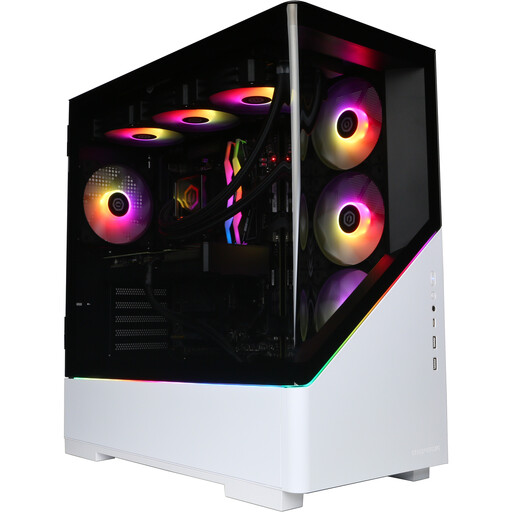
Why This Fits Their Persona: Designed for enthusiasts building a fixed UK gaming setup who prioritise high-end graphics, large storage and desktop performance over portability.
The listing states the RTX 5080, 16GB GDDR7 graphics memory and 2TB NVMe SSD, while clearly noting that the monitor and peripherals are not included.
Ryzen 7 9800X3D processor, 32GB DDR5 memory, 2TB storage and HDMI plus DisplayPort outputs.
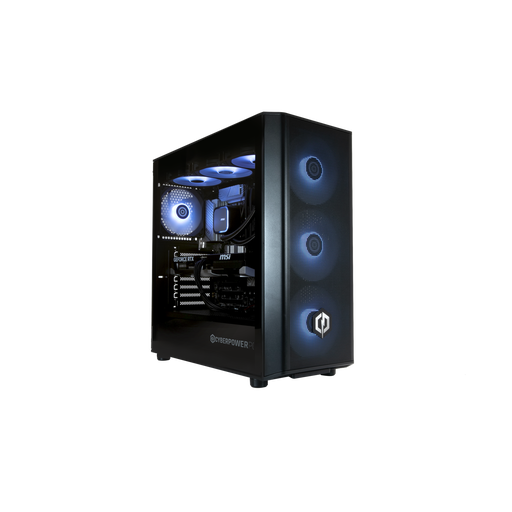
Why This Fits Their Persona: Suitable for streamers, content creators and multitaskers who need strong desktop processing alongside modern graphics hardware.
It specifies 32GB DDR5, a 1TB M.2 NVMe SSD and an RTX 5070 with 12GB GDDR7, while confirming that display output comes from the dedicated GPU.
20-core Intel Core Ultra 7 265KF processor, four display outputs and Windows 11 Home pre-installed.
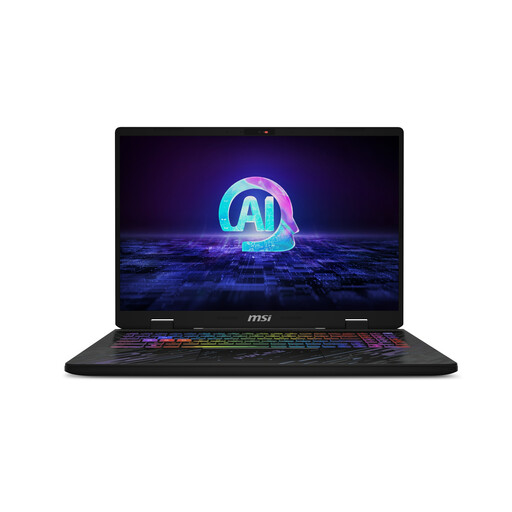
Why This Fits Their Persona: A fit for players and creators who want a QHD+ screen, high refresh rate and a portable workstation for gaming, editing and study.
The 240Hz screen is paired with an RTX 4060 Laptop GPU, 16GB DDR5 memory and a stated QHD+ resolution, making the core display and hardware details clear.
1TB PCIe 4.0 NVMe SSD, 100% DCI-P3 display coverage, Wi-Fi 6E and Thunderbolt 4 connectivity.
We have compiled a complete, real-time list of products that fully satisfy these strict selection criteria and UK safety regulations.
Electricity use varies according to the GPU, processor, brightness, power mode and gaming duration. Desktop systems may draw more power during demanding sessions, while laptops can reduce consumption in balanced or battery modes. For regular gaming, use the manufacturer’s balanced setting when maximum performance is not required.
Useful lifespan depends on the games played, resolution and upgrade options. A desktop with replaceable memory, storage and graphics hardware may offer more upgrade flexibility. Laptop buyers should check memory limits, available SSD slots, battery warranty terms and cooling design before purchase.
Not necessarily. A suitable gaming laptop can handle gaming and streaming, provided its processor, memory and GPU meet the software requirements. Streamers who use multiple monitors, capture devices and editing applications may prefer a desktop with 32GB DDR5, additional ports and easier component access.