
24/7 Customer Support

Free returns

Same-day & Next-day Delivery

Quality Guaranteed

Unlock Your Welcome Offers: FREE Delivery | Up to 80% OFF | Free 30-day JoyPlus trial
Download the APP
Buying gaming PCs and laptops involves more than comparing processor names or choosing the largest graphics card. A suitable system needs to match your games, monitor, workspace, upgrade plans and everyday use. The wrong specification can leave you paying for unused power, replacing components sooner than expected or accepting poor portability and battery life.
This guide from the Joybuy Product Recommendation Officer explains the specifications that matter and highlights suitable options for different UK users.
An NVIDIA RTX model gives a useful indication of graphics capability, but actual performance also depends on the laptop’s power limit, cooling system, processor and display resolution. An RTX 5060 gaming laptop with a 165Hz QHD screen may be configured differently from another model with the same GPU.
Desktop graphics cards also need adequate case airflow and a suitable power supply. Before buying, check the complete system rather than relying on the gaming graphics card name alone.
A 240Hz screen can provide smoother motion than a 144Hz panel, but only when the system can produce sufficiently high frame rates. It is particularly relevant to competitive games, while story-led AAA titles at QHD or 4K may place more emphasis on GPU power and image quality.
A 144Hz gaming laptop can be a sensible balance for general gaming. A 240Hz gaming laptop is more relevant to esports players who prioritise response and high frame rates.
A desktop may offer stronger sustained performance and easier upgrades, but it requires a monitor, keyboard, mouse and suitable desk space. Large towers can also be heavy: some high-performance systems weigh more than 20kg.
Laptops save space and include a screen, keyboard and battery, but gaming performance normally requires the supplied charger. They can also become hot and noisy during demanding sessions. Check dimensions, weight, ventilation and warranty terms before ordering.
The GPU is usually the most important component for gaming. For 1080p play, an entry-level dedicated card such as the ASUS Dual GeForce RTX 3050 OC Edition 6GB may suit esports and less demanding titles. Its compact 20cm, two-slot design can also help with smaller desktop builds, although buyers must confirm the required PCIe power connector and available space.
For QHD and high-refresh gaming, consider a newer RTX 5060, RTX 5070 or RTX 5070 Ti configuration. For a 4K gaming PC, an RTX 5080-class desktop provides more graphics headroom, particularly where ray tracing, high texture settings or AI-assisted upscaling are enabled.
Remember that laptop GPUs are not identical to desktop versions. Compare the complete model’s cooling and power specifications where available.
An AMD Ryzen gaming PC can provide strong multi-core performance for gaming, streaming and creative software. The Stormforce Cyclone with Ryzen 7 7800X3D, 32GB DDR5 and RTX 5080 pairs a gaming-focused processor with current-generation memory.
An Intel Core gaming laptop may suit users who want a portable system for gaming, video editing and multitasking. The Lenovo Legion Pro 7 combines an Intel Core Ultra 9 275HX processor with 64GB DDR5 memory and an RTX 5090 Laptop GPU.
For most modern gaming and everyday multitasking, 16GB RAM is a practical starting point. Choose 32GB or more if you stream, edit video, use design software or keep many applications open. Check whether the memory is upgradeable, especially on laptops.
A 1TB SSD gives more usable space than a 512GB drive once Windows, applications and large games are installed. A 2TB NVMe SSD is more convenient for extensive libraries and creative files.
For laptops, assess more than refresh rate. Look at resolution, panel type, brightness, colour coverage and the screen’s aspect ratio. For design work, an OLED or high-colour-coverage display may be more useful than a very high refresh rate.
For desktops, inspect motherboard access, available M.2 slots, memory support and power supply capacity. A tool-less chassis, such as that used by the Lenovo Legion T7, can make future upgrades easier. Confirm the exact expansion details with the listing before purchase.
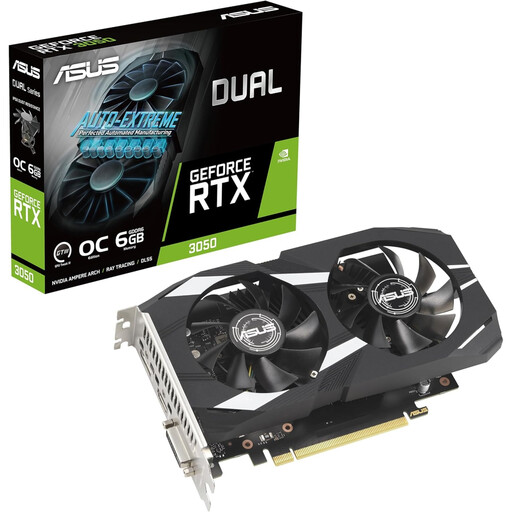
Why This Fits Their Persona: A compact option for upgrading a compatible desktop used for 1080p gaming, esports and everyday graphics work.
Its 20cm length and two-slot design make case compatibility easier to assess. Buyers should still check the PCIe slot, power connector and PSU before installation.
6GB GDDR6 memory, HDMI 2.1, three DisplayPort outputs and a compact dual-fan cooler.
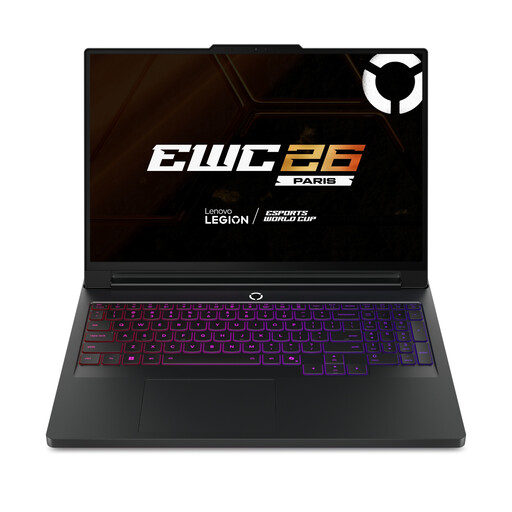
Why This Fits Their Persona: Suitable for users seeking a portable workstation for high-end gaming, streaming and demanding creative applications.
The specification lists 64GB DDR5 memory, 2TB SSD storage and two M.2 slots, reducing the need for immediate storage or memory changes.
RTX 5090 Laptop GPU with 24GB GDDR7, 16-inch 2560×1600 OLED display and 240Hz refresh rate.
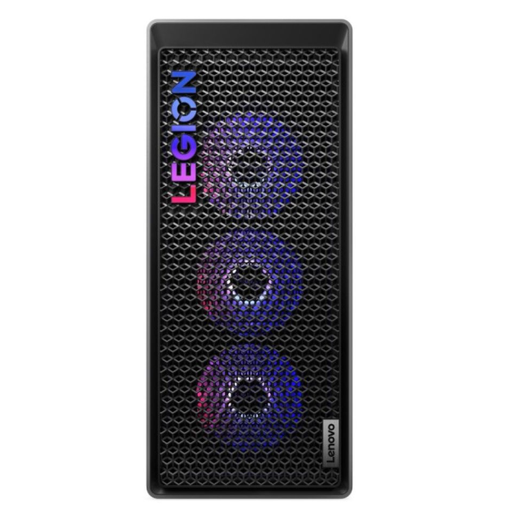
Why This Fits Their Persona: A desk-based choice for 4K gaming, content creation, streaming and users who want room for future upgrades.
The 34-litre tool-less chassis and 850W power supply are clearer indicators of upgrade potential than vague future-proofing language.
Intel Core Ultra 7 265K, RTX 5070 Ti with 16GB GDDR7 and 32GB DDR5 memory.

Why This Fits Their Persona: Designed around high-resolution visual work, including design, editing, colour-sensitive projects and mobile productivity.
It prioritises a 3840×2400 OLED touchscreen and 64GB LPDDR5X memory rather than relying only on gaming-focused refresh-rate claims.
RTX 5080 Laptop GPU with 16GB GDDR7, 2TB SSD, Wi-Fi 7 and a listed weight of 1.95kg.
We have compiled a complete, real-time list of products that fully satisfy these strict selection criteria and UK safety regulations.
Yes. Models with 16GB or more RAM, an SSD and a modern processor can handle office applications, browsing, streaming and creative software. Larger gaming laptops are less convenient to carry and may have shorter battery life under demanding workloads, so check weight and charger size.
Running cost depends on the system’s power draw, usage hours and electricity tariff. A high-performance gaming desktop can draw considerably more power under load than during light desktop work. Use Windows power-saving settings when appropriate and avoid assuming that a higher-rated PSU automatically means the PC constantly uses that wattage.
There is no fixed lifespan. Dust management, ventilation, usage intensity and upgradability all matter. A desktop with replaceable memory, storage and graphics components can be refreshed over time. For laptops, check memory configuration, SSD access, battery warranty and manufacturer support before purchase.