
24/7 Customer Support

Free returns

Same-day & Next-day Delivery

Quality Guaranteed

Unlock Your Welcome Offers: FREE Delivery | Up to 80% OFF | Free 30-day JoyPlus trial
Download the APP
Buying gaming peripherals can seem straightforward until a new keyboard feels cramped, a headset becomes uncomfortable or a wireless mouse needs charging at the wrong moment. Marketing often focuses on RGB lighting, polling rates and dramatic response-time figures, while the details that affect daily use receive less attention.
This guide highlights common buying traps and explains which specifications matter for PC gaming, home working, studying and long sessions at a desk.
A compact keyboard can free up desk space for wider mouse movements, but a 60% model normally removes the dedicated function row, navigation keys and arrow keys. Secondary functions may be available through shortcuts, but this can be inconvenient for spreadsheets, coding or everyday typing.
Also check the regional layout. Several products use a US QWERTY layout, which differs from the UK layout in key shape, symbols and the position of certain punctuation keys. If you regularly switch between gaming and office work, a UK full-size or 75% layout may be more practical.
An 8000Hz polling rate means the device can report input at very short intervals, but the benefit depends on the game, computer hardware and settings. It does not automatically make every system feel faster. Switch technology, firmware, connection stability and your own control preferences also affect the experience.
Likewise, a rapid trigger keyboard can reset a key as it moves upwards rather than waiting for a fixed reset point. This may suit competitive FPS players, but it is not essential for general typing or casual gaming.
Wired devices avoid battery charging and generally offer simple plug-and-play setup. Wireless gaming headsets and keyboards provide a tidier desk, but buyers should check whether they use Bluetooth, a 2.4GHz receiver, USB charging or all three.
For battery-powered products, consider charging frequency, replacement battery availability and whether the wireless receiver occupies a valuable USB port. For UK households, also check the included plug, cable type, compatibility and product safety information before ordering.
Mechanical gaming keyboards use individual switches, while magnetic switch keyboards detect key movement through Hall Effect technology. Optical analogue switches, such as those used in the Razer Huntsman V3 Pro Mini, use light-based actuation. Neither design is automatically suitable for everyone: check actuation adjustment, noise, keycap material and software support.
For everyday typing, PBT keycaps can offer resistance to surface shine compared with some lower-cost keycap materials. A hot-swappable keyboard allows compatible switches to be changed without soldering, but always confirm the supported switch format.
A wired gaming headset with a 3.5mm connection is simple to connect to many PCs, consoles and handheld devices. A USB headset may provide lighting or digital controls, while a wireless gaming headset can reduce cable clutter.
Check whether the microphone flips to mute, rotates for positioning or requires a separate control. Closed-back, over-ear designs can reduce surrounding distractions, but comfort depends on clamp pressure, cushion material, headband adjustment and weight. RGB lighting is an appearance feature and should not be treated as an audio-performance measure.
For FPS gaming, a mouse should feel controlled during low-sensitivity movements. For office work, button placement and hand support may matter more than maximum DPI. A high DPI number is not a guarantee of better tracking.
An ergonomic wireless mouse with a vertical or handshake grip may suit users who prefer a more upright hand position. However, shape is personal, so check dimensions and whether the design is intended for left- or right-handed use. A compact ambidextrous model can be more suitable for travel, shared desks or students moving between locations.

Why This Fits Their Persona: A straightforward option for new PC or console players who want one headset for gaming, voice chat and multiple platforms without managing a wireless battery.
Its wired 3.5mm connection avoids charging requirements, while the flip-to-mute microphone and in-line volume control keep everyday operation simple.
32mm dynamic drivers, a 246g weight and replaceable ear cushions are listed, with compatibility across PC, Mac, PlayStation, Xbox and Nintendo Switch.
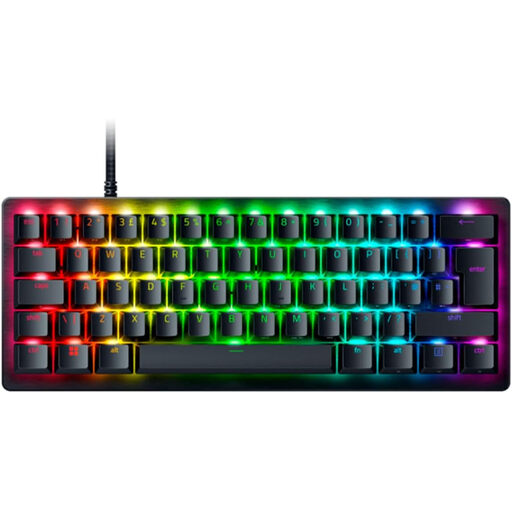
Why This Fits Their Persona: Suited to competitive PC players who value adjustable actuation and a compact footprint for large mouse movements.
The product information specifies per-key actuation adjustment from 0.1mm to 4.0mm, onboard profiles and a detachable USB-C cable rather than relying only on lighting features.
60% form factor, optical analogue switches, Rapid Trigger, double-shot PBT keycaps and six onboard profile slots are specified.
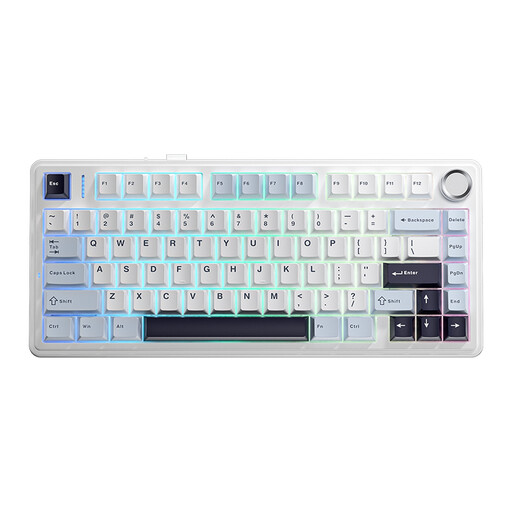
Why This Fits Their Persona: A practical match for students, home-office users and gamers who want one keyboard for wireless desk use, focused work and longer sessions.
Its 75% layout retains more everyday keys than a 60% board, while tri-mode connectivity gives a choice of wired USB, Bluetooth or 2.4GHz use.
The listed features include a 4000mAh battery, hot-swappable sockets, a control knob, PBT keycaps and internal sound-dampening layers.
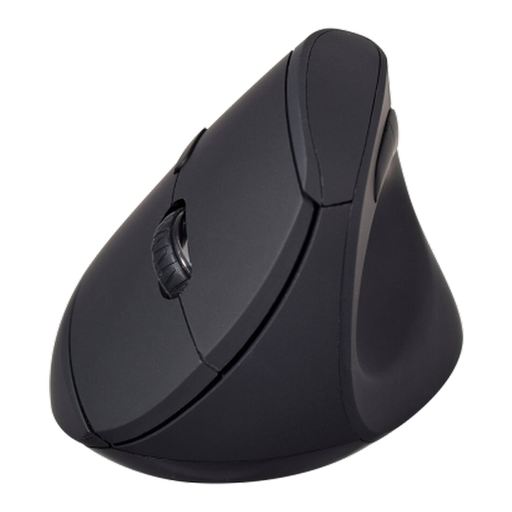
Why This Fits Their Persona: Designed for people alternating between gaming, documents, browsing and home-office tasks who want dual-mode wireless connection and additional controls.
The vertical shape, concave thumb rest and selectable 2.4GHz or Bluetooth connections address desk comfort and cable clutter without requiring a gaming-specific sensor claim.
It has six buttons, 800/1200/1600 DPI settings, an optical sensor and a stated two-year warranty.
We have compiled a complete, real-time list of products that fully satisfy these strict selection criteria and UK safety regulations.
Before ordering, confirm the following:
They can be, particularly if you value distinct key feedback, customisation or hot-swappable switches. However, switch noise, layout and key height matter in shared UK offices or study areas. A quieter mechanical model, a 75% layout or an office keyboard and mouse set may be more suitable for mixed use.
A wired model avoids charging and pairs easily with devices that have a compatible 3.5mm port. A wireless model offers more freedom of movement, but you should compare battery capacity, charging method, wireless mode and microphone performance. The right choice depends on whether cable-free use or simple long-term maintenance matters more.
Lifespan depends on usage, cleaning, storage and component quality. Look for replaceable headset cushions, durable PBT keycaps, detachable cables and stated switch-life figures where available. Keep electronics away from liquids, avoid pulling cables and follow the manufacturer’s cleaning and battery guidance.