Who is choosing a child’s gaming setup?

Parent managing online chat

Your child wants to play with friends, and you need to check which communication permissions come from the account and which are set within the game. Ofcom advises using a child’s correct age wherever a service requires it.

Parent matching friends’ games

You want to establish the exact game, supported devices and cross-platform options before choosing a console, tablet or PC. Microsoft’s Xbox support notes that cross-network play is available in some multiplayer games.

Parent managing a shared device

You need controls that fit how the child will sign in and use a shared console or tablet. Check whether settings apply to an individual child account, an app or everyone using the device.

What should parents prioritise?

Games console

Choose when: the child’s intended games and friends’ devices fit the same console setup.

Trade-off: check cross-play and game-specific chat; Nintendo UK says Switch 2 GameChat requires Nintendo Switch Online, with parental-app setup for users under 16.

Tablet

Choose when: the child’s friends use compatible mobile games and a portable, general-purpose device suits the family.

Trade-off: device settings do not establish who a child can contact in every game, so check the game’s own account and communication controls.

Windows PC

Choose when: the required games or the child’s friends’ arrangements call for PC play, and you can manage both Windows and game-service accounts.

Trade-off: Microsoft Family Safety supports app and game limits on connected Windows devices, while web-activity reporting is limited to supported browsers.

Concern What to check when buying Who this matters to
Chat and contact Check the child’s correct-age account, platform communication permissions and the named game’s chat controls. If my child wants to chat with friends, I need to know which settings govern that conversation. Around 31% of consumers put managing contact and chat first.
Playing with friends Check the exact game and edition, supported devices, cross-platform play and any account or membership requirements. If friends use different devices, I would check the game before buying so we know whether they can play together. Around 25% of consumers put playing with existing friends first.
Age and content Use the child’s correct age where required; compare account-based or console-wide controls with the game’s own permissions. When choosing games for a child, I want age settings and content access to fit their account. About 19% of consumers prioritise age-appropriate access.
Ongoing spending Check the game’s online-play terms, membership requirements and which store or game account processes purchases. I want to understand any membership and purchase controls before settling on a setup. Around 13% of consumers put ongoing spending first.
Playtime scheduling Check whether limits follow the child’s account, an app, the whole console or only a home-network connection. If a device is shared or used away from home, I need to know where its time limits apply. About 12% of consumers prioritise managing when gaming happens.

Buying pitfalls to avoid

  • Buying a device before confirming the friends’ game

    Playing online does not by itself mean that two devices can run the same game together. Cross-network play depends on the specific game and its supported platforms.

    Check the exact game, edition, platforms and account requirements before choosing the hardware.

    A different game edition, platform or online membership may be needed.

  • Assuming device controls cover every in-game conversation or purchase

    Game services can have their own communication settings. Google says Family Link purchase approvals apply to purchases made through Google Play’s billing system.

    Review the child’s device account, store settings and individual game-service controls separately.

    Separate account checks may mean another round of setup.

  • Assuming a Bluetooth headset microphone works with Switch 2

    Nintendo says Bluetooth microphones cannot be used with Switch 2, even though the console supports Bluetooth audio devices.

    Check microphone input compatibility for the exact console and intended chat feature before ordering.

    You may need an alternative microphone connection or a different compatible accessory.

  • Treating router controls as a replacement for a child’s account

    Home-network schedules and filtering manage connection access, not the game’s communication permissions, and apply to use of the managed connection.

    Use supported network controls as an additional layer alongside the relevant platform and game accounts.

Relevant brands to consider

Nintendo

Relevant when the child’s intended games suit Nintendo Switch play and the family wants handheld as well as shared-screen options.

  • Nintendo UK documents TV, tabletop and handheld play on Switch 2.
  • Nintendo UK says parental restrictions apply to the console rather than separately to each user. Switch 2 GameChat has additional membership and parental-app requirements.

Sony PlayStation

Relevant when the child’s intended games and friends’ arrangements call for PlayStation.

  • PlayStation Support UK documents family-based child controls for games, communication and spending.
  • Sony’s PS5 Digital Edition has no disc drive. Sony lists a paid PlayStation Plus requirement for online multiplayer; check the chosen game’s terms.

Microsoft Xbox

Relevant when the child’s games and friends’ arrangements fit Xbox, or when a household is considering connected Windows devices too.

  • Xbox Support UK documents family settings for content, communication and multiplayer. Xbox says multiplayer for free-to-play console games is available without charge.
  • The Xbox Series S 512 GB model is all-digital; disc-based games are not compatible with that model. Check online-play terms for other games.

Apple

Relevant when the child’s friends use compatible tablet games and the family wants an iPad with account and Screen Time tools.

  • Apple Support UK documents controls for apps, content, communication and device use on iPad.
  • Device controls do not confirm a particular game’s friend or chat settings. Apple’s UK listing identifies 128 GB starting storage for the 11-inch iPad (A16); check game compatibility for the exact model.

Samsung

Relevant when compatible games make an Android tablet a suitable route for the child’s setup.

  • Samsung describes Samsung Kids and Galaxy for Families controls; Google documents Family Link supervision for supported Android devices.
  • Check the exact tablet, account and game rather than assuming that every mode has the same controls or governs in-game chat.

Joybuy gaming setup options

These Joybuy options include Nintendo Switch consoles, Xbox Series S consoles and an Android children’s tablet. Match a device to the exact game and friends’ platforms, and check game-account settings separately.
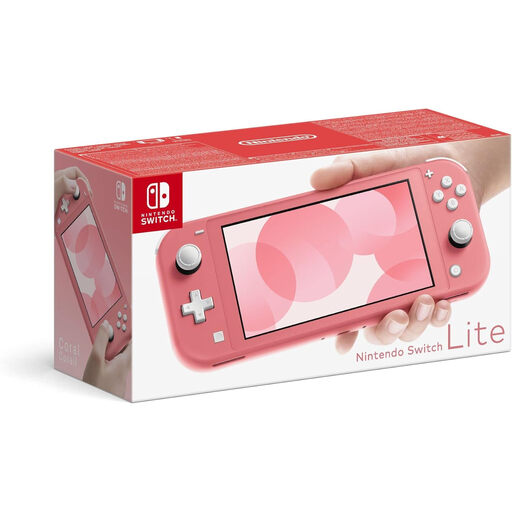
Nintendo Switch Lite in Coral

Nintendo Switch Lite – Coral

A handheld console option when the child’s intended games and friends’ arrangements fit Nintendo Switch play.

The listing says online play requires a Nintendo Switch Online subscription. Nintendo UK says Switch parental restrictions apply to the console, not separately to each user.

Joybuy

Nintendo Switch 2 Console, UK Version

Nintendo Switch 2 Console (UK Version)

Consider it when the child’s games and friends’ arrangements fit Nintendo Switch play and the family wants to switch between play styles.

Nintendo UK documents TV, tabletop and handheld play. Its parental restrictions apply to the console, not separately to each user. GameChat requires Nintendo Switch Online; users under 16 also need parental-app setup.

Joybuy
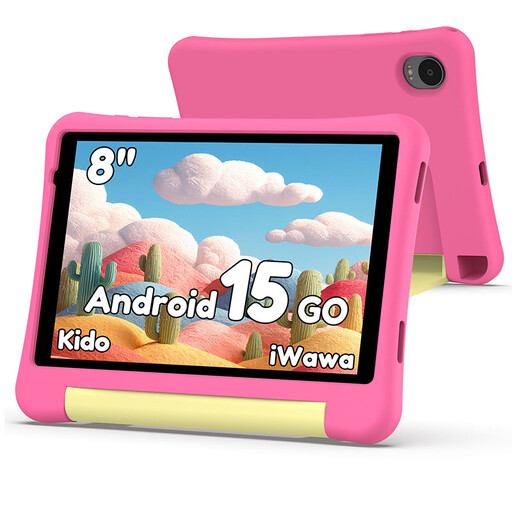
Alldocube Kido 8-inch Android 15 children’s tablet

Alldocube Kido 8-inch Android 15 Children’s Tablet

A tablet option when the child’s intended games are compatible with this type of device and the family wants app-management controls.

The listed specifications include Child Lock, Unisoc T310, 3GB+32GB, 5G WiFi, a 5000mAh battery, two speakers and a 3.5 mm socket. The listing says no adapter is included. Check game-level chat controls and support for the exact model and account.

Joybuy

Xbox Series S 512 GB Console in White

Xbox Series S 512 GB Console – White

Consider it when the child’s intended games and friends’ arrangements fit Xbox, and an all-digital console suits the household.

This is a 512 GB all-digital model with no disc drive; disc-based games are not compatible. Check online-play requirements for the chosen game.

Joybuy

Xbox Series S 1 TB

Xbox Series S 1 TB

Consider it when the child’s intended games and friends’ arrangements fit Xbox and an all-digital console suits the household.

The listing identifies this as a 1 TB all-digital console. Check online-play requirements and the child’s account settings for the chosen game.

Joybuy

Questions about children’s online gaming setups

Does a child’s correct age on an account set permissions in every game?

No; an account’s age does not establish that every game uses the same communication controls. Ofcom advises parents to use the child’s correct age wherever a service requires it, then check the device or family-account settings and the named game’s controls separately. Roblox documents age-dependent communication settings of its own.

What should I check before setting up a shared console?

Check whether restrictions apply to the child’s account or to the whole console. Nintendo UK says Switch and Switch 2 parental restrictions apply to everyone using that console; PlayStation Support UK says to create a family and add the child for its family controls.

Will Bluetooth headphones provide a microphone for Switch 2 GameChat?

No, Nintendo says Bluetooth microphones cannot be used with Switch 2. Check the microphone connection for any alternative accessory before buying. GameChat also has separate membership and parental-app conditions.

Do we need a subscription for online play?

It depends on the platform and game. Nintendo UK says Switch 2 GameChat requires Nintendo Switch Online, and Sony lists a paid PlayStation Plus requirement for online multiplayer on its PS5 Digital Edition page. Xbox says multiplayer for free-to-play console games is available without charge. Check the exact game’s terms before choosing a setup.

Can children on different devices play the same game together?

Only when the exact game supports the relevant devices and cross-platform play. Microsoft’s Xbox support notes that some multiplayer games offer cross-network play; check the game, edition, friend accounts and online mode before buying hardware.