Choose the game and the friends your child wants to play with first, then check the game’s supported devices, edition, account permissions and online-play requirements before choosing equipment. A shared console may suit play in one room, while a gaming PC or laptop offers a different game library; add controllers, a headset, storage or network equipment only when they fit the chosen game and device.
Who this guide is for
Parents managing online chat
If you are choosing a platform or headset, check the child’s account and the game’s chat settings as well as the equipment. Ofcom reported on 13 October 2026 that 64% of parents of 3–17-year-olds who game online were concerned about contact with strangers through games or chat.
Families joining friends’ games
If your child wants to join particular friends, confirm the exact game edition, supported platforms, account permissions and any online membership requirement before choosing a device.
Households sharing a setup
If several people will use one device or display, check how many players the game supports at once and whether restrictions apply to each account or to the whole console.
What to prioritise before buying
For UK households choosing shared online-gaming equipment for children aged 8–17, start with the child’s main need: joining friends, managing communication or sharing a device.
| Concern |
What to check when buying |
Who this matters to |
| Communication and account controls |
Check the child’s console account, the game’s own chat settings and any parental approval needed for the intended feature. |
If I want to know who my child can contact before choosing a headset, I need to check account and game settings too. Consumers who put chat controls first could account for around 28% of this group. |
| Game and friend compatibility |
Confirm the exact game edition, friends’ devices, cross-platform support and any account or membership requirements. |
When joining particular friends is the priority, I would check the game and their devices before settling on a platform. Consumers focused first on joining the intended game and friends could make up around 22%. |
| Sharing the device |
Check local-player support, the number of controllers needed and whether restrictions apply per account or across the console. |
If several people will share a screen or take turns, I need a setup that suits both the game and the household. Consumers prioritising shared-device use could represent around 22%. |
| Memberships and accessories |
Check the game’s online-play requirements, which accounts a membership covers and whether the headset or controller connects to the chosen device. |
When I want to understand the whole setup before buying, I would check subscriptions and compatible accessories as well as the console. Consumers whose first concern is memberships and accessories could account for around 17%. |
| Connection and storage |
Check the connection where the device will be used; for storage, confirm the exact console and supported expansion format. |
If online play is already unreliable or downloaded games fill the console, I would investigate that specific issue before adding equipment. Consumers focused first on connection or storage could make up around 11%. |
Buying pitfalls to avoid
-
Assuming a headset will enable chat
A compatible headset cannot override restrictions set on a platform account or within a game’s own account system.
Set up the child’s accounts and check the intended chat feature before choosing a headset.
-
Buying a platform before checking friends’ game editions
An online-capable console does not by itself establish that the game, edition and friends’ devices can join the same session.
Confirm the game title and edition, friends’ platforms, cross-platform support and account requirements first.
-
Assuming one membership covers everyone using a console
Nintendo says that users sharing a console are not automatically included in a family membership.
Check which accounts need cover and whether they have been added to the relevant family group.
-
Buying storage that only looks compatible
Nintendo, PlayStation and Xbox specify different storage arrangements for the consoles covered here.
Identify the exact console and check its supported storage type and any installation requirements before ordering.
Relevant brands to compare
Nintendo
Relevant if the household wants to play on a console screen as well as a TV, and the intended games work with the friends’ devices.
- Nintendo specifies 256 GB of internal storage for Switch 2 and microSD Express for expanded storage.
- Parental restrictions apply to the console; GameChat has separate requirements, including parental-controls app setup for users under 16.
PlayStation
Consider a PS5 variant when the intended games and friends use a compatible PlayStation version.
- Sony documents child-account settings for games, playtime and communication.
- The Digital Edition has no disc drive. PlayStation Plus includes online multiplayer, but check the requirement for the specific game.
Xbox
Xbox Series S is a digital-only console route with family settings for members of the household.
- Microsoft documents communication and multiplayer settings for family members.
- Series S variants are listed with 512 GB or 1 TB storage and cannot use discs; match the storage and accessories to the selected variant.
Lenovo
Legion gaming laptops are a PC route when the household also wants a computer.
- Lenovo’s UK Legion 5 Gen 10 listings include different memory, storage and graphics configurations.
- Check the exact configuration against the intended game’s system requirements; suitability cannot be assumed for the whole product line.
Seagate
Relevant to an Xbox household that has established a need for additional compatible game storage.
- Xbox describes its Series X|S Storage Expansion Card as an expansion option intended to maintain the console’s internal-SSD performance.
- This card is not established as compatible with Switch 2, PS5 or a gaming laptop.
Joybuy products for shared online gaming
These Joybuy options cover Nintendo Switch 2 and Xbox console play, plus an Xbox controller and Switch 2 storage expansion. Check the intended game, account settings and device compatibility before adding accessories.
 No image available
Nintendo Switch 2 Console + Nintendo Switch Sports Resort
Suited to a household choosing Switch 2 for play on its screen or a TV.
The product description lists Joy-Con 2 controllers, a game download and a three-month Nintendo Switch Online membership. Online services require an account and internet access; check the specific game’s membership requirements.
For children under 16 using GameChat, Nintendo requires the parental-controls app for setup.
Joybuy
 No image available
Xbox Series S 512GB Console - White
Suited to a household choosing an all-digital Xbox console and checking that its intended games are available in digital form.
This variant has 512 GB storage and no disc drive; disc-based games are not compatible with Xbox Series S.
Xbox documents family communication and multiplayer settings. Check the intended game and account requirements before relying on online play.
Joybuy
 No image available
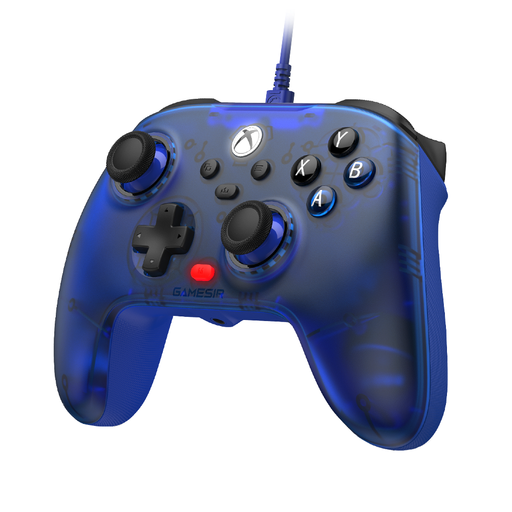
GameSir T7 Wired Xbox Controller with Hall Effect Joysticks and Triggers (Blue)
Relevant if a compatible Xbox or Windows setup needs a wired controller.
The product listing names Xbox Series X|S, Xbox One, Windows 10/11 and Steam compatibility. It specifies a detachable USB cable, Hall Effect joysticks and triggers, and a 3.5 mm headphone jack.
The controller uses a wired USB connection. A controller or headset does not change account- or game-level chat permissions.
Joybuy
 No image available
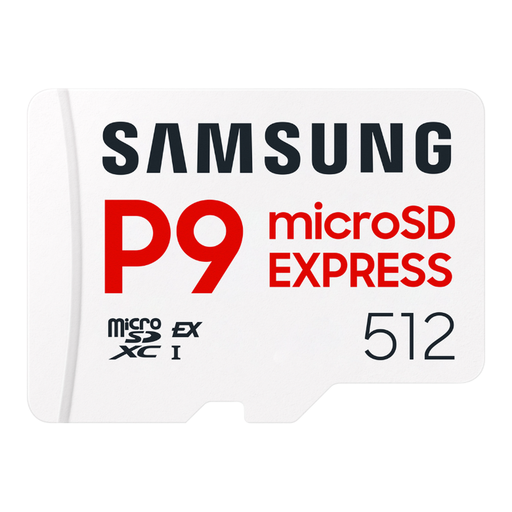
Samsung MicroSD 512GB P9 Express
Relevant to a Switch 2 household that needs additional game storage.
The listing identifies a 512GB microSD Express card compatible with Switch 2. Nintendo specifies microSD Express for Switch 2 game-storage expansion.
The product listing states that UHS-I hosts operate at UHS-I speeds.
Joybuy
Frequently asked questions
Should I buy a headset so my child can talk to friends?
Check the game, the child’s platform account and any separate publisher account first. PlayStation can restrict child-account voice and text communication, and Epic says some Cabined Account chat features remain unavailable while parental consent is outstanding. A compatible headset does not change those permissions.
How can I check whether my child can join friends on another platform?
Check cross-platform support for the exact game and edition, then confirm the friends’ devices and the child’s account permissions. Support can vary by game, so do not assume that two online-capable devices can join the same session.
Can siblings share one Nintendo Switch Online family membership?
Yes, if each Nintendo Account needing the service is added to the purchaser’s family group. Nintendo says sharing a console alone does not automatically cover those users.
Can I use a standard Switch microSD card to expand Switch 2 game storage?
No. Nintendo specifies microSD Express for Switch 2 game-storage expansion, so check the card standard before buying.
What should I check before buying equipment for unreliable online play?
Check for a provider outage and heavy simultaneous downloads or streaming before buying network equipment. Ofcom advises trying a suitable network cable for a stationary device with an Ethernet socket where possible.


