Families joining friends online
Check which games and platforms friends use, whether the game supports playing together, and what the child account allows. Ofcom reports that many children play with friends, family or people they know in person.


Start with the exact game and the platforms your child’s friends use: a console, gaming PC or handheld only fits if that title supports the way they want to play together. Then decide whether play will use a shared TV or a separate screen, and check child-account chat controls and any game-specific membership before choosing hardware. Ofcom reports that many children play with friends, family or people they know in person, but the right setup still depends on the game and household.
Check which games and platforms friends use, whether the game supports playing together, and what the child account allows. Ofcom reports that many children play with friends, family or people they know in person.
Decide whether gaming can use the household TV or whether a handheld or laptop screen would suit your routine better. Check that the intended game works on the device you choose.
Compare child-account settings for chat, friend access, playtime and spending before enabling online sessions. Ofcom identifies contact with strangers as a leading concern among parents of children who play online.
Confirm the game and friends’ platforms first; then choose a screen arrangement and review the account controls and ongoing requirements that come with that setup.
| Concern | What to check when buying | Who this matters to |
|---|---|---|
| Joining the intended games and friends | Check the exact game, friends’ platforms, cross-network play and account requirements. | If your child has a particular friend group in mind, check the game and each friend’s platform before choosing hardware. Around 28% of consumers put joining the intended games and friends first. |
| Controlling voice, messages and contacts | Review child-account, friend, voice, text and game-specific chat settings. | If you want to manage who can contact your child, compare the account and game chat settings before enabling play. Around 28% of consumers make contact and chat controls their first priority. |
| Fitting play around household screens | Decide where sessions will happen; check the device’s screen, TV connection and game compatibility. | When the TV is often in use, consider where your child can play and whether the intended game runs on that device. Around 17% of consumers put fitting play around household screens first. |
| Continuing online-play costs | Check the intended game’s multiplayer terms and any applicable membership. | If you want to understand continuing costs before settling on a device, check the game’s online requirements and relevant membership. Around 16% of consumers put ongoing costs first. |
| Buying only necessary accessories | Check the game’s chat or local-play features, device connections and storage format. | When you are deciding whether to add a headset, camera, controller, storage card or dock, match it to the exact setup and feature. Around 11% of consumers put accessory fit first. |
Cross-network play depends on the specific game and account settings, so owning the same broad type of device does not establish that children can join one another.
Check the exact game, each friend’s platform and the child account’s permissions before buying.
Controls vary by platform and feature. For example, Steam Families settings apply to Steam features, while Switch 2 GameChat has separate supervised-friend conditions.
Set up the child account and test the permitted contact and chat route before regular online sessions.
Membership requirements vary by platform and game, and free-to-play titles can be exceptions.
Check the intended game’s multiplayer terms and any applicable membership before comparing the setup’s continuing costs.
Switch 2 game-storage expansion uses microSD Express, and its optional GameChat video uses a separately sold compatible USB camera; the console has a built-in microphone.
Match each accessory to the exact console and the feature your child will use.
An incompatible storage card or an unnecessary camera may mean replacing an accessory.
Switch 2 offers handheld, tabletop and TV display modes. Nintendo UK lists a built-in microphone, while supervised GameChat access has separate parental-control conditions.
PlayStation consoles provide a TV-based route with child-account communication settings through PlayStation Family.
Xbox Series consoles offer a TV-based route with family settings for communication, content, multiplayer and screen time.
Steam Deck OLED is a portable PC-gaming option when the intended Steam titles suit the device.
Lenovo LOQ and Legion gaming laptops offer a separate-screen PC route when the intended games and household setup suit a laptop.
These Joybuy choices cover voice-chat accessories, gaming laptops and consoles for a child’s online gaming setup. Check each game’s compatibility and account requirements before choosing a device.
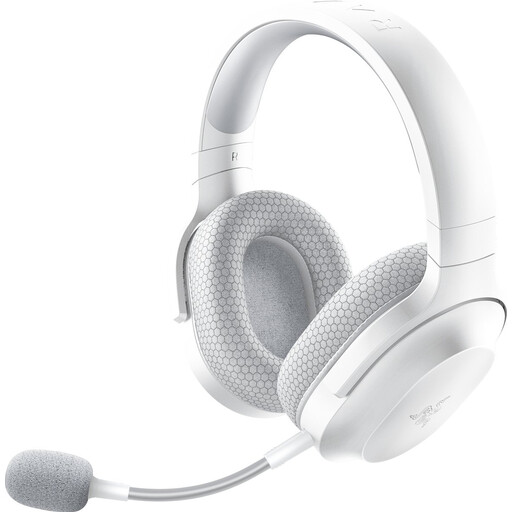 Image unavailable
A detachable microphone makes this an option when a compatible gaming setup needs voice communication.
The listed connections are 2.4 GHz wireless, Bluetooth and wired. Listed compatibility includes PC, PlayStation, Nintendo Switch and mobile devices; check the exact device before choosing.
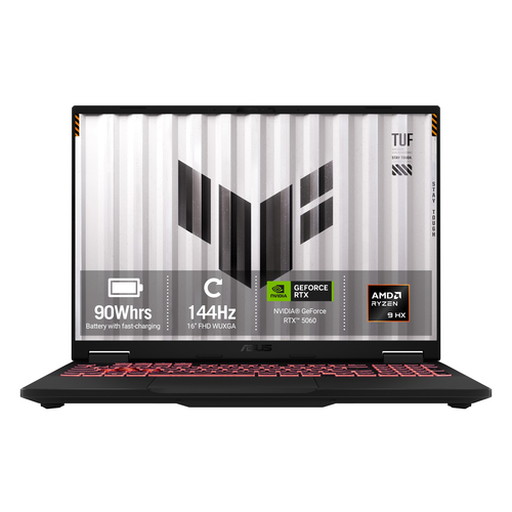 Image unavailable
Its built-in screen offers a separate-screen option when the shared household TV is in use; check the intended PC game’s requirements.
Listed specifications include a Ryzen 9 8940HX processor, RTX 5060 Laptop GPU, 16 GB DDR5 memory, 1 TB NVMe SSD and a 16-inch WUXGA 144 Hz display. The product description identifies Windows 11.
 Image unavailable
Handheld play and TV output via a dock offer different ways to fit gaming around household screens; confirm the intended game supports the setup.
Listed features include a 7.9-inch screen, attached Joy-Con 2 controllers and 256 GB internal storage. Game-storage expansion uses a microSD Express card.
 Image unavailable
This TV-connected console is an option if the intended setup uses physical games; check game and account requirements separately.
The listed features include an Ultra HD Blu-ray drive and DualSense controller. The product description identifies PS5 and PS4 game-disc support as well as digital downloads.
 Image unavailable
This TV- or monitor-connected option suits a digital-game setup; check the exact game’s multiplayer and account requirements.
The listed configuration has a 1 TB SSD and includes an Xbox Wireless Controller and HDMI cable. It is an all-digital console with no disc drive.
Only if the particular game supports the relevant cross-network arrangement and the child account allows it. Xbox documents cross-network play for some games, not all, so check the exact game and friends’ platforms before buying.
Create the platform’s child or supervised account, then review its game, communication, playtime and spending settings. PlayStation describes separate child accounts, Xbox provides family-member settings, and Nintendo’s GameChat permissions need separate attention.
For a user under 16, Nintendo requires the parental-controls app to be set up before GameChat use, and a parent must approve friends for that feature. Nintendo also specifies a Nintendo Switch Online membership for GameChat; these are feature-specific conditions, not a general rule for all game chat.
It depends on the game and platform. Nintendo says many Switch games require Nintendo Switch Online but identifies free-to-play exceptions; Xbox says free-to-play multiplayer is open to Xbox players; PlayStation lists online multiplayer among PlayStation Plus benefits. Check the intended game’s terms.
Not for every setup. Nintendo Switch 2 has a built-in microphone for GameChat, while Nintendo identifies a separately sold compatible USB camera for optional video chat. For other platforms or in-game chat, check the specific device and chat method before choosing an accessory.