
24/7 Customer Support

Free returns

Same-day & Next-day Delivery

Quality Guaranteed

Unlock Your Welcome Offers: FREE Delivery | Up to 80% OFF | Free 30-day JoyPlus trial
Download the APP
A suitable set of gaming simulator controls can make driving and flying games feel more natural, but choosing the wrong hardware can lead to compatibility problems, uncomfortable setups and unnecessary expense. A wheel designed for PlayStation may not work with Xbox, while a detailed flight controller can be excessive if you only play occasionally.
Before buying, focus on the connection standard, the type of feedback or sensors used and whether your desk or cockpit can support the equipment. The following guide explains the main pitfalls and highlights suitable options for different UK gaming setups.
A racing wheel may connect to a PC but lack support for your console. Xbox, PlayStation and Windows compatibility are often separate, so check the official platform list rather than relying on a USB connection alone.
For example, an Xbox racing wheel is not automatically suitable for PS5, and a PS5 racing wheel may not be recognised by an Xbox console. Game support can also vary. Check compatibility for the specific title, such as Forza Motorsport, Gran Turismo 7, Assetto Corsa or Microsoft Flight Simulator, before placing an order.
A direct drive racing wheel with strong force feedback can require a sturdy racing cockpit or heavy desk. If it is clamped to a lightweight table, the base may move during braking or cornering. Similarly, a full HOTAS flight controller with numerous switches may take time to configure and occupy considerable desk space.
Consider your available room, preferred games and typical session length. A simpler control system may be more practical for a bedroom or shared living space.
The wheel receives most of the attention, but pedals influence braking and acceleration control just as much. Look for stable construction, adjustable positioning and consistent sensor performance. Magnetic or Hall Effect sensors avoid the contact wear associated with traditional potentiometers, although the complete system still needs sensible handling and secure mounting.
For force feedback racing wheels and high-torque systems, cable routing and fixing points also matter. Loose cables can create trip hazards, and an unsecured wheel base can shift during use.
Start by identifying your main device:
A product that works on PC through DirectInput may not provide the same plug-and-play experience on a console.
A force feedback racing wheel uses motorised resistance and vibration to communicate information such as kerbs, grip and steering load. Hybrid systems combine belt and gear mechanisms, while a direct drive racing wheel connects the wheel more directly to the motor. Direct drive systems can offer stronger, more detailed feedback, but they usually demand a firm mounting surface and higher spending.
Wheel rotation also affects the driving feel. A 240° wheel can be accessible for casual play, whereas up to 900° or more may suit a wider range of driving simulations. For pedals and joysticks, Hall Effect or other contactless magnetic sensors are useful specifications because they are designed to provide consistent input without potentiometer wear.
Measure your desk before buying. Check the clamp opening, pedal footprint, cable length and clearance around the wheel. A flight yoke and throttle quadrant may need more depth than a joystick, while a dual-throttle HOTAS flight controller may require two separate USB connections.
For UK homes, also consider storage. Equipment that can be removed without tools is easier to put away after a session. Heavy direct-drive bases and metal pedal assemblies are more suited to a dedicated rig or a permanently available desk.
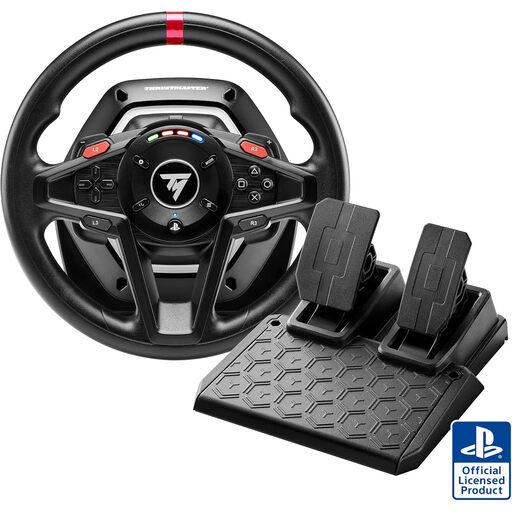
Why This Fits Their Persona: This compact bundle suits new sim-racing players using a PlayStation console or Windows PC, without requiring a dedicated cockpit.
Its stated PS5, PS4 and PC compatibility helps reduce platform uncertainty, while the included pedals avoid the need to buy a separate set.
Hybrid Drive force feedback, magnetic paddle shifters, engine-speed LED display and magnetic T2PM pedals.
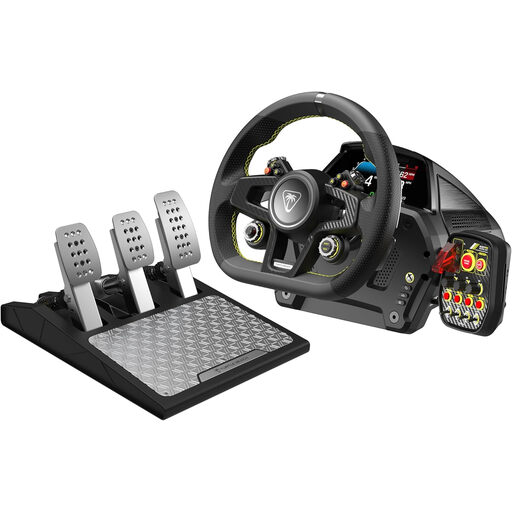
Why This Fits Their Persona: Designed for Xbox and PC users who have a stable desk or cockpit and want a more detailed, adjustable driving setup.
The direct-drive base and included mounting hardware make the support surface a clear part of the purchase decision rather than an afterthought.
7.2 Nm direct-drive force feedback, up to 2,600° rotation, aluminium pedals and a load-cell brake.
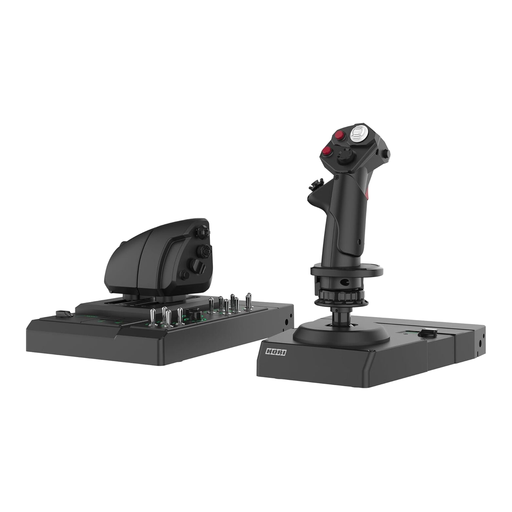
Why This Fits Their Persona: This PC-only setup is aimed at flight-simulation players who want extensive physical controls for combat or aircraft management games.
The adjustable steel desk mount addresses stability, while the Windows compatibility and configuration app clarify the intended platform.
Hall Effect joystick sensing, dual throttle with adjustable resistance, rudder control and more than 200 configurable functions.
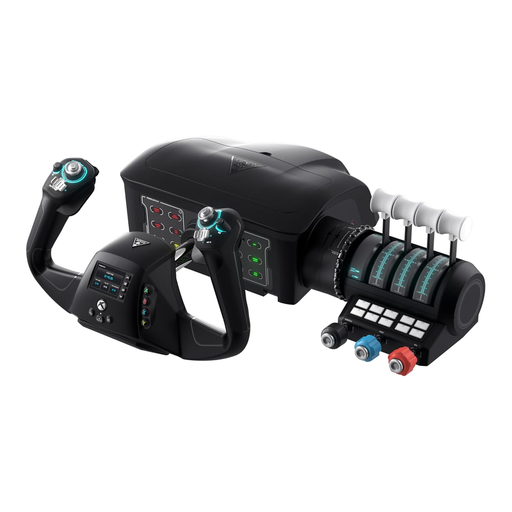
Why This Fits Their Persona: Xbox and PC pilots wanting a single yoke-based system with integrated rudder controls and throttle functions may prefer this tidy arrangement.
It combines the yoke, rudder controls, trim wheel and throttle quadrant, reducing the need to purchase several separate flight simulator controls.
180° yoke rotation, integrated rudder and brake controls, modular throttle handles and a Flight Management Display.
Secure wheels, pedals, yokes and HOTAS flight controllers before use. A clamp should sit fully over a stable surface, while pedals should rest against a wall, pedal plate or suitable stopper. Keep USB and power cables away from walkways, and use only the supplied power adapter where one is provided.
On PC, install the relevant drivers or configuration application, then calibrate steering, throttle, brakes and dead zones in the game. Start with moderate force feedback and increase it gradually. This helps you establish comfortable resistance without making the wheel difficult to control.
We have compiled a complete, real-time list of products that fully satisfy these strict selection criteria and UK safety regulations.
Most USB systems are straightforward, but console compatibility and in-game mapping still need checking. Racing wheels normally require calibration, while HOTAS flight controller setups may involve assigning several axes and buttons. Begin with a supported game profile and adjust sensitivity after a few sessions.
A powered force feedback wheel uses more electricity than a standard gamepad because its motor needs power. Actual consumption varies by model and feedback intensity. Switch the system off when not in use and avoid leaving the power adapter connected unnecessarily.
Lifespan depends on construction, usage frequency, storage and maintenance. Contactless magnetic sensors are designed to avoid potentiometer wear, but cables, clamps, pedals and moving mechanisms still require careful handling. Keep equipment dry, do not force connectors and store removable controls safely between sessions.