Handheld-seat commuters
If you expect to hold a tablet in your seat and pack it into a small bag afterwards, dimensions and weight deserve attention before screen size. A compact display leaves less room for maps and dense menus.


For role-playing games played mostly while holding a tablet in a train seat, start with a compact 8–9-inch model; choose a larger screen when reading maps and menus matters more than handheld convenience. If demanding Android games are the priority, examine gaming-focused hardware, but check each game’s compatibility and offline requirements before relying on it for a journey. National Rail says onboard Wi-Fi availability and charges vary.
If you expect to hold a tablet in your seat and pack it into a small bag afterwards, dimensions and weight deserve attention before screen size. A compact display leaves less room for maps and dense menus.
If your intended RPGs are demanding, gaming-oriented hardware may be worth investigating. Check the exact games rather than assuming that a processor or high-refresh display establishes their performance.
If you spend time reading dialogue, checking maps or managing a party, a larger display may be more comfortable. Allow for its larger footprint when deciding how you will hold and carry it.
Decide how you will play in your seat before comparing screen sizes: a tablet held for most of the journey presents a different trade-off from one used with a stand or table.
Choose it when: a small tablet for handheld play and packing matters more than a broad view of RPG maps.
Trade-off: Apple UK lists an 8.3-inch display and a 293 g Wi-Fi model; check whether the smaller interface and the game’s iPadOS support suit you.
Choose it when: Android gaming features take priority, but you still want an 8.8-inch format.
Trade-off: Lenovo UK lists a 350 g weight and a 165Hz display, but the panel specification does not establish any particular RPG’s frame rate.
Choose it when: space for maps, text and menus matters more than compact handheld use.
Trade-off: Samsung UK lists a 10.9-inch display for its Wi-Fi model; consider its larger footprint and do not assume that model has cellular connectivity.
| Concern | What to check | Who this matters to |
|---|---|---|
| Handheld comfort | Compare dimensions and weight with the case attached; consider whether you will hold the tablet or use a stand. | If I will hold the tablet through much of the journey, I want it to feel manageable and fit easily into my bag. Around 36% of consumers put compact handheld use first. |
| Demanding games | Check the exact RPG’s operating-system support and game-specific performance information; a refresh-rate specification alone cannot establish frame rate. | When a demanding Android RPG is my main reason for buying, I care more about how that title runs than about having the smallest device. Performance is the primary concern for around 29% of consumers. |
| Maps and menus | Assess the intended game’s text and controls at the screen size you want; allow for the tablet’s footprint in your seat. | I would accept a larger tablet if it made the maps, dialogue and party screens I use easier to view. Around 21% of consumers place interface readability first. |
| Connection and offline play | Confirm whether each game launches and plays offline, then check your operator’s Wi-Fi and socket provision or your own mobile-data option. | If my game needs a connection, I want a plan that does not depend entirely on train Wi-Fi. Keeping play available during the journey comes first for around 14% of consumers; National Rail says Wi-Fi availability and charges vary. |
National Rail says Wi-Fi availability and charges vary between train services, so a game that needs a connection may not work as planned on every journey.
Download game content before travelling, test the game’s offline behaviour and check your train operator’s Wi-Fi provision if online play is essential.
Using a cellular plan or phone hotspot can also consume your mobile-data allowance.
A larger display offers more space for maps and menus, but an 8.3-inch or 8.8-inch tablet takes up less room when held in a train seat than a 10.9-inch model.
Compare dimensions with your case fitted and decide whether you expect to play handheld, with a stand or at a table.
Lenovo UK lists a 165Hz display for the Legion Tab Gen 3, but a game’s own limits and optimisation affect what that title can display.
Check developer compatibility guidance or reliable testing for the exact RPG rather than treating the display figure as its frame rate.
Samsung UK says the Galaxy Tab S10 FE and S10 FE+ do not include a travel adapter. Apple UK lists a USB-C charging cable, rather than a wall adapter, in the iPad mini box.
Check the contents of the exact product you choose and decide whether you also need an adapter, case, stand, controller or storage card.
Carrying a case, stand or controller also adds bulk to the setup you will use on the train.
Apple UK lists the iPad mini (A17 Pro) as an 8.3-inch option with a 293 g Wi-Fi model and a separate cellular option.
Lenovo UK positions the Legion Tab Gen 3 around mobile gaming, listing an 8.8-inch display, Snapdragon 8 Gen 3 hardware and a 350 g weight.
Samsung UK lists the Galaxy Tab S10 FE Wi-Fi model with a 10.9-inch display, 90Hz refresh rate and microSD expansion of up to 2TB.
These Joybuy choices span a compact iPad and larger-screen tablets. Compare how each would fit your seat, bag and intended RPG before deciding whether extra display area is worth carrying.
 Image unavailable
Consider this compact option if you expect to hold your tablet while playing. Check whether the intended RPG’s maps and menus suit the 8.3-inch display and whether the game supports iPadOS and offline play.
The product name specifies 512GB storage.
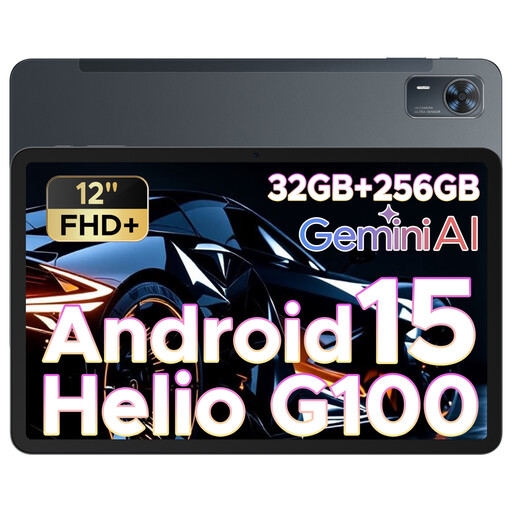 Image unavailable
Consider the larger screen if you expect to view RPG maps and menus with the tablet supported rather than held throughout the journey. Check how its 12-inch format fits your seat and whether your game runs offline.
The product name states a 90Hz display, Helio G100 processor, 256GB storage and a SIM slot. Confirm network compatibility before depending on mobile data.
 Image unavailable
This 11-inch option is worth comparing if you want more room for RPG interfaces than a compact tablet provides. Check its weight and dimensions if you plan to hold it for much of the journey.
The product name states a 90Hz display and Helio G100 processor. Confirm the supplied storage configuration, the game’s Android compatibility and whether it plays offline; do not assume the listed SIM slots establish a usable mobile-data service.
 Image unavailable
Consider this larger format if viewing maps takes precedence over holding the tablet in a confined seat. Check its weight and dimensions, as well as the intended RPG’s Android support and offline behaviour.
The product name states a 2K display, Helio G99 processor, 256GB storage, dual-SIM 4G LTE and an included stylus. Confirm supported mobile bands and service compatibility if you intend to use cellular data.
 Image unavailable
Compare this tablet if storage for games and downloads matters to you. Check its operating system against the exact RPG, and check its dimensions before choosing it for handheld train use.
The product name specifies 12G RAM and 512G ROM. Confirm whether the game can launch and play offline before travelling.
Wi-Fi-only can suit games that launch and play offline after their content is downloaded, or journeys where you have a suitable phone hotspot. If a game needs a connection, check its requirements and your mobile-data option: National Rail says onboard Wi-Fi availability and charges vary. Apple UK lists a separate Wi-Fi + Cellular version of the iPad mini, so check the exact variant if cellular access matters.
Check the publisher’s compatibility information for the exact game and version, including its supported operating system, storage needs, controller support and account or internet requirements. Confirm whether it launches and remains playable offline if you expect to play without a dependable connection.
Check the in-box contents of the exact tablet: Samsung UK says the Galaxy Tab S10 FE and S10 FE+ do not include a travel adapter, while Apple UK lists a USB-C charging cable for the iPad mini. A cable does not establish that a wall adapter is included.
Pack it securely in a case or bag that you can carry comfortably, and keep it clear of aisles and access areas. National Rail advises that luggage should be securely packed and light enough to carry; check your train company’s policy for the journey.