Choose a compact tablet if carrying and holding it matters most, or a larger screen if reading dialogue and exploring detailed scenes takes priority. A gaming-focused Android tablet is worth considering for demanding native Android games, but its hardware specifications do not establish how a particular game will run. For an airport session, download compatible games before travelling rather than depending on a connection for console streaming.
Who is this for?
Carry-on light travellers
If your tablet needs to fit in a small cabin bag and feel manageable while you wait at the gate, compact models are a useful starting point. Apple lists the iPad mini at 8.3 inches and 293g for the Wi-Fi model; Lenovo lists the Legion Tab Gen 3 at 8.8 inches and 350g.
Story-game immersion seekers
If dialogue, maps and scenery matter more to you than a small bag footprint, compare larger displays such as the 11-inch iPad Air and 10.9-inch Galaxy Tab S10 FE. Check that you are comfortable carrying and holding the size you choose.
Native Android gaming enthusiasts
If you intend to install Android games rather than rely mainly on streaming, gaming-oriented hardware such as the Lenovo Legion Tab Gen 3 may be relevant. Confirm that your games run on the exact tablet before choosing it for its processor or display refresh rate.
What matters when choosing?
Start with the games you want to play and whether they must work without a connection. Then weigh screen space against the tablet’s size and the time you expect to hold it.
| Concern |
What to check |
Who this matters to |
| Carrying and holding |
Compare screen size, the Wi-Fi model’s weight and the space available in your cabin bag. Apple lists the iPad mini at 293g and the 11-inch iPad Air at 464g; Lenovo lists the Legion Tab Gen 3 at 350g. |
I want to hold the tablet at the gate and put it away easily when boarding. Around 25% of consumers put carrying and holding comfort first. |
| Downloaded games and storage |
Check each game’s installed size and the tablet’s storage configuration. Samsung specifies microSD support up to 2TB for the Galaxy Tab S10 FE; choose an iPad mini or iPad Air with enough internal storage for your plans. |
If the airport connection is unreliable, I want my games and updates ready on the tablet. For around 31% of consumers, local play and storage are the primary concern. |
| Readable screen |
Compare display size and how comfortably you can read dialogue and maps. Apple lists an 11-inch display for the iPad Air, while Samsung lists 10.9 inches for the Galaxy Tab S10 FE. |
Small text and visual clues could make a compact screen frustrating during a story-heavy game. Readability comes first for around 19% of consumers. |
| Native gaming or streaming |
For installed Android games, check game compatibility and the exact hardware. For PS Remote Play, confirm a compatible device, a PS4 or PS5 and a connection: PlayStation requires at least 5Mbps and recommends at least 15Mbps for a better experience. |
I may need hardware for demanding Android games, or a dependable connection to play games from my console. Around 25% of consumers put these gaming requirements first. |
Mistakes to avoid
-
Choosing a tablet by refresh rate alone
A 165Hz display, as specified by Lenovo for the Legion Tab Gen 3, does not mean every adventure game will run at that frame rate.
Check the games you intend to play, their platform availability and their graphics settings before making refresh rate the deciding factor.
-
Treating Remote Play like an offline game
PS Remote Play needs a PS4 or PS5 and a suitable connection. PlayStation specifies a 5Mbps minimum and recommends at least 15Mbps for a better experience; mobile streaming also uses your data allowance.
Install a compatible native game before travelling, and treat Remote Play as an additional option after checking your console setup and connection.
Streaming over mobile data can use up your allowance.
-
Putting a power bank in checked baggage
The UK Civil Aviation Authority says power banks must stay with you in the cabin, not in checked luggage.
Keep yours in your cabin bag and check your airline’s requirements before travelling.
-
Assuming storage can be expanded later
Samsung specifies microSD support for the Galaxy Tab S10 FE, while an iPad mini or iPad Air requires you to choose its internal storage capacity when buying.
Check the sizes of your intended games and updates, then confirm the storage and expansion options of the exact model and variant.
Brands to consider for these tablet routes
Apple
Consider the iPad mini for a compact iPadOS tablet or the 11-inch iPad Air when a larger view matters more.
- Apple’s UK specifications list an 8.3-inch display, A17 Pro chip and 293g Wi-Fi weight for the iPad mini; the 11-inch iPad Air has an M4 chip and weighs 464g in Wi-Fi form.
- Check that your intended games are available for iPadOS and choose enough internal storage at purchase.
Samsung
The Galaxy Tab S10 FE is a larger-screen Android option for buyers comparing display space and expandable storage.
- Samsung’s UK specifications list a 10.9-inch 90Hz display and microSD support up to 2TB.
- Those specifications do not establish performance or compatibility for a particular adventure game; check the games and accessories you need.
Lenovo
The Legion Tab Gen 3 is a compact Android route for buyers interested in gaming-oriented hardware.
- Lenovo’s UK listing specifies an 8.8-inch 165Hz display, Snapdragon 8 Gen 3 processor, 12GB memory, cooling hardware and a 350g weight.
- Check your games’ Android availability and requirements; the display specification alone does not establish a game’s frame rate.
Joybuy tablets for this decision
These choices include a compact iPad and larger-screen tablets for locally installed games. Compare their exact variants and game compatibility against the space you have in your cabin bag; the list is not a ranking of every tablet route discussed above.
 No image available
Apple iPad Mini 7 (A17 Pro), 512GB, Space Grey
Consider this compact iPad if carrying space matters more than a large view of maps and dialogue.
The product name specifies 512GB storage and an A17 Pro chip. Apple lists an 8.3-inch display and a 293g weight for the Wi-Fi iPad mini; check your games’ iPadOS availability.
View on Joybuy
 No image available
DOOGEE Tab E3+ Android 15, 12-inch, Black
Consider its larger screen if viewing scenery and dialogue matters more than keeping your tablet compact.
The product name specifies a 12-inch FHD+ 90Hz display and Helio G100 processor. It lists storage options as 256GB/2TB; confirm the configuration offered for this variant and whether your games run on it.
View on Joybuy
 No image available
Xiaomi Pad 8 Pro Gray, 12G RAM, 512G ROM
Consider this variant if its stated storage capacity suits the games you plan to install before travelling.
The product name specifies 12G RAM and 512G ROM. Check the exact display, carrying weight and compatibility with your intended games before choosing it for airport use.
View on Joybuy
 No image available
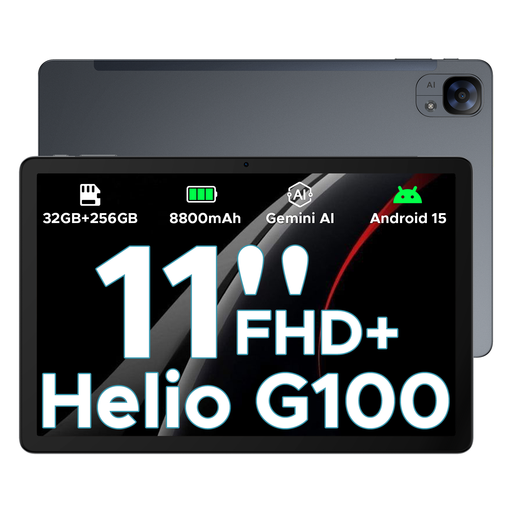
DOOGEE Tab E3 Android 15, 11-inch, 256GB, Gray
Consider the 11-inch format if you want more room for story text and touch controls while planning a local game library.
The product name specifies a 90Hz FHD+ display, Helio G100 processor and 256GB storage expandable to 2TB. Check the selected variant’s storage, carrying weight and game compatibility.
View on Joybuy
 No image available
TECLAST ArtPad Pro 2025 Edition, 12.7-inch, 256GB
Consider its large display if viewing space matters to you and the tablet will fit comfortably in your cabin bag.
The product name specifies a 12.7-inch 2K display, Android 15, a Helio G99 processor and 256GB storage. Its stated 20GB memory includes 8GB RAM and 12GB virtual memory; check carrying weight and compatibility with your games.
View on Joybuy
Questions before you buy
Do I need a cellular tablet for airport gaming?
Not if the games you want work offline and you download them before travelling. If you intend to use PS Remote Play over mobile data, check device compatibility and your data allowance: PlayStation requires at least 5Mbps and recommends at least 15Mbps for a better experience.
Where should I pack a power bank for a UK flight?
Keep it with you in the cabin, not in checked baggage, as the UK Civil Aviation Authority advises. Check your airline’s requirements for the power bank you intend to carry.
Will a tablet that fits my bag be allowed as cabin baggage?
Check your airline’s cabin-baggage allowance before relying on the fit. GOV.UK advises passengers to confirm how many bags they may take and the permitted sizes with their airline.
What should I set up before playing at the airport?
Install and update your intended games, then check that they open and that any controller or headphones you plan to use work with the tablet. If you plan to use PS Remote Play, test the console and account setup beforehand and keep a downloaded game available in case the airport connection is unsuitable.


