Choose a compact tablet if holding and stowing it in a coach seat matters most; choose a larger screen if dense maps, menus and touch controls are harder for you to use at a smaller size. Before buying either, confirm that your strategy game and account work on its operating system, and prepare for a journey without dependable onboard charging or connectivity.
Which players suit each format?
Players who need easy handling
If you expect to hold and reposition the tablet in your seat, a compact display may be worth the smaller tactical view. Apple specifies an 8.3-inch display and a weight of 293 g for the Wi-Fi iPad mini; Lenovo lists an 8.8-inch display for the Legion Tab Gen 5.
Players who prioritise map visibility
If your games have dense maps, toolbars or small text, consider whether a larger screen is worth carrying and supporting during the journey. Samsung lists a 10.9-inch Galaxy Tab S10 FE, while Amazon lists an 11-inch Fire Max 11. Check that your games are available on the operating system before choosing by screen size.
Players seeking gaming-focused Android hardware
If your intended games call for more demanding hardware, Lenovo lists a Legion Tab Gen 5 configuration with Snapdragon 8 Elite Gen 5, 12GB memory and a 165Hz display. Those specifications do not establish how a particular strategy game will perform, so check its Android requirements as well.
What matters when choosing?
For strategy games on a coach, settle the screen-size trade-off alongside game compatibility before comparing other hardware. A larger display gives maps and menus more physical space, but you still need a way to hold or support it in your seat.
| Concern | What to check | Who this matters to |
|---|
| Handling and packing |
Compare the display size and stated weight of the exact variant; consider whether you will hold it or use a stable case stand. |
If I play while holding the tablet in a confined seat, I need to reposition and stow it comfortably; around 42% of consumers put handling first. |
| Maps and controls |
View screenshots of your game at the intended screen size, and consider how you will support a larger tablet. |
When maps, menus and small touch targets crowd the screen, I want more room to see and use them; roughly 33% of consumers prioritise map visibility. |
| Games and offline use |
Confirm the exact game, account requirements and offline content on the tablet’s operating system; check its hardware requirements too. |
I need my game and account to work during the journey, particularly if I am choosing gaming-focused hardware; about 25% of consumers put compatibility and performance first. |
What should you avoid assuming?
-
A bigger screen will always be easier to use on a coach
A larger display leaves more physical space for a strategy game’s maps and menus, but it also needs room in your bag and a comfortable way to support it in your seat.
Choose the larger format if the extra viewing space matters to your game; otherwise compare compact models and how you would hold them.
A case with a stable stand may be useful if you do not want to hold the tablet throughout the journey.
-
Every coach will have the charging connection you need
National Express describes USB-A charging on its coaches, but says USB ports may be unavailable on third-party-operated services. Do not plan your play around a particular seat connection being present.
Charge before boarding, download games and updates in advance, and take a cable that works with the connection you intend to use.
-
A Fire tablet can use any Android game from Google Play
Amazon states that Google Play is not supported on Fire tablets. An Android game’s availability elsewhere does not establish that it is available through a supported route on Fire OS.
Check the exact strategy game, any expansions and its sign-in requirements before choosing a Fire Max 11 for it.
-
A general battery-life claim predicts gaming time
Amazon’s stated up-to-14-hour figure for the Fire Max 11 covers mixed entertainment use, not a defined strategy-game session. Gaming time can vary with the game and settings.
Start a long journey with a full charge and try your usual game beforehand rather than treating a general battery figure as a gaming-runtime promise.
Brands to consider
Apple
The iPad mini is a compact iPadOS option for playing in a coach seat, provided your intended games are available for it.
- Apple specifies an 8.3-inch display, an A17 Pro chip and a weight of 293 g for the Wi-Fi model.
- The smaller display leaves less physical room for dense maps and menus than a larger tablet.
Samsung
The Galaxy Tab S10 FE is an Android option to consider when a larger tactical view matters more than compact handling.
- Samsung specifies a 10.9-inch display and microSD support up to 2TB for this product line.
- Samsung says the Galaxy Tab S10 FE does not include a travel adaptor. Its specifications are not a benchmark for your particular game.
Lenovo
The Legion Tab Gen 5 combines an 8.8-inch format with gaming-oriented Android hardware.
- Lenovo lists Snapdragon 8 Elite Gen 5, 12GB memory, 256GB storage and a 165Hz display for its cited configuration.
- Check the exact game’s compatibility and requirements; the listed hardware alone cannot establish its performance.
Amazon
The Fire Max 11 offers an 11-inch display for casual play when the games you want are supported on Fire OS.
- Amazon lists an 11-inch, 2000 × 1200 display for the Fire Max 11.
- Google Play is not supported on Fire tablets, so confirm game and account availability before choosing one.
Joybuy tablets for coach travel
These tablets offer compact or larger-screen ways to play strategy games while travelling. Compare the space each gives your game with how you would hold or support it, then check the exact title’s platform requirements before buying.
 No image available
Apple iPad mini 7 (A17 Pro), 512GB, Space Grey
Consider this compact iPad if you expect to hold the tablet while playing; check your strategy game’s iPadOS availability before choosing it.
Apple specifies an 8.3-inch display for the iPad mini. This variant has 512GB storage; the smaller screen gives dense maps and menus less room than a larger tablet.
View on Joybuy
 No image available
Xiaomi Pad 8 Pro, Grey, 12G RAM, 512G ROM
Consider how you would support this tablet in a coach seat, and confirm that your intended games and account services work on it.
The named variant has 12G RAM and 512G ROM. Check its screen dimensions and weight against the space you have for play.
View on Joybuy
 No image available
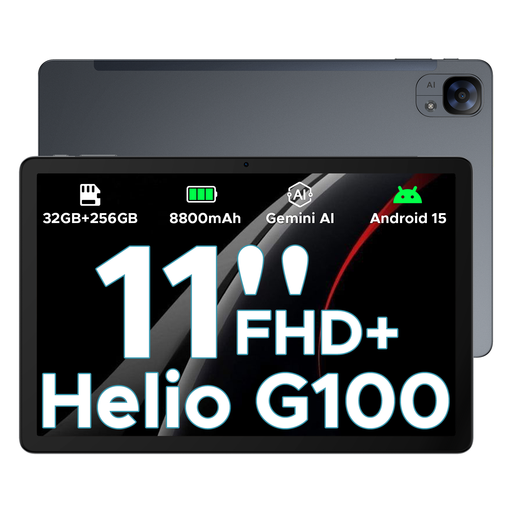
DOOGEE Tab E3, 11-inch, 256GB, Grey
The 11-inch format is worth considering if map visibility matters more to you than compact handling; check the game’s Android compatibility.
The title specifies Android 15, an FHD+ 90Hz display, a Helio G100 processor and 256GB storage. Its stated 8800mAh battery capacity does not indicate gaming runtime.
View on Joybuy
 No image available
DOOGEE Tab E3+, 12-inch, 256GB, Black
This larger format gives a strategy-game interface more physical screen space, but consider whether you can support it comfortably in a coach seat.
The title specifies Android 15, a 12-inch FHD+ 90Hz display, a Helio G100 processor, 256GB storage and a SIM card slot. Check your game’s Android requirements before buying.
View on Joybuy
 No image available
TECLAST ArtPad Pro 2025 Edition, 12.7-inch, 256GB
Consider this large-screen tablet if viewing maps takes priority and you have a practical way to support it while seated; confirm your game’s Android compatibility.
The title specifies a 12.7-inch 2K display, Android 15, a Helio G99 processor and an included stylus. Its stated 20GB memory consists of 8GB RAM plus 12GB virtual memory, not 20GB physical RAM.
View on Joybuy
Common questions
Can I rely on charging at my coach seat?
Do not depend on a seat connection for your tablet. National Express describes USB-A charging on its coaches but says USB ports may be unavailable on third-party-operated services; charge before boarding and bring a suitable cable.
Should I download my strategy games before travelling?
Yes, download the game, updates and any available offline content before departure. National Express describes Wi-Fi on its branded network, but says additional vehicles used in exceptional circumstances may not have all listed facilities; also check whether your game needs an online account connection during play.
Will an Android strategy game work on the Fire Max 11?
Not necessarily. Amazon states that Google Play is not supported on Fire tablets, so check the exact game’s supported Fire OS store route, expansions and sign-in requirements before buying.
Does the Galaxy Tab S10 FE come with a travel adaptor?
No travel adaptor is included according to Samsung’s UK purchase information for the Galaxy Tab S10 FE and S10 FE+. Samsung lists a data cable; check that your existing charger is compatible if you plan to take it on the coach.


