Long-session strategy players
If you play extended campaigns away from home, check your games' platform and device requirements first. Then compare memory, storage and screen space for the titles and save files you plan to use.


Start with a tablet of around 11 inches if you want room for strategy-game maps and menus without committing to a larger travel device. Check that your games run on its operating system and model before choosing between an iPad Air for a documented light Wi-Fi configuration, an Android tablet with expandable storage, or a larger screen you expect to use on a desk. Storage, connectivity and your charging setup can change which option works for a hotel stay.
If you play extended campaigns away from home, check your games' platform and device requirements first. Then compare memory, storage and screen space for the titles and save files you plan to use.
An approximately 11-inch screen gives maps and touch controls more room than a phone while remaining a useful travel-size comparison point. Check the actual weight if you expect to play while holding the tablet.
If your games are on Android or you keep downloaded content for travel, compare the exact model's internal storage and microSD support. Check which games and saves will work without a hotel connection.
Confirm your must-play games and their device requirements before weighing screen size, travel connectivity and the equipment you will need to pack.
| Concern | Buying checks | Who this matters to |
|---|---|---|
| Game compatibility and responsiveness | Check each game's current operating-system and device requirements; compare the exact model and memory configuration. | I want my chosen strategy games to run on the tablet I take away, including when a match becomes demanding. Around 36% of consumers put compatible, responsive play first. |
| Readable screen and travel size | Compare display size with tablet weight, and decide whether you will play handheld or prop it on a surface. | If I read dense maps for a long session, I need space for the controls without making the tablet awkward to hold or pack. For around 29% of consumers, that balance is the primary concern. |
| Connection and offline preparation | Check whether your games, multiplayer modes and saves need internet access; decide whether hotel Wi-Fi, a phone hotspot or a cellular variant suits you. | I do not want a hotel connection to interrupt a game or leave an account task unfinished. Around 21% of consumers chiefly need a workable connectivity plan. |
| Storage and travel essentials | Choose enough storage for downloaded games and files; check expansion support and the exact box contents. | Before packing, I want room for my games and the charging equipment I will actually need. Adequate storage and essentials come first for around 14% of consumers. |
iPadOS and Android have different app libraries. A processor name or screen specification cannot establish whether a particular game, controller or cloud-save service will work.
Look up every must-play title in the relevant app store and check the publisher's current device requirements before selecting a tablet.
More screen area may help with dense interfaces, but a larger tablet also takes up more bag space and may be less comfortable to hold.
Compare approximately 11-inch models first if you play handheld. Consider a larger screen if you usually prop the tablet on a desk or table.
Samsung says the Galaxy Tab S10 FE series includes a USB-C cable but not a travel adaptor. A cable alone may not complete your hotel charging setup.
Check the exact tablet's box contents and whether you already have a compatible UK charging adaptor.
Large downloads may be inconvenient during a stay. The UK National Cyber Security Centre also warns that attackers on the same public or insecure Wi-Fi network may intercept or modify data.
Install games and updates before travelling, check what works offline, and use a trusted hotspot or cellular connection when account security or dependable access matters.
The 11-inch iPad Air (M4) is worth considering when your strategy games are available on iPadOS and you want a documented light Wi-Fi tablet.
The Galaxy Tab S10 FE line suits consideration when your games are on Android and microSD expansion or S Pen use matters to you.
The Tab Plus is a desk-use option to consider if your checked Android games suit its configuration and you want an integrated stand.
These tablets offer several Android screen sizes alongside an 11-inch iPad Air. Compare them against your own game library and travel setup; a listing's gaming wording does not establish compatibility or measured game performance.
 No image available
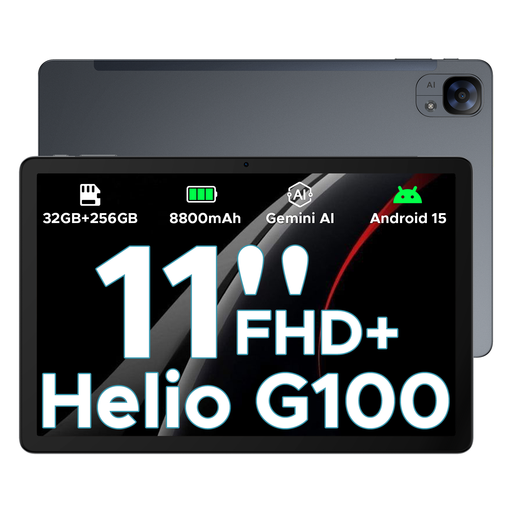
Consider this 11-inch Android option if its specifications and your chosen games are a match. Its listed configuration includes Android 15, a Helio G100 processor, an FHD+ 90Hz display and 256GB storage expandable to 2TB.
The title lists 32GB RAM; confirm how much is physical memory if that figure affects your choice. Check the weight and box contents before packing.
 No image available
Consider the Xiaomi Pad 7 if your Android games support it and you want to compare a slightly larger display. Its listed configuration includes an 11.2-inch 3200 × 2136 display with adaptive refresh up to 144Hz, a Snapdragon 7+ Gen 3 processor, 8GB RAM and 128GB storage.
Check its weight for handheld play and confirm the box contents before relying on a charging adaptor for travel.
 No image available
Consider this model if you expect to use a larger screen for your Android strategy games. The title lists Android 15, a 12-inch FHD+ 90Hz display, a Helio G100 processor, 256GB storage and a SIM-card slot.
Check support for your games, the tablet's weight and the charging equipment supplied. A SIM-card slot alone does not establish which mobile service will work for you.
 No image available
This 11-inch Android tablet is an option to check if you want a SIM-card slot as part of your travel setup. Its title lists 256GB storage, an octa-core T7280 processor and an 8000mAh battery; the listed weight is 528g.
Verify support for your games and intended mobile connection, and check the charging box contents before travel.
 No image available
Choose this configuration only after confirming that your strategy games are available for iPadOS and support it. Apple specifies a 464g weight and a 2360 × 1640 display for the matching 11-inch Wi-Fi model.
The listed 128GB storage is fixed at purchase. Check that it accommodates your downloads and that you have a suitable adaptor for the included USB-C charging cable.
Choose Wi-Fi-only if you can prepare downloads before travelling and use hotel Wi-Fi or a phone hotspot when a game needs a connection. Consider a cellular variant if you need a connection independent of hotel Wi-Fi; it will not improve the tablet's local game-processing performance. Check the exact variant and your games' online requirements.
Do not assume a hotel network is private. The UK National Cyber Security Centre warns that attackers on the same public or insecure Wi-Fi network may intercept or modify data. Protect your accounts and consider a trusted hotspot or cellular connection when handling sensitive account activity.
Samsung says the Galaxy Tab S10 FE and S10 FE+ do not include a travel adaptor. Their listed box contents include a USB-C cable, so check that you have a compatible adaptor before your trip.
Take an old tablet to an appropriate electrical recycling collection point rather than putting it in household rubbish, as UK government consumer guidance advises for electrical products bearing the crossed-out wheelie-bin symbol. Erase your personal data before handing it over.