Handheld long-session players
Passengers who would rather hold a compact tablet through a longer strategy-game session than have the largest possible map view. Lenovo lists the Legion Tab Gen 3 at 8.8 inches and 350 g.


For passenger-seat play, consider a compact gaming-focused Android tablet if holding comfort matters most, an 11-inch iPad Air if your chosen games are on iPadOS and you want more map space, or an 11-inch Galaxy Tab S11 if you want Android with a Wi-Fi or 5G choice. Check your exact games, offline requirements and preferred controls before choosing: hardware specifications alone cannot establish whether a title will work on a particular tablet.
Passengers who would rather hold a compact tablet through a longer strategy-game session than have the largest possible map view. Lenovo lists the Legion Tab Gen 3 at 8.8 inches and 350 g.
Consumers whose preferred titles and purchases are already on iPadOS and who want an 11-inch screen for maps and menus. Each title still needs its own compatibility check.
Passengers who want Android game access and may need a cellular-capable tablet away from Wi-Fi. A mobile connection does not replace checking each game’s download, login and offline requirements.
Consider it: If you will hold the tablet for long periods and your must-play games work on Android, the Lenovo Legion Tab Gen 3 offers an 8.8-inch, 350 g format.
Trade-off: Its screen leaves less room for maps and menus than an 11-inch tablet.
Consider it: If your chosen titles and purchases are on iPadOS, the 11-inch iPad Air (M4) offers a larger screen than the compact Lenovo format.
Trade-off: Apple lists the 11-inch Wi-Fi model at 464 g; confirm each game and any save-transfer requirements before changing devices.
Consider it: If you want an 11-inch Android tablet, Samsung lists Galaxy Tab S11 with Wi-Fi and 5G configurations.
Trade-off: Its included S Pen does not establish game or control compatibility, and Samsung says a travel adapter is not included.
| Concern | What to check | Who this matters to |
|---|---|---|
| Long-session gaming | Compare the exact processor and cooling design, then check your games’ requirements; specifications are not a game-performance test. | If I expect long strategy sessions, I want to prioritise gaming-oriented hardware over a bigger screen. Around 40% of consumers put sustained gaming first. |
| Readable maps and handling | Compare screen size with the weight of the exact variant and how you intend to hold or support it. | Dense maps matter to me, but I still need a tablet I can handle comfortably as a passenger; around 30% of consumers make this balance their primary concern. |
| Games and connectivity | Check each title’s device compatibility, storage needs, controls, offline behaviour and whether your journey calls for mobile data. | I need my own games and saves to be usable away from home, rather than choosing by hardware alone. For around 30% of consumers, game access and connectivity come first. |
Strong stated hardware does not establish that a must-play title is available on the operating system, works on the selected device or suits your preferred controls.
List the games you actually play and check each one in the relevant store for the intended account and device before settling on Android or iPadOS.
A game’s own requirements determine whether it needs a connection to launch, authenticate, update or sync saves. The tablet’s Wi-Fi specification cannot answer those questions.
Download and update titles before departure, and check their offline and save-sync guidance individually.
An 11-inch screen gives a strategy interface more space than an 8.8-inch screen, while a larger device may be less comfortable to hold for an extended session.
Compare the screen size and weight of the exact variants, then decide whether you will play handheld or support the tablet.
GOV.UK says drivers in Great Britain must not hold and use a tablet while driving, including when stopped in traffic. Northern Ireland’s nidirect guidance also prohibits using a hand-held phone or similar data-capable device while driving.
Keep gaming for passengers or for a time when the vehicle is safely parked; the driver should not hold or operate the tablet while driving.
Lenovo’s Legion Tab Gen 3 represents the compact, gaming-focused Android format in this comparison.
The 11-inch iPad Air (M4) is a larger-screen option for consumers whose chosen games are on iPadOS.
Samsung’s Galaxy Tab S11 is an 11-inch Android option with Wi-Fi and 5G configurations.
These tablets offer different stated screen sizes, storage configurations and connectivity options for passenger-seat play. Match the exact variant to your games, available connection and preferred way of holding the screen.
 No image available
Consider this 11-inch iPadOS model if your chosen strategy games are available for iPad and you want space for their maps and menus.
The listed variant has an M4 chip, 128GB storage and Wi-Fi connectivity. Check each game’s compatibility and offline requirements before travelling.
 No image available
This is a tablet to consider if storage for downloaded games is a priority.
The product name identifies a 12G RAM and 512G storage variant. Check the exact device’s game-store compatibility and handling specifications before choosing it for travel.
 No image available
Consider this larger iPadOS format if map space and the option to use mobile data matter more to you than holding a compact tablet.
The named variant has an M5 chip, 13-inch display, 1TB storage and Wi-Fi + Cellular connectivity. Check its handling weight, your games’ requirements and whether you need a suitable data plan.
 No image available
This larger-screen Android tablet may suit a passenger who plans to support the tablet rather than hold it throughout play.
Its product name specifies a 12.7-inch 2K display, Helio G99 (MT8781), 8GB RAM plus 12GB virtual memory, 256GB storage, Android 15 and dual-SIM 4G LTE. Check the exact screen specification and game compatibility before buying.
 No image available
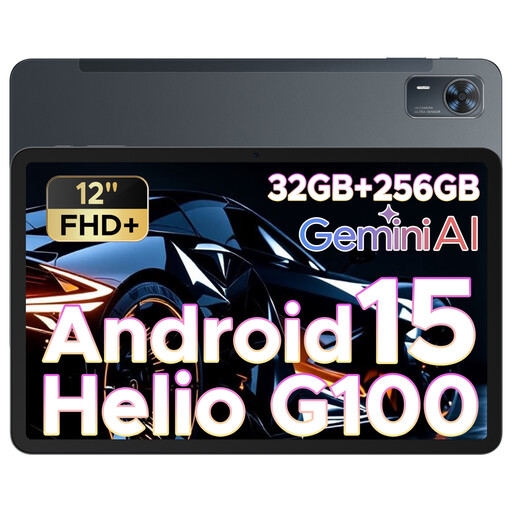
Consider its 12-inch format if you want more room for a strategy interface and are comfortable handling a larger tablet.
The product name specifies a Helio G100 processor, 90Hz display, 256GB storage and SIM slot. These specifications do not establish performance or offline play for a particular game; check each title for this device.
No: a driver must not hold and use a tablet while driving. GOV.UK says this rule in Great Britain includes stops in traffic or at lights; Northern Ireland’s nidirect guidance also prohibits using a hand-held phone or similar data-capable device while driving. Keep tablet play for passengers or for when the vehicle is safely parked.
Choose according to what your games need when Wi-Fi is unavailable, rather than assuming either connection type determines offline play. Apple says its iPad Air Wi-Fi + Cellular configuration can connect through a mobile-data plan; check each title’s connection requirements and the data plan you would use.
Check every must-play title against the intended device and account before changing platform. Google Play provides device-compatibility filters for Android apps and games; for iPad, locate the title in Apple’s games environment. Check the individual game’s guidance separately for offline play, controls and save transfer.
Check the box contents for the exact model rather than assuming a mains charger is included. Samsung says its UK Galaxy Tab S11 package contains an S Pen and USB-C cable but not a travel adapter, so you would need a suitable charger if you do not already have one.