For local basketball matches on PS5 or Xbox Series X, choose a TV by checking whether its specific HDMI input supports the gaming modes you intend to use, including 4K at 120Hz, variable refresh rate (VRR) and a low-latency mode. Make sure the screen and seating arrangement work for everyone playing. Higher advertised refresh rates are worth considering for a compatible gaming PC, but Samsung limits its listed 4K 144Hz, 165Hz and 240Hz modes to supported PC games and graphics cards.
Who this choice suits
Competitive couch players
If quick passes and shot timing matter to you, prioritise the display modes and low-latency settings your console and game can actually use. PlayStation and Sony describe VRR and gaming modes as conditional on compatible equipment.
Shared-screen hosts
When several people follow the same court, choose a screen size and position that suit the room and everyone’s seating position, rather than relying on the diagonal measurement alone.
Console-and-PC households
If a PC may share the TV with a console, check their display modes separately. Samsung says its listed 4K modes above 120Hz require a connected PC, a supported game and a suitable graphics card.
What to check when choosing
Start with the device and game you will use, then check the complete HDMI connection. Measure the room before settling on a screen size for shared play.
| Concern | What to check | Who this matters to |
|---|
| Responsive play |
Check the exact TV input for supported 120Hz output, VRR and a low-latency gaming mode; the console and game must support the mode too. |
I want quick changes of possession to feel responsive and motion to remain easy to follow. Around 42% of consumers put responsive play first. |
| Console compatibility |
Identify your console and check its cable, the TV’s HDMI input and any soundbar or receiver in the signal path. |
I need the TV to accept the mode my existing console can send, rather than choosing by its panel label alone. For around 33% of consumers, connection compatibility is the primary concern. |
| Shared-screen fit |
Compare screen and stand dimensions with the room, then consider where each player will sit or stand. |
Everyone playing needs to see the court comfortably from their place in the room. Shared viewing comes first for around 25% of consumers. |
Buying pitfalls
-
Assuming a 120Hz label guarantees 4K at 120Hz in every game
The available output depends on the game and the whole display connection. Xbox Support specifies an Xbox Series X, an Ultra High Speed HDMI cable supporting HDMI 2.1 and an HDMI 2.1 TV for 4K gaming at 120 frames per second.
Check the exact model’s HDMI input specifications before choosing a TV, then inspect the console’s video-output information after connecting it.
-
Overlooking the cable or audio pass-through device
Xbox Support warns that a soundbar or AV receiver between the console and TV can affect video features and quality.
Plan the cable route before mounting the TV. Test the console directly with the TV first, then check whether any intermediary passes through the mode you want.
A longer cable run may require a suitable certified Ultra High Speed HDMI cable.
-
Treating PC refresh-rate claims as console modes
Samsung limits its listed 4K 144Hz, 165Hz and 240Hz modes to PC-connected games that support them and a suitable graphics card. Those figures do not establish a console game’s frame rate.
For a console setup, check 4K 120Hz, VRR and low-latency support on the intended input. Assess higher modes separately if you will also connect a compatible PC.
-
Applying one compliance statement to every UK delivery location
UK government guidance recognises CE marking alongside or instead of UKCA marking in Great Britain where the relevant product-regulation requirements are met; Northern Ireland has different arrangements. A marking alone does not establish that a particular imported variant suits your setup.
Check the model variant, plug and power specification, supplier information, warranty terms and delivery location. For Northern Ireland, ask the seller for the compliance information applicable there.
Brands to consider
LG
Consider LG gaming-capable TV lines when an exact model has the refresh rate, inputs and screen size your setup needs.
- LG’s UK gaming-TV guidance highlights high refresh rates, VRR and low input lag as features to compare.
- Its range-level descriptions do not establish the HDMI-port layout or gaming modes of every LG model.
Samsung
Consider Samsung OLED and Neo QLED gaming TV models if you want to compare console features with selected PC-oriented modes.
- Samsung lists HDMI 2.1, low-latency and adaptive-sync features across selected gaming TVs.
- Samsung says its listed 4K 144Hz, 165Hz and 240Hz modes need supported PC games and a suitable graphics card; check each model’s console modes separately.
Sony BRAVIA
Consider a compatible Sony BRAVIA model if PS5 gaming modes and their setup instructions are important to you.
- Sony’s guidance explains automatic Game Mode through Auto Low Latency Mode and enhanced HDMI settings for supported 4K 120Hz and VRR setups.
- The guidance applies to specified models, and enhanced-format VRR may be restricted to particular HDMI inputs.
Joybuy TVs for local matches
These screen sizes offer starting points for a shared local match. Compare each TV’s exact HDMI-port gaming modes with your console or PC, and check its dimensions against the room before choosing.
 Image unavailable
Hisense 65U7QTUK Pro 65-inch Mini LED TV
Consider this 65-inch screen if it fits the seating arrangement for your local matches.
The product name identifies a 4K HDR TV with a 165Hz Game Mode Ultra claim; that figure does not establish a console game’s output rate. Check which HDMI input accepts the modes your device and game support.
View on Joybuy
 Image unavailable
Hisense 55U7QTUK Pro 55-inch Mini LED TV
The 55-inch size may suit a shared match where the screen and seating positions fit the room.
Its product name identifies 4K HDR and a 165Hz Game Mode Ultra claim. Confirm the intended HDMI input and supported console mode rather than treating the advertised gaming figure as a game frame rate.
View on Joybuy
 Image unavailable
TCL 75Q6C 75-inch QD-Mini LED TV
Consider the 75-inch screen if several players can sit at comfortable positions and the TV fits the intended space.
The product name identifies 4K HDR and a 144Hz native-refresh claim. Check this variant’s dimensions and the HDMI input’s supported console modes before choosing it.
View on Joybuy
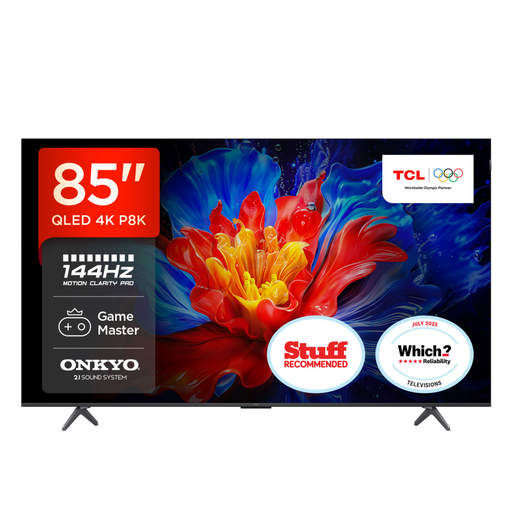 Image unavailable
TCL 85P8K-UK 85-inch QLED TV
An 85-inch screen calls for a careful check of viewing positions, TV width and stand footprint before a shared match setup.
The product name identifies 4K HDR PRO. Confirm the native refresh specification and port-specific 4K 120Hz support for your console: the product title and description give different refresh-rate descriptions.
View on Joybuy
 Image unavailable
TCL 55P8K-UK 55-inch QLED TV
This 55-inch option is worth assessing where room fit matters alongside gaming connectivity for local play.
The product name identifies 4K HDR PRO and a 288Hz Game Accelerator feature. That feature name does not establish a native refresh rate or console output mode; check the exact input and mode required by your device.
View on Joybuy
Common questions
Does a 120Hz TV automatically give an Xbox Series X 4K at 120Hz?
No. Xbox Support says 4K gaming at 120 frames per second requires an Xbox Series X, an Ultra High Speed HDMI cable supporting HDMI 2.1 and an HDMI 2.1 TV. Check the specific TV input and the game’s supported output before setting the console to 4K UHD and 120Hz.
Can I use 120Hz without HDMI 2.1?
Xbox Support says 120Hz may be available at a lower resolution when a TV does not support HDMI 2.1. That does not confirm 4K at 120Hz; check the modes offered by your connected console and TV.
Should the console connect through a soundbar or AV receiver?
Connect the console directly to the TV when establishing or troubleshooting the intended video mode. Xbox Support warns that an intermediary device can affect video features and quality; check its pass-through specifications before adding it back to the connection.
How can I check PS5 VRR and 120Hz output?
Check the PS5’s Video Output settings and its connected HDMI-device information, then confirm that the game and TV support the mode. PlayStation makes VRR conditional on compatible TVs and games; Sony says applicable BRAVIA models may also require enhanced HDMI format on the correct input.
Will a 144Hz, 165Hz or 240Hz TV mode help with console basketball games?
Do not assume those modes are available to the console. Samsung says its listed 4K modes at those rates require supported PC-connected games and a suitable graphics card. For PS5 or Xbox Series X, check the TV’s supported console output modes instead.


