Choose a display for the picture modes your console and games can actually use, then confirm that the specific TV input supports them; an HDMI socket alone does not establish 4K at 120 Hz or VRR compatibility. Measure your seating position and available space, and check how a soundbar or receiver will connect before choosing a living-room TV or a monitor. Which?, PlayStation Support UK, Xbox Support UK and Nintendo UK explain why the console, game and display capabilities all matter.
Who is choosing a gaming TV?
Fast-game sofa player
You want responsive play from the living-room seat and need to distinguish a game’s supported frame-rate mode from a TV’s advertised panel rate. Which? identifies high refresh rates and variable refresh rate as relevant gaming features.
Shared-room console player
You need a screen that fits the seating distance and furniture while also working with your console and any existing soundbar or receiver. Which? advises measuring the viewing distance and checking the TV’s audio connections.
Console-feature checker
You want to use particular 4K, HDR or VRR modes without choosing features your console or games cannot use in the intended setup. PlayStation Support UK, Xbox Support UK and Nintendo UK provide console-specific output information.
What matters when choosing?
Start with the output modes your console and games support, then check the TV’s inputs and settings; measure the room and plan the audio connections before settling on a screen size.
| Concern |
What to check when buying |
Who this matters to |
| High-frame-rate play |
Check supported game modes, the exact input’s 4K/120 Hz capability, game mode and the console’s reported video output. |
If I play from the sofa and want to use a supported high-frame-rate mode, I need the game, console and TV input to work together. Around 33% of consumers put high-frame-rate responsiveness first. |
| Console picture modes |
Identify the console and games, then verify the display’s resolution, HDR and VRR support for the intended connection. |
If I care most about using my console’s 4K, HDR or VRR modes, I want to confirm the exact combination rather than rely on a feature label. Around 25% of consumers put console-mode compatibility first. |
| Screen and room fit |
Measure sofa-to-screen distance and installation space, then check the model’s physical dimensions. |
If I share a room or watch from a particular sofa position, I need a screen that fits the space and is comfortable to view there. Around 25% of consumers put room fit first. |
| Audio and HDMI connections |
Identify the ARC/eARC socket and check which other inputs support the console’s intended modes. |
If I want to keep my soundbar or receiver, I need a workable connection for it as well as the console. Around 17% of consumers put their existing setup first. |
Gaming TV buying pitfalls
-
Treating HDMI or an advertised refresh rate as proof of compatibility
The console, game, cable, TV input and settings must work together; a panel’s advertised maximum does not establish the game’s output.
Check the exact input specifications and the console’s connected-display information before choosing for 4K/120 Hz or VRR.
-
Choosing a screen diagonal without measuring the playing position
A screen may feel too small from the sofa or take up too much of the available room.
Measure the seating distance and installation space, then compare gaming features among sizes that fit.
-
Overlooking the soundbar’s HDMI connection
ARC/eARC uses a designated socket, and other sockets may differ in gaming capability.
Map the soundbar, console and other devices to specific sockets before ordering. If the layout does not suit the devices, you may need a different connection plan or compatible equipment.
-
Assuming similar model names mean the same gaming TV
Hisense’s documented 55U7QTUK and 55U7QTUK PRO list different gaming rates, so leaving off a model suffix can change which specification you are checking.
Match the complete UK model identifier and screen size against the manufacturer’s specifications.
Relevant TV brands for reference
Hisense
Hisense UK lists a 144 Hz game mode for the 55U7QTUK and advertises 165 Hz VRR and four HDMI 2.1 inputs for the distinct 55U7QTUK PRO.
- The model-specific specifications give buyers concrete input and refresh-rate details to compare.
- These are manufacturer specifications, not independent performance measurements; an advertised maximum does not establish a console game’s frame rate.
LG
LG describes the UK OLED55C66LB C6 as a 55-inch OLED TV and advertises 4K gaming at up to 165 Hz.
- The cited model gives OLED buyers a specific model and advertised gaming rate to investigate.
- The advertised rate is not a measured console-game result; check the exact input modes and whether the size suits the room.
Samsung
Samsung’s UK QE65S90FATXXU is a documented 65-inch OLED variant; Samsung advertises Motion Xcelerator 144 Hz for this model.
- The exact 65-inch variant provides a defined model to consider for a room that accommodates that size.
- The advertised rate does not show that a particular console game outputs 144 fps, and the cited specification is for the 65-inch UK variant.
TCL
TCL’s C7K-UK QD-Mini LED range includes a documented 115C7K-UK model with an advertised native 144 Hz refresh rate.
- The cited model gives buyers a specific high-refresh example to compare against their console’s supported modes.
- The cited 115-inch model’s size-specific dimming and audio claims should not be assumed for smaller C7K-UK variants.
Sony
Sony’s A75K series documentation lists 4K/120, VRR and eARC specifications for a console and sound-system setup.
- Sony specifies VRR and ALLM on HDMI inputs 3 and 4 for the cited series.
- Four physical HDMI sockets do not mean four identically featured gaming inputs. The documentation is for a 2022 model series, not evidence of current stock or newer BRAVIA models.
Joybuy product choices
These Joybuy choices cover living-room TVs and a close-up gaming monitor. Compare each model’s stated console modes and connections with your intended setup, and check that its physical size suits your viewing position.
 No image available
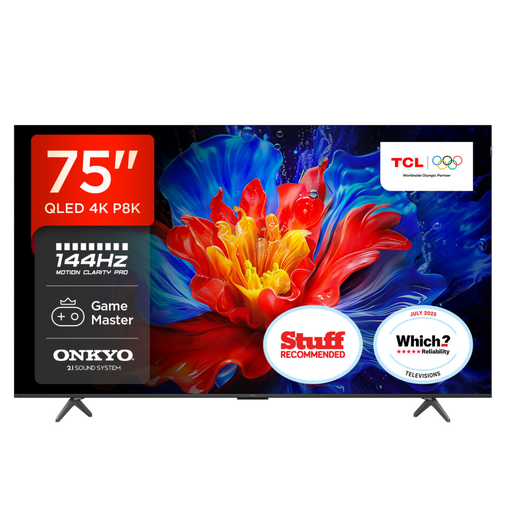
TCL 75P8K QLED 4K TV
Consider this 75-inch living-room TV if you want a large screen and the listed gaming connections; measure the viewing distance and installation space first.
The product description lists 144 Hz VRR, four HDMI 2.1 ports, ALLM and a 2.1-channel Onkyo audio system.
View on Joybuy
 No image available
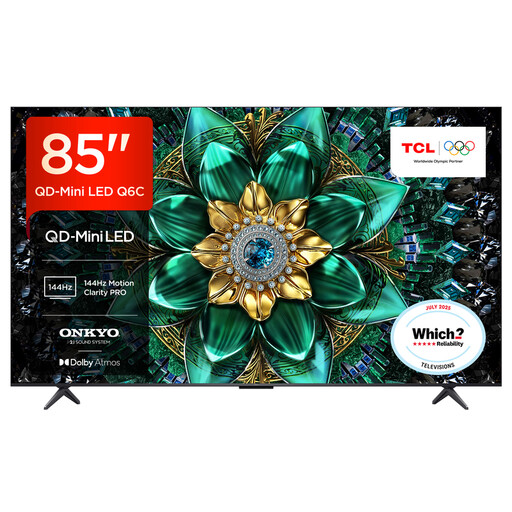
TCL 85Q6C QD-Mini LED 4K TV
This 85-inch TV is a large-screen option for a room with enough viewing and installation space; check those measurements before choosing it.
The product description lists 144 Hz VRR, ALLM, four HDMI ports including eARC, and Onkyo audio.
View on Joybuy
 No image available
Hisense 55U7QTUK Pro Mini LED 4K TV
Consider this 55-inch TV if that size suits your viewing position and you want to check its listed high-refresh gaming modes against your console and games.
The product description lists 165 Hz VRR, HDMI 2.1, ALLM and a built-in subwoofer.
View on Joybuy
 No image available
MAG 274QP QD-OLED X24 gaming monitor
Consider this monitor for close-up console play if its size, audio arrangements and supported console modes suit your setup rather than sofa viewing.
The listing specifies a 26.5-inch panel, 240 Hz and Adaptive-Sync. It also lists PS5 and Xbox modes including 1080p and 1440p at 120 Hz, plus VRR support.
View on Joybuy
 No image available
TCL 65Q7C QD-Mini LED 4K TV
This 65-inch TV is a living-room option if the screen size fits your seating position and you want to compare its stated refresh rate with your console’s output.
The product name lists a 144 Hz native refresh rate and audio by Bang & Olufsen.
View on Joybuy
Gaming TV FAQs
Does every PS5 or Xbox Series X game benefit from a 120 Hz TV?
No; console capability alone does not establish a particular game’s output. Check the game’s available modes and the TV input, and use the console’s display information to confirm what it detects.
Can Nintendo Switch 2 output 4K at 120 fps to a TV?
No. Nintendo UK says Switch 2’s 4K output is capped at 60 fps; supported software can use higher frame rates on compatible TVs at other output settings.
How should I connect a console if I already use a soundbar?
Identify the TV’s ARC/eARC-marked HDMI socket for a compatible soundbar, then check which other socket accepts the console’s intended video mode. The exact TV and audio-device instructions can confirm how the connections work.


