Shared-sofa co-op groups
Players viewing the same game from different seats need to consider whether on-screen details remain clear away from the centre position, as well as whether the screen fits their seating distance.


For cooperative cooking games on one screen, choose a TV that everyone can see comfortably from their seats and use its low-latency Game Mode. If you also play compatible high-frame-rate games, check the exact model and HDMI input for 120Hz and variable refresh rate (VRR); compare individual OLED and Mini LED/LCD models for side-seat viewing and daylight reflections rather than choosing by panel label alone.
Players viewing the same game from different seats need to consider whether on-screen details remain clear away from the centre position, as well as whether the screen fits their seating distance.
Households using a PS5, Xbox Series X|S or gaming PC may want a TV that preserves the higher-refresh and VRR modes their other games and hardware support. The chosen HDMI input and setup matter too.
Consumers who play in daylight or under strong lighting need to weigh reflections and screen brightness alongside gaming features, particularly when seats face windows or lamps.
Start with the seats and viewing distance, then check Game Mode and the features your console or PC can actually use. Compare daylight visibility and side-seat viewing on the exact TVs under consideration: neither OLED nor Mini LED/LCD settles both questions by itself.
| Concern | What to check | Who this matters to |
|---|---|---|
| Shared-screen visibility | Match screen size to seating distance and look for viewing-angle evidence for the exact model. | If several of us sit across a sofa, we need to follow the same on-screen action without relying on the centre seat; around 27% of consumers put shared-screen visibility first. |
| Responsive play | Check for Game Mode or automatic low-latency mode (ALLM); for compatible games, confirm 120Hz and VRR on the intended HDMI input. | When timing matters, I want my controls to feel responsive, and I may also use the TV for higher-frame-rate games; roughly 33% of consumers prioritise responsive play. |
| Daylight visibility | Compare exact-model reflection handling and brightness against the room's windows and lighting. | In a bright living room, I need to read the game through reflections rather than choose a panel label on its own; about 20% of consumers make daylight visibility their main concern. |
| Connections and ongoing use | Check which HDMI ports support the required modes, the connected devices and cables, and the TV's UK energy-label consumption figure. | With several devices to connect, I want the intended gaming mode to work on the ports I can use and to understand the TV's stated energy consumption; around 20% of consumers put these practical checks first. |
A TV may support 4K at 120Hz or VRR on particular inputs only. Sony UK notes that support listed for a BRAVIA model does not necessarily apply to every HDMI input.
Check the exact model's port table before assigning ports to consoles and a soundbar, then review the required HDMI signal-format and Game Mode settings after installation.
A 120Hz or 144Hz figure does not mean every game will run at that rate. The game, source hardware, connection and relevant settings also determine which modes are available.
Decide whether you need higher-frame-rate support beyond your cooperative cooking games, then check the complete TV-to-device setup for the mode you intend to use.
Side-seat image consistency and reflection handling are properties to assess on individual models. RTINGS found strong off-angle consistency in its LG OLED Flex review, but that result does not establish how every OLED—or any particular Mini LED/LCD TV—will look from your sofa.
Look for exact-model viewing-angle information for spread-out seating, and exact-model reflection information if the room is bright.
A gaming feature list does not tell you the TV's stated on-mode energy consumption. The UK television energy label provides an SDR figure in kWh per 1,000 hours.
Compare the energy labels of TVs that already meet your size, seating and gaming requirements; check the HDR figure too where one is displayed.
These ranges offer different specifications to investigate, but brand names do not establish the viewing angle, reflections or HDMI capabilities of every model and size.
LG's OLED range is relevant when off-centre seating and controlled room lighting shape the choice; its UK C5 range includes a 48-inch model.
Samsung describes gaming TVs with features that can include HDMI 2.1, ALLM, VRR-related technologies and higher-refresh PC support.
Sony publishes model-specific BRAVIA guidance for console features, including 4K at 120Hz, VRR and ALLM.
TCL's Q9BK Mini LED range is an example to examine for a bright-room or larger-screen gaming setup.
These OLED and Mini LED TVs offer different screen sizes to consider for a shared gaming space. Choose a size for your seats first, then check exact-model viewing and reflection evidence and the HDMI modes needed by your other games.
 No image available
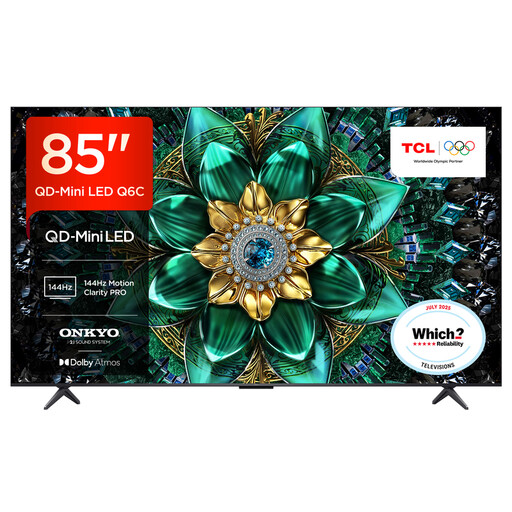
Consider this model if you are planning a larger shared-screen setup; confirm the screen dimensions against your seating space.
The product name specifies 4K HDR, a native 144Hz refresh rate and an ONKYO 2.1 audio system. Check its exact HDMI-port features and how it handles side seats and reflections.
 No image available
The 65-inch screen is an option to assess for a sofa shared by several players; check sightlines from the seats you use.
The product name specifies 4K HDR, 165Hz Game Mode Ultra and a built-in subwoofer. Check the gaming modes available on your intended HDMI input and the model's side-seat and reflection performance.
 No image available
Consider the 55-inch variant when you want to compare a smaller screen with your room's seating distance.
The product name specifies 4K HDR, 165Hz Game Mode Ultra and a built-in subwoofer. Confirm the HDMI input needed for your console or PC and assess visibility from off-centre seats.
 No image available
This OLED model is worth comparing if players sit away from the centre and you can manage the room's lighting.
The product name identifies a 55-inch 4K TV. Check exact-model viewing-angle and reflection evidence, along with the HDMI input and gaming modes your devices require.
 No image available
The 50-inch screen is an option to compare for a more compact shared seating arrangement.
The product name specifies 4K HDR, a native 144Hz refresh rate and an ONKYO 2.1 audio system. Check the exact HDMI-port features and whether the picture remains usable from your side seats and under your room lighting.
No, not if the games and connected hardware you intend to use run at 60fps or below. A 120Hz-capable TV becomes relevant when you also want compatible PS5, Xbox Series X|S or PC games to use higher-frame-rate modes; RTINGS and Xbox Support advise checking that the TV and source support the intended output.
Compare exact models against your seating positions and lighting rather than choosing by panel type alone. RTINGS reports strong side-view consistency for the LG OLED Flex it tested, while daylight reflections and brightness still need model-specific checks for either route; if considering OLED for prolonged use with static game elements, take its burn-in risk into account.
The chosen HDMI input or signal-format setting may not support the mode, or the source device and cable may not provide the required connection. Sony UK advises checking the exact BRAVIA model's supported inputs and, where applicable, its Enhanced Format and VRR settings.
Compare the on-mode SDR consumption in kWh per 1,000 hours for TVs that otherwise suit your room and gaming setup, and check an HDR figure where displayed. GOV.UK defines the SDR consumption field; your actual use will also depend on viewing time and settings.