Choose the screen size around the seats your players actually use, then check Game Mode and the HDMI features supported by your console. For games that offer a 120fps mode, look for 4K/120Hz on the intended input; weigh dark-room contrast against how the picture looks in your flat’s usual lighting rather than choosing by display label alone.
Who is this TV for?
Shared-flat match hosts
If two to four people regularly play together, work out where each person will sit before settling on a screen size. Sony UK gives approximate minimum 4K viewing distances of 1.0 m for a 55-inch TV and 1.2 m for a 65-inch TV; neither figure tells you whether an off-centre seat has a clear view.
Console players who value responsive controls
For matches on a compatible console, check the TV’s Game Mode and the modes available on the HDMI input you intend to use. Sony UK notes that 4K/120Hz and variable refresh rate (VRR) support can depend on the input, connected equipment and settings.
Flatmates sharing a room in changing light
If the room is bright by day but matches also run in the evening, compare the picture in conditions that resemble both. LG UK promotes deep blacks for its OLED B6E, while TCL UK describes brightness and backlight control for its QD-Mini LED Q9BK; those model-family descriptions do not settle how another TV will look in your room.
What matters when choosing?
Settle the seating layout first, then check console modes on the exact HDMI input and consider the room’s lighting and placement.
| Concern | Buying checks | Who it matters to |
|---|
| Shared visibility and room fit |
Measure the usual seats and the space for the TV and stand. Sony UK’s approximate 4K minimum distances are 1.0 m at 55 inches and 1.2 m at 65 inches, not prescribed seating positions. |
I need everyone to follow the pitch from their usual seat without the screen overwhelming our room; around 40% of consumers would put shared sightlines and fit first. |
| Responsive console play |
Check Game Mode or automatic low-latency mode (ALLM), plus 4K/120Hz and VRR on the intended HDMI input if your console and games can use them. |
When a match responds slowly to my controls, that matters more to me than a higher refresh-rate badge; roughly 40% of consumers would make responsive play their main concern. |
| Lighting and setup |
Look for reflections at your usual play time, check the intended screen position and count the connections needed for consoles and other devices. |
Our living room changes between daylight and evening use, so I need a picture and placement that work in both; about 20% of consumers would prioritise lighting and setup. |
Mistakes to avoid
-
Choosing a diagonal before checking the seats
A screen can fit the wall yet leave a player sitting awkwardly to see the pitch. Sony UK’s viewing-distance figures are minimum references for 4K TVs, not a substitute for checking the whole seating layout.
Measure from each regular seat to the planned screen position, then check the stand and wall space.
-
Assuming every HDMI socket offers the same gaming modes
Sony UK’s gaming guidance notes that 4K/120Hz and VRR may depend on the input and can require compatible equipment and settings.
Check the exact model’s input specifications and identify the socket your console will use before choosing the TV.
-
Treating 144Hz as essential for console-only matches
A higher refresh-rate figure alone does not establish lower control delay. TCL UK describes 120Hz as the relevant target for PlayStation 5 and Xbox Series X|S games offering 120fps modes.
Check the game’s available mode, Game Mode, VRR and the intended input; consider modes above 120Hz separately if you also use a compatible gaming PC.
-
Planning a wall mount before checking the room
Wall placement can change the viewing position and may require permission in a rented flat.
Check the wall, seating positions and any tenancy requirements before deciding between a mount and an existing TV unit.
Brands to consider
LG
Its UK OLED B6E is a reference point for shoppers interested in OLED contrast alongside console-gaming features.
- LG UK advertises up to 4K/120Hz, G-SYNC compatibility and FreeSync Premium for the OLED B6E model family.
- Check the exact size and input specifications rather than extending those claims to every LG OLED TV.
Samsung
Its gaming-TV range includes QLED, Neo QLED and OLED models with differing display and connection features.
- Samsung UK describes HDMI 2.1 and high-refresh gaming features on applicable models.
- Confirm the selected model’s ports and supported modes; higher 4K refresh rates also require a compatible PC and game.
Sony
Its BRAVIA support guidance is useful when checking a console setup model by model.
- Sony UK identifies supported 4K/120Hz, VRR and ALLM features for relevant BRAVIA series.
- Support may vary by HDMI input and may require compatible hardware, cables and settings.
TCL
Its QLED and QD-Mini LED ranges offer models to examine for shared rooms with daytime use.
- TCL UK advertises QD-Mini LED, HDMI 2.1, ALLM and VRR for its Q9BK series.
- Check the exact model and size: the Q9BK claims do not establish the gaming modes of other TCL TVs.
Joybuy TVs for this setup
These 55-inch TVs give shared-flat players different display and gaming configurations to check against their seating layout and console. The model’s refresh-rate wording alone does not confirm that a particular game will run at 4K/120Hz on the input you plan to use.
 No image available
Hisense 55U7QTUK Pro 55-inch Mini LED TV
A 55-inch option to assess for the shared seating area and a console connection.
The title identifies a 4K TV with VIDAA OS and 165Hz Game Mode Ultra. Confirm which modes work on your intended HDMI input and whether the screen and stand fit the room.
View on Joybuy
 No image available
Hisense 55E8QTUK 55-inch Mini LED TV
Consider this 55-inch model if its screen position works for every player and its console modes meet your needs.
The title specifies 4K, VIDAA OS and 144Hz Game Mode Pro. Check the resolution and HDMI input supported for the mode you intend to use.
Purchase link unavailable
 No image available
TCL 55V6C 55-inch Direct LED TV
This model gives players a 55-inch screen to assess against their seating layout.
The title states 4K resolution and 120Hz Game Accelerator at FHD resolution. Do not treat that FHD mode as confirmation of 4K/120Hz; check the console mode and intended input.
View on Joybuy
 No image available
TCL 55P8K-UK 55-inch QLED TV
Consider its 55-inch format if it suits both the available space and the regular player seats.
The title identifies a 4K TV with a 288Hz Game Accelerator feature. Check the resolution and HDMI input available for your console’s chosen mode rather than reading that feature name as a 4K refresh-rate specification.
View on Joybuy
 No image available
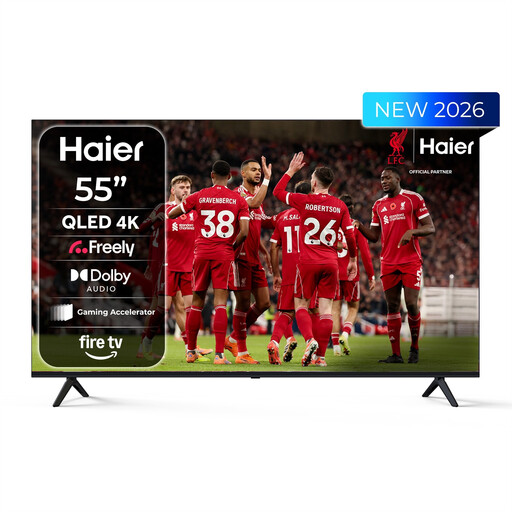
Haier H55S80GUF 55-inch QLED TV
This 55-inch screen may suit a shared seating arrangement if its dimensions and placement work in the room.
The title specifies 4K resolution, HDR10+, Freely and Fire TV. If high-frame-rate console play is a priority, check the exact supported input and refresh modes before choosing it.
View on Joybuy
Questions about the setup
Do local console football matches require a TV Licence?
Playing a local console match is not itself a live-TV viewing activity. GOV.UK says a TV Licence is required for watching or recording live TV; check whether anyone in the flat also uses the screen for live TV or BBC iPlayer.
Do I need a 144Hz TV for PlayStation 5 or Xbox Series X|S matches?
No: TCL UK describes 120Hz as the target for games on those consoles that offer a 120fps mode. Check the particular game and the TV’s supported input mode; a higher refresh-rate feature may be more relevant if you also connect a compatible gaming PC.
Why might a console not offer 4K/120Hz on a TV advertised with it?
The mode may be available only on particular HDMI inputs or require an enhanced-format setting. Sony UK advises checking the TV input, connected device, cable and settings; the game must also offer a suitable mode.


