Competitive couch-match players
You play local matches frequently and want responsive controls and smooth motion. Your main purchase check is whether the console can use its supported output through the TV input you plan to connect.


For local football matches, choose a TV with a Game Mode and confirm that the HDMI input you will use supports the output your console needs, particularly if you want 4K at 120Hz or variable refresh rate (VRR). An OLED model is worth considering when you can control the room light and value contrast; for a bright shared lounge, compare screen size and glare treatment on the exact models you are considering rather than relying on the display technology alone.
You play local matches frequently and want responsive controls and smooth motion. Your main purchase check is whether the console can use its supported output through the TV input you plan to connect.
You play with others in a shared room, often during daylight. Screen visibility, reflections and a size that works from your usual seats matter alongside gaming features.
The same screen handles football games and everyday viewing. You need to weigh picture preferences and straightforward mode switching against the gaming features you will actually use.
Decide where and with whom you will play, then check the exact TV’s console-compatible inputs. Sony UK cautions that a supported HDMI feature may not work on every input.
Consider it when: You can control the light during matches and put particular value on dark-scene contrast. LG describes its OLED evo C6 as a contrast-led display.
Keep in mind: LG’s stated gaming features are model specifications, not an independent measurement of response in your setup.
Consider it when: Daytime play and a shared lounge make reflections a priority. Samsung advertises a Glare Free treatment on its QN90F Mini LED range.
Keep in mind: That treatment is a claim about the QN90F, not a guarantee that every Mini LED TV will handle your room’s reflections equally well.
| Concern | What to check | Who this matters to |
|---|---|---|
| Responsive console play | Check Game Mode and whether the intended HDMI input supports your console’s required 4K/120Hz, VRR and automatic low-latency mode (ALLM) settings. | If I play close matches often, I want the controls to feel responsive without discovering that I used the wrong input. Around 40% of consumers put responsive, console-compatible play first. |
| Shared-room visibility | Consider reflections, usual seating positions and the exact screen size; compare display treatments on specific models. | When friends join a daytime match, I need everyone to see the screen comfortably. For around 30% of consumers, shared-room visibility is the primary concern. |
| Everyday use | Compare the exact size’s energy label and product information sheet, alongside its viewing features and mode controls. | If this is also our main television, I care about ordinary viewing and how easily we switch back after gaming. Mixed-use needs come first for around 30% of consumers. |
Connecting a console to a different input can leave 4K/120Hz or VRR unavailable even when the TV supports the feature. Sony UK says feature support does not necessarily extend to every HDMI input.
Check the exact model’s port specifications before ordering. After connecting the console, inspect its video-output information and enable the relevant TV input setting where applicable.
A 144Hz or 165Hz panel claim does not mean a console game will produce that output. PlayStation UK documents PS5 support for 4K/120Hz output; the TV input, connection and game settings still matter.
Match the TV’s supported input modes to your own console and games instead of choosing on the largest refresh-rate figure in a title.
OLED contrast and the glare treatment advertised for some Mini LED models address different viewing priorities. Neither label, by itself, tells you how a particular screen will look from your seats during a daytime match.
Think about when you usually play and where reflections fall, then compare the exact models and sizes under similar lighting where possible.
For a TV that also serves as the household’s everyday screen, energy information gives you another way to compare exact sizes alongside gaming specifications.
Read the energy label and product information sheet for each size you are considering.
LG’s OLED evo C6 is a contrast-led option for gaming in controllable light.
Samsung’s Neo QLED QN90F is a Mini LED range to consider for a bright shared room.
Sony’s BRAVIA 5 is a Mini LED option for households combining console play with everyday viewing.
These TVs offer different screen sizes and display types for console matches and shared viewing. Compare each model’s stated gaming features with the HDMI input and room conditions you will actually use.
 No image available
Consider this 65-inch screen if several people will watch or play in the same room. Its title specifies 4K HDR, VIDAA OS and 165Hz Game Mode Ultra; confirm the output supported by the HDMI input you intend to use.
 No image available
This 55-inch model is another size to consider for shared-room play. The title specifies 4K HDR, VIDAA OS and 144Hz Game Mode Pro; check which HDMI input supports the console output you want.
 No image available
Consider this smaller OLED screen if your playing area suits a 42-inch TV and you can control the room light. The title specifies 4K HDR and Google TV; check the exact HDMI inputs before relying on a particular console gaming mode.
 No image available
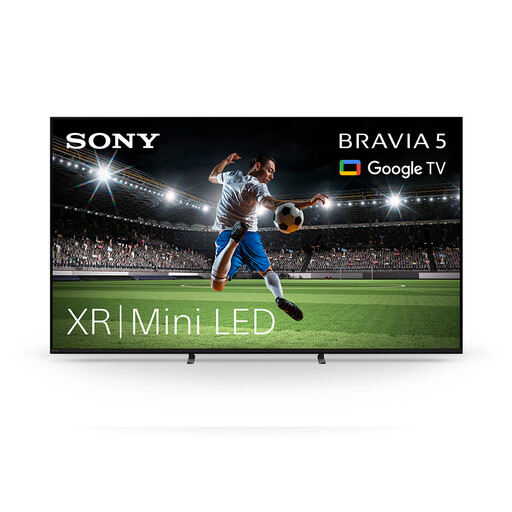
This 55-inch Mini LED model is an option for shared play and everyday viewing. Its title specifies 4K HDR and Google TV. Sony UK lists BRAVIA 5 support for 4K120, VRR and ALLM, but advises checking which HDMI inputs provide the features on the exact model.
 No image available
Consider this 55-inch model if you want a TV for both local matches and ordinary viewing. Its title specifies 4K HDR Pro, Google Cast and a 288Hz Game Accelerator feature; that feature name does not establish a 288Hz console output. Check 4K/120Hz support on your intended HDMI input if you need it.
Not necessarily: a 120Hz-capable TV matters most if the console, game and selected TV input can use that output. PlayStation UK documents PS5 support for 4K/120Hz, but the capability alone does not mean every match will run at 120Hz.
Read the port specifications for the exact TV model before buying. Sony UK notes that feature support does not necessarily apply to every HDMI input; after connecting your console, check its video-output information and any required TV input setting.
Connect it to an input that supports your intended output, then check the console’s video settings and the TV’s Game Mode. Sony UK’s gaming guidance also describes enabling an enhanced HDMI format for 4K/120Hz where applicable.
Compare the energy labels and product information sheets for the exact sizes you are considering, alongside their gaming specifications. The UK Department for Energy Security and Net Zero and Office for Product Safety and Standards describe these as consumer energy-information resources for in-scope displays.