Tournament hosts with off-centre spectators
When people watch from across the room, the two players are not the only viewers who matter. RTINGS advises checking viewing angles for wide seating arrangements.


Start with independently measured input lag in Game Mode at the signal your tournament will use, then check whether spectators can see the picture clearly from the sides. An OLED TV is worth considering for widely spread seating, but repeated static tournament graphics need attention; an LCD or Mini LED TV is another route for long sessions, provided its viewing angles, room fit and gaming ports meet your needs.
When people watch from across the room, the two players are not the only viewers who matter. RTINGS advises checking viewing angles for wide seating arrangements.
Responsive controller-to-screen feedback matters during matches. Compare measured input lag in Game Mode at the signal you intend to use, rather than relying on a gaming label; RTINGS identifies input lag as relevant to fast-paced games.
Plan for the room’s lighting, connected devices and any scoreboards or game interfaces that remain on screen. RTINGS has observed permanent burn-in after prolonged static content in OLED testing, so repeated exposure deserves attention when considering OLED.
Consider it when: spectators sit across a wide area and the exact model performs well from off-centre seats.
Account for: unusually long, repeated displays of fixed HUDs or scoreboards; RTINGS has found permanent burn-in after prolonged static-content exposure in OLED testing.
Consider it when: long sessions with recurring static graphics make an LCD-based display a better fit for your plans, subject to the individual model’s room performance.
Account for: side-seat picture quality varies by model; a Mini LED label does not establish wide viewing angles.
| Concern | What to check | Who this matters to |
|---|---|---|
| Match responsiveness | Compare independently measured input lag in Game Mode at your intended resolution and refresh rate. | During competitive matches, I want controller inputs to appear promptly on screen. Around 34% of consumers put match responsiveness first. |
| Group visibility | Check viewing-angle results for the exact model against the planned seating layout. | If spectators sit well to the sides, I need them to see a usable picture too; roughly 33% of consumers give group visibility first priority. |
| Source connections | Check the HDMI port map and accepted signal modes against every console, PC or switcher in the setup. | With several devices in the bracket, I need the intended gaming mode to work through the connections I will use. For about 20% of consumers, source compatibility is the primary concern. |
| Long-session use | Consider room lighting and repeated static graphics; review the exact model’s panel-care guidance if choosing OLED. | When a display repeatedly shows fixed scoreboards or HUDs, I need a plan for that exposure. Long-session display management comes first for around 13% of consumers. |
A TV’s advertised mode may not be usable by the tournament source. Samsung says its selected 4K 144Hz, 165Hz and 240Hz modes require compatible PC-connected games and suitable hardware.
Match the TV’s accepted modes to the actual console or PC, game and connection before treating a higher figure as useful.
Spectators seated off-centre may see a different picture. RTINGS recommends paying particular attention to viewing angles for wide seating arrangements.
Check viewing-angle evidence for the exact model and place the screen with the group’s seating positions in mind.
Gaming features can differ between HDMI inputs, while picture processing outside Game Mode can add delay. Sony’s BRAVIA 7 K-55XR70 specification, for example, lists VRR on HDMI 3 and 4 but ALLM on HDMI 1 through 4.
Check the model’s port map, enable the appropriate HDMI format and Game Mode, then test the complete source-to-screen setup before matches.
RTINGS observed permanent burn-in after prolonged static-content exposure in OLED testing. That matters when the same scoreboard, HUD or menu is displayed for unusually long periods across repeated sessions.
Consider how often those graphics will remain fixed, follow the model’s panel-care guidance and compare an LCD-based option if that exposure will be frequent.
LG’s TV range gives organisers OLED and LCD-based display families to compare for different seating and session plans.
Selected Samsung gaming TVs may suit setups that need several capable HDMI inputs, subject to the exact model.
Sony’s BRAVIA gaming guidance is useful when planning Game Mode settings and model-specific HDMI connections.
These LCD-based Mini LED and QLED choices offer different screen sizes for a shared tournament setup. Choose a size for the room and seating plan, then check independent input-lag and viewing-angle results and the gaming connections needed by your sources.
 Image unavailable
Consider this 65-inch set if its size suits the distance between players, screen and spectators.
The product title specifies 4K and a 165Hz gaming mode. Check measured input lag, off-centre viewing and source-specific HDMI modes for this model before relying on them for tournament play.
 Image unavailable
Consider the 55-inch size where the tournament seating layout keeps spectators within a suitable viewing distance.
The product title specifies 4K and a 165Hz gaming mode. Check its measured lag and viewing angles, and confirm that your source can use the intended signal mode.
 Image unavailable
The 75-inch size is worth assessing when spectators will sit farther from the shared screen.
The product title specifies 4K and a native 144Hz refresh rate. Check the room fit, side-seat picture quality and the HDMI modes available to your tournament source.
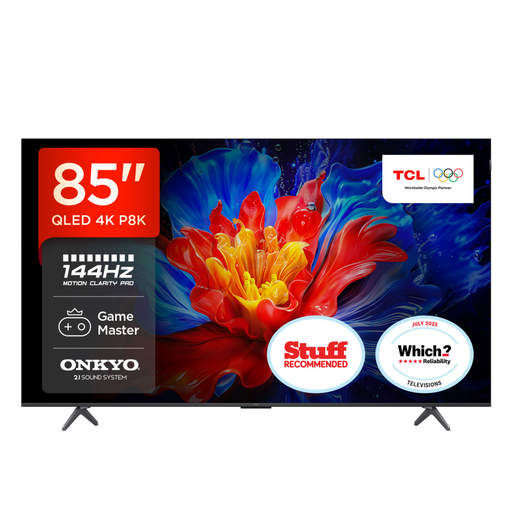 Image unavailable
Assess this 85-inch model if the venue has space for a large shared screen and an appropriate viewing distance.
The product title specifies 4K. Check placement dimensions, measured gaming lag, side-seat visibility and which refresh modes work with the planned source.
 Image unavailable
Consider this 55-inch screen if it fits the room while keeping the furthest spectators close enough to follow matches.
The product title specifies 4K. Verify measured input lag, off-centre viewing and the HDMI modes supported by your console or PC before choosing it for the bracket.
Not necessarily: check the exact TV’s port map before assigning consoles or PCs. Sony lists VRR on HDMI 3 and 4 of the BRAVIA 7 K-55XR70, but ALLM on HDMI 1 through 4; the port you use must support your intended signal.
Test the complete console- or PC-to-TV connection in Game Mode at the signal you plan to use. Check the correct HDMI input and settings on both devices; Sony advises enabling the appropriate enhanced HDMI format and VRR on compatible BRAVIA setups where those features are needed.
No, but repeated, unusually long displays of the same HUD or scoreboard make static-content exposure an important part of the choice. RTINGS observed permanent burn-in after prolonged static content in OLED testing, so consider your session pattern and the exact model’s panel-care guidance alongside its viewing-angle performance.