What matters when choosing?
Start with where the TV will sit, then check the gaming signal your equipment can use and the lighting you normally play in.
| Concern |
What to check |
Who this matters to |
| Size and physical fit |
Measure the seating distance and compare the TV’s full width and stand depth with the available space. Treat viewing-distance guides as starting points. |
If a screen crowds the furniture or seating position, its picture features will not solve the fit problem. Around 39% of consumers put size and placement first. |
| Console gaming modes |
Check 4K/120Hz, variable refresh rate (VRR) and Auto Low Latency Mode (ALLM) for the exact TV model and HDMI port, alongside support in your console and games. |
When my regular arcade-sports games offer a higher-frame-rate mode, I want a connection that can use it rather than a larger refresh-rate number on the box. Console compatibility is the primary concern for around 31% of consumers. |
| Light and panel choice |
Look for reflections at your usual playing time, then compare the exact model’s glare treatment and panel type. |
If daylight falls across the screen, I need to judge reflections; for darker viewing, OLED contrast may matter more to me. Around 15% of consumers primarily weigh this room-lighting choice. |
| Installation and connections |
Confirm the stand footprint, the ports needed by your devices and any installation or recycling terms before checkout. |
I need the TV to fit its stand and leave the right HDMI socket accessible once everything is installed. For around 15% of consumers, setup is the deciding concern. |
Joybuy TVs for this setup
These 42- and 43-inch TVs are options to assess where space is tight; the 48-inch OLED is worth considering if its full footprint fits. Their stated gaming features differ, so match each model to the output modes your console and games use.
 No image available
Sony BRAVIA XR42A90K 42-inch 4K OLED TV
Consider this 42-inch OLED where the screen needs to stay compact and OLED contrast is a priority.
Sony specifies VRR and ALLM on HDMI 3 and 4 for the XR-42A90K. Check the TV’s dimensions with its stand and use a port that supports the gaming mode you need.
View on Joybuy
 No image available
TCL 43V6C 43-inch 4K Direct LED TV
Consider this 43-inch set if the smaller screen size suits your furniture and you want to assess its gaming modes.
The named 120Hz Game Accelerator feature is specified at FHD, not 4K. Confirm the input resolution, HDMI-port capabilities and dimensions with stand for your setup.
View on Joybuy
 No image available
Sony BRAVIA XR48A90K 48-inch 4K OLED TV
Consider the 48-inch OLED if you want the larger screen and can fit its full width and stand in the room.
Before choosing it for a particular console mode, check the XR48A90K’s VRR, ALLM and HDMI-port specifications. Measure against the exact model’s installed dimensions.
View on Joybuy
 No image available
Haier H43S80GUF 43-inch 4K QLED TV
Consider this 43-inch model if its footprint suits the room and the stated 4K QLED format meets your viewing priorities.
Its title also identifies HDR10+, Freely and Fire TV. Check the exact gaming input modes and dimensions with stand before pairing it with a console.
View on Joybuy
 No image available
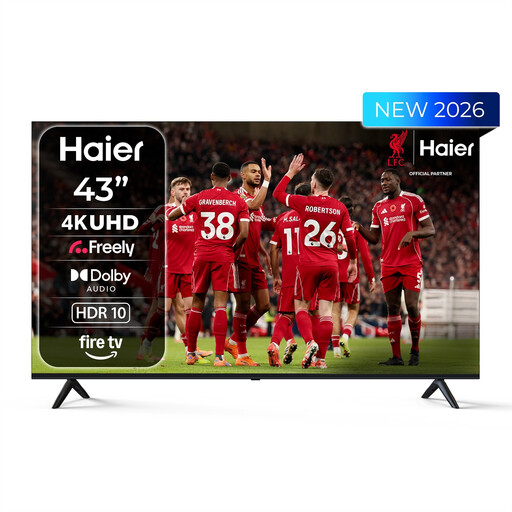
Haier H43K85GUF 43-inch 4K LED TV
Consider this 43-inch LED model when the smaller diagonal fits your seating and furniture arrangement.
Its title identifies HDR10, Freely and Fire TV. Confirm the exact console input modes, port allocation and stand dimensions if those details will determine your choice.
View on Joybuy
Frequently asked questions
Do I need a 120Hz TV for arcade sports?
Not unless the arcade-sports games and console modes you use can take advantage of 120Hz output. PlayStation says 120Hz output applies to supported TVs and games; Xbox says 120Hz may still be enabled at a lower resolution without HDMI 2.1. A higher TV refresh-rate figure does not make a 60fps game run at 120fps.
What do VRR and ALLM change when gaming?
VRR adjusts a compatible display’s refresh rate to a compatible source, while ALLM lets a console or PC signal the display to switch automatically to a low-latency mode, as HDMI.org explains. Check support on the specific TV, HDMI port and connected equipment before making either feature a deciding factor.
Can I connect my console to any HDMI socket?
Not if you need a mode restricted to particular sockets. Sony specifies VRR and ALLM on HDMI 3 and 4 of the XR-42A90K, and its A90K HDMI guidance identifies those ports for 4K/120Hz signals. Check the manual for your exact model before routing cables.
Do I need a TV Licence if I mainly use the TV for games?
Playing games alone does not determine the licence requirement. TV Licensing says you need to be covered if you watch or record live TV on any TV service, watch live TV on a streaming service, or use BBC iPlayer; that includes viewing through a games console. Check your household’s actual viewing against TV Licensing’s rules.


