For local basketball matches with a large group, start with a screen that suits the seating layout: people at the sides need to see the game, and windows or lamps may make reflections important. Then check whether the exact HDMI input supports the modes your console or PC can use, particularly 4K/120Hz, variable refresh rate (VRR) and automatic low-latency mode (ALLM). A 144Hz label matters only with a compatible source and game; a larger TV also cannot increase a game’s local-player limit.
Who needs what from the TV?
Hosts with people in side seats
If players and spectators sit across a sofa or on chairs away from the centre, consider screen size, side-seat visibility and reflections before a PC-oriented refresh-rate claim. Samsung lists wide-viewing-angle and anti-reflection features for the QN90D, but those features should be checked on the model you intend to buy.
Competitive local-console players
If responsive controls matter while players take turns, check the console’s output against the TV’s 4K/120Hz, VRR and ALLM support. Sony notes that support can depend on the model, HDMI input and settings.
Shoppers considering a larger screen
If the group is spread around a room, compare screen sizes with the available wall or furniture space and delivery access. TCL lists large sizes in its C7K range, but a size or refresh-rate label alone does not establish how a particular set will work in your room.
What should you check before buying?
Settle the seating and lighting requirements before choosing gaming modes; then match those modes to the console or PC and the HDMI input you will use.
| Concern | What to check | Who this matters to |
|---|
| Shared visibility |
Check the screen size against seating distance and look for viewing-angle information for the exact model. |
If friends watch from the ends of the sofa, I want them to follow the court without moving into the centre seat; around 31% of consumers put shared visibility first. |
| Responsive play |
Match the console or PC to the exact input’s 4K/120Hz, VRR and ALLM support; check the cable and settings too. |
When matches get competitive, I care most about how the connected system handles controls and motion; roughly 31% of consumers make responsive play their primary concern. |
| Room-light glare |
Note where windows and lamps face the screen, then check any anti-reflection claim for the chosen model. |
Daylight falls across my TV during group sessions, and reflections can obscure the game; for about 23% of consumers, glare control comes first. |
| Practical screen size |
Check the set’s dimensions, stand or mounting requirements and delivery access before settling on a size. |
I want a screen the whole group can see, but it still has to fit the room; around 15% of consumers prioritise the largest practical shared display. |
Mistakes to avoid
-
Assuming everyone can play at once on a larger TV
A larger screen helps more people watch, not more people join a game simultaneously. Xbox lists NBA 2K26 local co-op and local multiplayer for two to four players on Xbox.
Plan controllers and turns around the game’s player limit, then choose a screen for both active players and spectators.
-
Choosing by a 144Hz label alone
The advertised mode may require a compatible PC or game. LG qualifies the C4’s 144Hz mode by game or PC-input support, while Samsung limits the QN90D’s 4K/144Hz claim to PC-connected content.
For console-led play, check 4K/120Hz, VRR and ALLM on the input you will use before treating 144Hz as a useful extra.
-
Assuming every HDMI socket supports the same modes
Sony says gaming-feature support can vary by input; 4K/120Hz or VRR may also require a compatible cable, device and enabled signal setting.
Use the exact model’s port information and check the intended console settings after connection.
-
Checking gaming specifications but overlooking the room
People seated off-centre may have a different view of the court, while windows or lamps can create distracting reflections.
Map the seats and light sources before buying, and assess viewing-angle and anti-reflection features on the exact model.
Relevant brands to consider
LG
The C4 OLED is a reference point for buyers considering gaming modes on a specific model.
- LG lists VRR, AMD FreeSync Premium, G-Sync compatibility and a 144Hz mode for the C4.
- LG says 144Hz requires a game or PC input that supports it; do not assume the mode applies to your console game.
Samsung
The QN90D is a model to examine when side seating and reflections matter alongside gaming connectivity.
- Samsung lists a wide viewing angle, an anti-reflection screen and HDMI 2.1 VRR/4K@120Hz support for the QN90D.
- Its 4K/144Hz claim is limited to PC-connected content; check features by exact model and size.
Sony
Sony’s BRAVIA guidance is useful when planning a compatible console connection.
- Sony explains how to check 4K/120Hz, VRR and low-latency settings on supported BRAVIA models.
- Support can depend on the model and input, with Enhanced Format, a compatible device and a suitable cable needed in some setups.
TCL
The cited QLED and Mini LED series provide models and screen sizes to compare for group viewing.
- TCL lists gaming-oriented features on the cited Q9BK, C805K and C7K models, and offers several sizes in the C7K range.
- Gaming features and display claims vary by series and size; confirm them for the exact variant.
Joybuy TVs for this setup
These TVs offer screen sizes and stated gaming features to compare for local group play. Decide whether your seating layout calls for a larger display, then check the exact TV input and your game source before relying on a refresh-rate label.
 No image available
TCL 98Q6C 98-inch QD-Mini LED 4K TV
Consider this size when spectators are spread around a large room; check the set’s dimensions, mounting position and delivery access.
The product name states a 144Hz native refresh rate. Confirm the gaming mode available through the input and source you plan to use.
Joybuy
 No image available
TCL 75Q6C 75-inch QD-Mini LED 4K TV
A 75-inch option for shared viewing, provided the screen and delivery route fit your space; assess side-seat visibility and reflections in the intended room.
The product name states a 144Hz native refresh rate. Check the exact HDMI input and compatible source modes for your setup.
Joybuy
 No image available
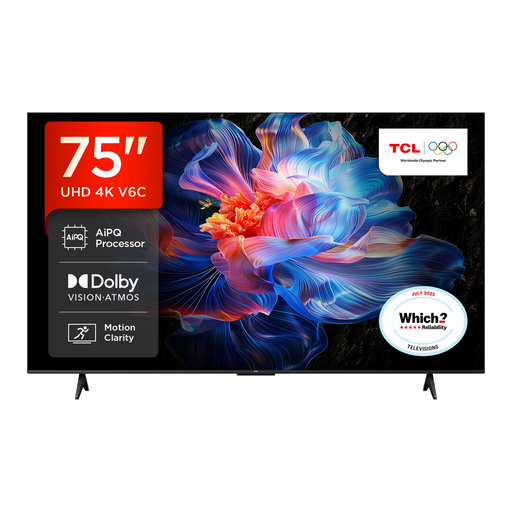
TCL 75V6C 75-inch Direct LED 4K TV
This 75-inch screen is worth considering for a group, but check its position relative to side seats and lights.
The named 120Hz Game Accelerator mode is specified as FHD. Do not treat that as confirmation of 4K gaming at 120Hz; check the exact input and source mode.
Joybuy
 No image available
TCL 75Q7C 75-inch QD-Mini LED 4K TV
Consider this 75-inch model if the group’s seating and the set’s installation requirements align; assess side-seat viewing and room glare before choosing it.
The product name states a 144Hz native refresh rate. For console play, check this exact model’s VRR and ALLM support and the HDMI input that provides the modes you need.
Joybuy
 No image available
TCL 55P8K 55-inch QLED 4K HDR Pro TV
A 55-inch option if the group sits close enough to share the screen comfortably; check viewing distance, side seats and reflections in your room.
Check which gaming modes your console or PC can use on the chosen HDMI input. The product name’s Game Accelerator label should not be read as a native refresh-rate specification.
Joybuy
Common questions
Will a 144Hz TV automatically run a basketball game at 144Hz?
No: the game and connected source must support the mode. LG says the C4’s 144Hz mode needs a supporting game or PC input, while Samsung limits the QN90D’s 4K/144Hz claim to PC-connected content. For console use, check the exact input’s 4K/120Hz, VRR and ALLM support.
Can a bigger TV let more than four people play NBA 2K26 locally at once?
No. Xbox lists two to four players for both local co-op and local multiplayer in NBA 2K26 on Xbox. A bigger screen can help others watch while players take turns, but it does not change that listed limit.
What should I check after connecting a console?
Start with an HDMI input that supports the modes you intend to use, then check the TV’s gaming settings and the console’s video output. Sony says 4K/120Hz may require Enhanced Format on the relevant input; VRR and other modes also depend on compatible equipment and, where required, a suitable cable.
What should I do with an old TV when replacing it?
Check your council’s electrical-waste collection or recycling options rather than putting the TV in a household bin. Coventry City Council, for example, says electrical appliances should not go in household bins; available services depend on your local council.


