Households playing across a sofa
If players sit well to either side of the centre, assess the picture from those seats as well as the main film-viewing position. Measure the space before deciding how large the screen should be.


Start with a screen size and position that work for everyone on the sofa, then check the exact TV model and HDMI input against the console features you intend to use. For PS5 or Xbox Series X, 4K/120 Hz, variable refresh rate (VRR) and automatic low-latency mode (ALLM) matter more than a higher refresh-rate number alone; a home-cinema setup also calls for checks on reflections and sound-system connections.
If players sit well to either side of the centre, assess the picture from those seats as well as the main film-viewing position. Measure the space before deciding how large the screen should be.
If you want compatible games to use 120 Hz output, check the TV’s exact input, the console settings and the cable. PlayStation and Xbox Support describe these modes as dependent on a compatible setup, not simply a TV labelled for gaming.
If an AV receiver or soundbar handles audio, plan where the console connects before buying the TV. The gaming input and the audio return channel (eARC) may need different HDMI ports.
For a screen shared by sofa players and film viewers, settle the room fit first, then check the console signal path and any separate audio connection. Give reflections and the exact model’s energy information their own check before ordering.
| Concern | What to check | Who this matters to |
|---|---|---|
| Screen fit across the sofa | Measure the viewing distance and available space; assess the picture from off-centre seats. | If several of us play side by side, I need a screen that fits the room and remains usable from my seat. Around 36% of consumers would put this shared-viewing need first. |
| Console gaming modes | For the exact model and input, confirm 4K/120 Hz, VRR and ALLM with your console, game and cable. | When I play a compatible PS5 or Xbox Series X game, I want the TV connection to support the mode I have selected. Roughly 29% of consumers would make console compatibility their primary concern. |
| Films and separate audio | Check the picture in your viewing conditions, then map the console input and eARC port to your soundbar or receiver. | If the same TV handles films and games, I need my sound system connected without losing the console video mode I plan to use. Around 21% of consumers would prioritise that combined setup. |
| Reflections and energy information | Look for reflections at your usual playing time; compare the energy label and product information for the exact size. | With daylight or lamps facing the screen, I need to judge visibility before relying on a glare-control claim; I also want to compare energy information. About 14% of consumers would put these checks first. |
Port allocation can differ even within one TV. Sony UK lists VRR on HDMI 3 and 4 for the cited BRAVIA 8 specifications, so the socket chosen for a console matters.
Before ordering, map each console and sound-system connection against the exact model’s HDMI specifications, including 4K/120 Hz, VRR, ALLM and eARC.
A 144 Hz or higher figure does not establish that a PS5 or Xbox Series X game will output at that rate. PlayStation and Xbox Support describe 120 Hz or 4K/120 Hz use as dependent on compatible equipment and games.
Check the console modes you intend to use on the specific TV input before giving a higher refresh-rate figure weight in your decision.
Xbox Support advises connecting the console directly to the TV for video quality because an intermediate device can affect video features.
If you use separate audio, check the receiver or soundbar manual and whether the TV’s eARC connection permits the wiring arrangement you need.
For a longer Xbox cable run, Xbox Support advises using a certified Ultra High Speed HDMI cable.
A glare-control statement applies to the named model, not to every screen from its manufacturer. Samsung’s description of the S95H, for instance, is a manufacturer claim rather than a measure of how that TV will look beside your windows or lamps.
Assess the intended screen position at the time you normally play, and compare energy information for the exact size rather than assuming it from the display type.
LG’s OLED G4 line is relevant to a wall-mounted screen used for both films and gaming.
Samsung’s 77-inch S95H is a model to examine if reflections are a concern in the intended room.
Sony’s BRAVIA 8 is relevant when the connection plan needs documented gaming and audio features.
These TVs offer different screen sizes and display types to assess for shared sofa viewing and films. For console play, check each exact model’s supported modes and HDMI ports before deciding how it fits your setup.
 No image available
Consider this 65-inch size if it fits both the viewing distance and the space available to everyone on the sofa.
The product name lists a 165 Hz Game Mode Ultra. Check 4K/120 Hz support on the intended HDMI input and the eARC port if you use separate audio.
 No image available
This large OLED model is worth assessing if the same room hosts films and sofa-wide play; check its physical fit from every usual seat.
Confirm 4K/120 Hz support and the gaming and eARC port allocation for this exact model before planning console and sound-system connections.
 No image available
Measure this 55-inch option against your sofa layout if a larger screen would be difficult to place.
The product name lists a 165 Hz Game Mode Ultra. For console use, confirm the required 4K/120 Hz mode and HDMI port; check eARC separately if needed.
 No image available
Consider its 75-inch screen only after checking viewing distance, placement and the picture from off-centre seats.
The product name states a 144 Hz native refresh rate. Confirm the console mode available on your chosen HDMI input and check the audio connections if using a soundbar or receiver.
 No image available
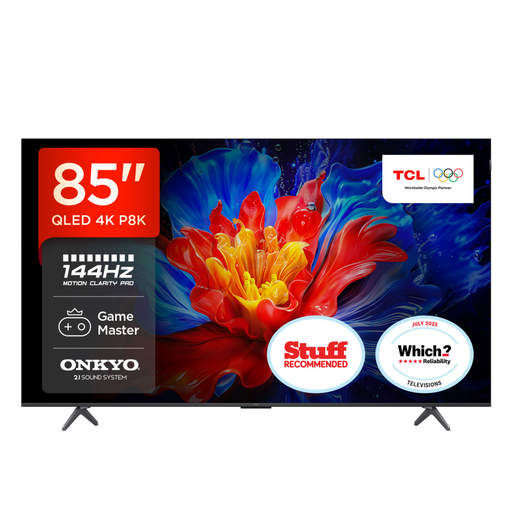
This 85-inch option calls for a careful check of room dimensions and sofa distance before you choose a screen for shared play.
The product name lists a 144 Hz native refresh rate and an ONKYO 2.1 sound system. Check the intended console mode and HDMI and eARC connections for any separate audio equipment.
No: 144 Hz is not a general requirement for either console. PlayStation describes 120 Hz output for compatible PS5 games and TVs, while Xbox Support sets out conditions for Xbox Series X 4K gaming at 120 Hz. Check 4K/120 Hz, VRR and ALLM on the TV input you intend to use.
A direct console-to-TV connection is the route Xbox Support recommends for video quality, because an intermediate receiver or soundbar can affect video features. If you need separate audio, check the TV’s eARC port and the sound equipment’s supported connections before settling on the wiring.
Gaming features can be assigned to particular ports. Sony UK lists VRR on HDMI 3 and 4 for its cited BRAVIA 8 model, so check the exact TV’s port specifications against your console and sound-system connections.
Compare the energy labels for the exact models and screen sizes you are considering rather than judging by display technology alone. UK government guidance requires an energy label at the point of sale for in-scope products, including on a website.
For a longer run, Xbox Support advises using a certified Ultra High Speed HDMI cable. Check the length and cable specification alongside the TV input and console mode you intend to use.