What matters before you buy?
Confirm the permitted connection and registration method for your hall first; then check the ports on your console or dock. Room audio and screen choices come after those network checks because they cannot make an unregistered console connect.
| Concern |
What to check |
Who this matters to |
| Network access |
Ask whether your room has an active Ethernet port or console-capable residence Wi-Fi, and which MAC address the registration process requires. Edge Hill University warns that a wireless MAC address will not work in its wired-console registration process. |
If my console needs registering, I want to know the permitted route before buying anything to connect it. Around 36% of consumers put network access first. |
| Cable and adapter fit |
Check the console and dock ports against the hall’s connection route. Nintendo UK says a Switch dock without a LAN port needs a USB LAN adapter for wired use; one with a built-in LAN port does not. |
When I plan to use Ethernet, I need to know whether my dock can take the cable directly or needs an adapter. For around 29% of consumers, accessory compatibility is the primary concern. |
| Private audio |
Read your residence’s noise rules and check the headset’s audio and microphone connection against your exact console. |
If I play while others are studying or sleeping, I want to keep game sound to myself and still use chat where needed. Quiet play comes first for around 21% of consumers. |
| Personal screen |
Check desk space, the console-to-display connection and its power needs. If you will watch live TV or use BBC iPlayer in your hall room, check the applicable TV Licence coverage; TV Licensing says students in halls need coverage for their room. |
Without a suitable room screen, I need a display I can place and connect, while keeping my viewing plans in mind. Around 14% of consumers prioritise the personal-screen setup. |
Headsets and displays for room use
These Joybuy choices cover private audio and personal screens for console use in a hall room. Choose a connection method with your accommodation first, then check each headset or display against your console and available space.
 No image available
LOGITECH ASTRO A10 Gen 2 wired headset, white
A wired headset to consider if you want private game audio in your room. Check its audio and microphone connection against your exact console setup before buying; it does not provide network access.
View on Joybuy
 No image available
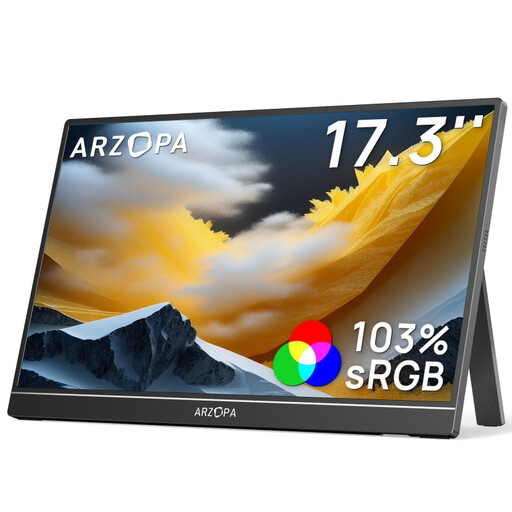
ARZOPA A1M 17.3-inch 1080p portable monitor
A personal screen to consider where you have room for a 17.3-inch display. Its title lists HDMI, USB-C and a kickstand; check which connection and power arrangement your console needs, along with the cables supplied. Confirm any display specification that is important to your choice.
View on Joybuy
 No image available
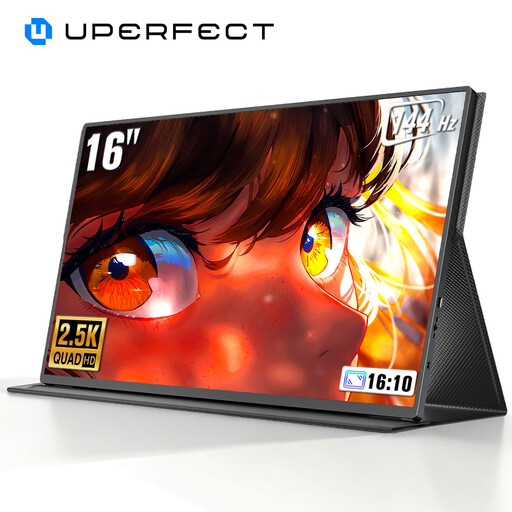
UPERFECT 16-inch 2K 144Hz portable monitor
A 16-inch personal display for a room setup where its listed Mini HDMI and Type-C connections suit your equipment. The title specifies 2560 × 1600 resolution, but the product information also uses 120Hz wording: confirm the refresh rate available with your console, plus the required cable and power setup.
View on Joybuy
 No image available
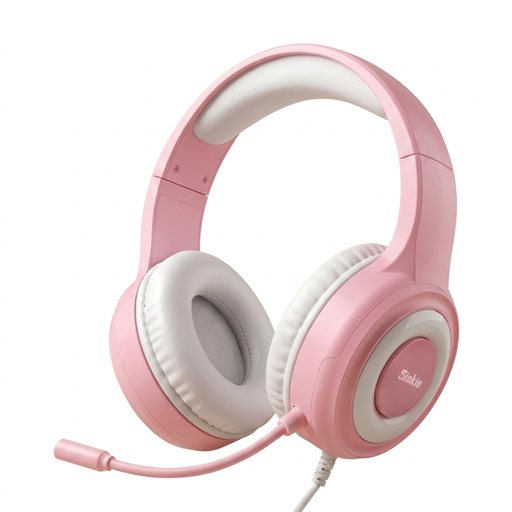
Siukie CH25 wired over-ear headset
A private-audio option for gaming in a shared building. The title lists a microphone, 50mm drivers, USB and a 3.5mm jack; confirm how both audio and microphone connect to your particular console rather than assuming either plug handles both functions.
View on Joybuy
 No image available
UPERFECT 18.4-inch 4K QLED portable monitor
A personal screen to consider if your room has space for an 18.4-inch display. The title specifies 3840 × 2160 resolution, USB-C and Mini HDMI; check the connection, cables, power needs and placement for your intended console setup.
View on Joybuy
Frequently asked questions
Can I count on having an Ethernet socket in my hall room?
No: check the instructions for your named accommodation before buying wired-only equipment. Lancaster University says its student rooms have wired points and require device registration through PASS, while the University of St Andrews directs recreational bedroom devices to Wireless ResNet.
Which MAC address should I register for a wired console?
Use the address required by your university’s wired-registration process. Edge Hill University says its console registration will not work if you submit the device’s Wi-Fi adapter MAC address instead of the wired address.
Does my Nintendo Switch need a USB LAN adapter?
A Switch used with a dock without a built-in LAN port needs a USB LAN adapter for a wired connection; Nintendo UK says a dock with its own LAN port does not. Check your dock and the hall’s wired-network arrangements before ordering.
Do I have to use headphones when gaming in halls?
Check your own accommodation’s noise policy rather than assuming one rule applies everywhere. The University of Edinburgh specifies quiet hours from 10pm to 8am in its accommodation, and Queen’s University Belfast asks residents not to play games loudly and to use headphones to limit travelling sound.
Does gaming on a portable monitor require a TV Licence?
The screen itself is not the deciding factor: TV Licensing says students in halls need coverage for their room if they watch live TV or use BBC iPlayer, on any device. Check how you intend to use the monitor or console when arranging coverage.


